这篇文章带你掌握 Python 的文件读写和 JSON 处理——with open、pathlib、json 模块,外加一个完整的实战案例,彻底打通前后端数据流通的"最后一公里"。
前言
前端开发者每天最熟悉的数据格式是什么?JSON。
从接口响应到配置文件,从 package.json 到 tsconfig.json,JSON 无处不在。而到了 Python 这边,你需要的核心技能就两个:
这两个技能结合起来,就能完成配置文件读取、数据持久化、本地缓存等大量日常任务。
这篇文章覆盖:
- with open 读写文件(为什么要用 with)
- JSON 文件的读写(json.load / json.dump)
一、文件读写基础:open()
1.1 打开文件的模式
# 语法:open(文件路径, 模式, encoding=编码)f = open("data.txt", "r", encoding="utf-8")
常用模式:
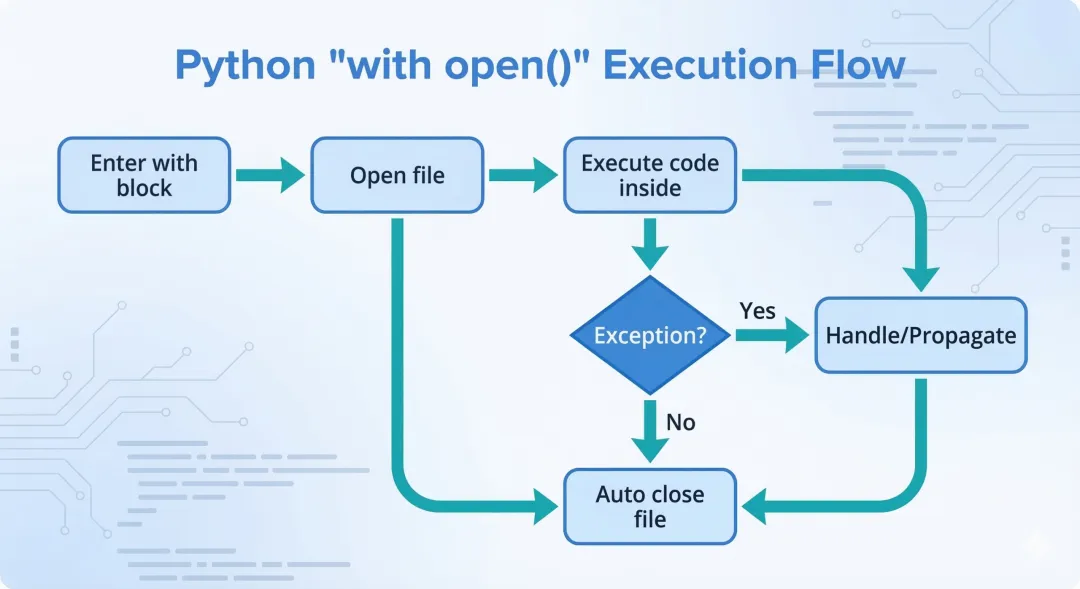
1.2 为什么必须用 with?
传统写法(不推荐):
f = open("data.txt", "r", encoding="utf-8")content = f.read()f.close() # ← 必须手动关闭,如果前面代码报错,这行就执行不到了!
with 写法(推荐):
with open("data.txt", "r", encoding="utf-8") as f: content = f.read()# with 块结束后自动关闭文件,无论是否发生异常
with 语句是 Python 的上下文管理器,离开 with 块时会自动执行清理操作(关闭文件)。这和 JS 里的 try...finally 有异曲同工之妙:
// JS 手动确保关闭(类比)let fdtry { fd = fs.openSync("data.txt", "r") // 读取操作} finally { if (fd !== undefined) fs.closeSync(fd)}
with 让代码更简洁,也更安全,务必养成习惯。
二、文件读取
2.1 读取全部内容
# 读取整个文件为字符串with open("article.txt", "r", encoding="utf-8") as f: content = f.read() print(content)
2.2 按行读取
# 读取所有行为列表(每行是一个字符串,含换行符 \n)with open("data.txt", "r", encoding="utf-8") as f: lines = f.readlines()# 去掉每行末尾的换行符lines = [line.strip() for line in lines]# 更优雅的写法:逐行迭代(内存效率更高)with open("data.txt", "r", encoding="utf-8") as f: for line in f: print(line.strip())
💡 大文件处理建议: 如果文件很大(几百 MB),不要用 f.read() 一次性读入内存,用 for line in f 逐行读取,内存友好。
三、文件写入
3.1 写入(覆盖模式)
# "w" 模式:每次都会覆盖原有内容with open("output.txt", "w", encoding="utf-8") as f: f.write("第一行\n") f.write("第二行\n")# 写入多行(writelines 不会自动添加换行符)lines = ["苹果\n", "香蕉\n", "樱桃\n"]with open("fruits.txt", "w", encoding="utf-8") as f: f.writelines(lines)
3.2 追加模式
# "a" 模式:在文件末尾追加,不覆盖原有内容with open("log.txt", "a", encoding="utf-8") as f: f.write("2025-03-01 10:00 - 任务执行成功\n")
3.3 同时读写
# "r+" 模式:读写,文件必须存在with open("data.txt", "r+", encoding="utf-8") as f: content = f.read() f.seek(0) # 移回文件开头 f.write("修改后的内容")
四、pathlib:现代的路径处理方式
Python 3.4+ 引入的 pathlib 模块,让路径操作变得优雅。强烈推荐用它代替字符串拼接路径。
from pathlib import Path# 创建路径对象p = Path("data/config.json")# 常用属性print(p.name) # config.json(文件名含扩展名)print(p.stem) # config(文件名不含扩展名)print(p.suffix) # .json(扩展名)print(p.parent) # data(父目录)print(p.absolute()) # /home/user/project/data/config.json(绝对路径)
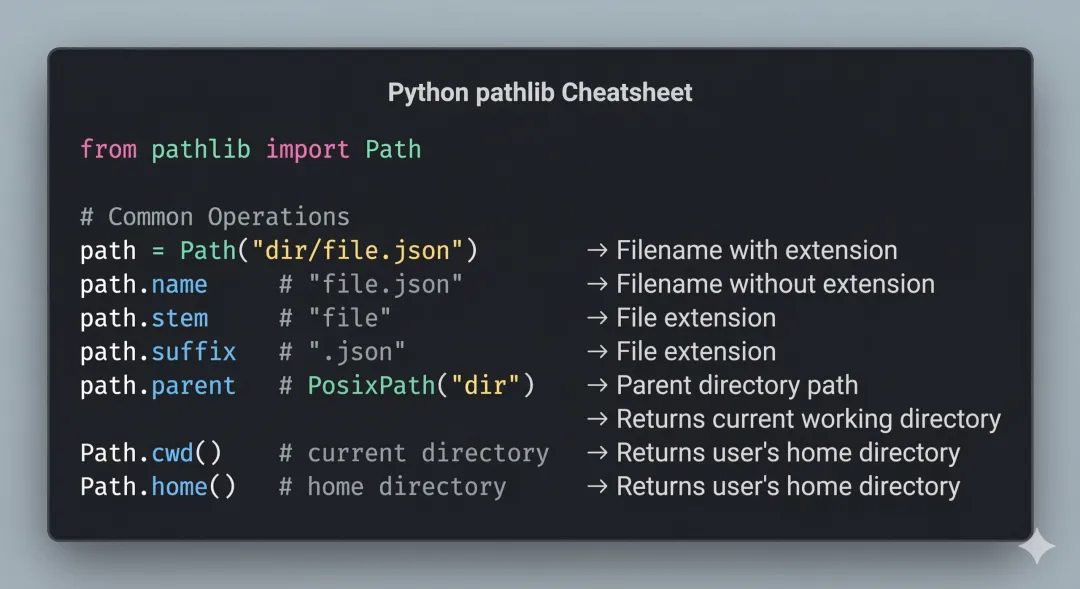
# 路径拼接(/ 运算符)base = Path("projects")config_path = base / "myapp" / "config.json"# projects/myapp/config.json# 对比字符串拼接(跨平台不安全)# config_path = "projects" + "/" + "myapp" + "/" + "config.json" ← 不推荐# 检查文件/目录是否存在if config_path.exists(): print("文件存在")if config_path.is_file(): print("是文件")if config_path.is_dir(): print("是目录")# 创建目录(parents=True 递归创建,exist_ok=True 已存在不报错)output_dir = Path("output/2025/march")output_dir.mkdir(parents=True, exist_ok=True)# 列出目录下的所有文件data_dir = Path("data")for file in data_dir.iterdir(): print(file.name)# 用通配符匹配文件json_files = list(data_dir.glob("*.json"))# 配合 open 使用with open(config_path, "r", encoding="utf-8") as f: content = f.read()# pathlib 原生读写(更简洁)text = config_path.read_text(encoding="utf-8")config_path.write_text("新内容", encoding="utf-8")
五、JSON 文件处理
5.1 四个核心函数
import json# json.loads() → 字符串转字典(s = string)data = json.loads('{"name": "Alice", "age": 28}')# json.dumps() → 字典转字符串(s = string)text = json.dumps({"name": "Alice", "age": 28})# json.load() → 从文件读取并解析(注意:没有 s)with open("data.json", "r", encoding="utf-8") as f: data = json.load(f)# json.dump() → 序列化并写入文件(注意:没有 s)with open("output.json", "w", encoding="utf-8") as f: json.dump(data, f)
记忆口诀:有 s 处理字符串,没有 s 操作文件。
5.2 常用参数
data = {"name": "张三", "scores": [95, 87, 92], "active": True}# indent:缩进(让输出更易读)# ensure_ascii=False:支持中文(必加!)# sort_keys=True:按键名排序(可选)json_str = json.dumps(data, indent=2, ensure_ascii=False, sort_keys=True)print(json_str)# {# "active": true,# "name": "张三",# "scores": [95, 87, 92]# }
⚠️ 重要: 处理含中文的 JSON 时,ensure_ascii=False 是必加参数,否则中文会被转成 \u5f20\u4e09 这样的 Unicode 转义序列。
5.3 读写 JSON 文件完整示例
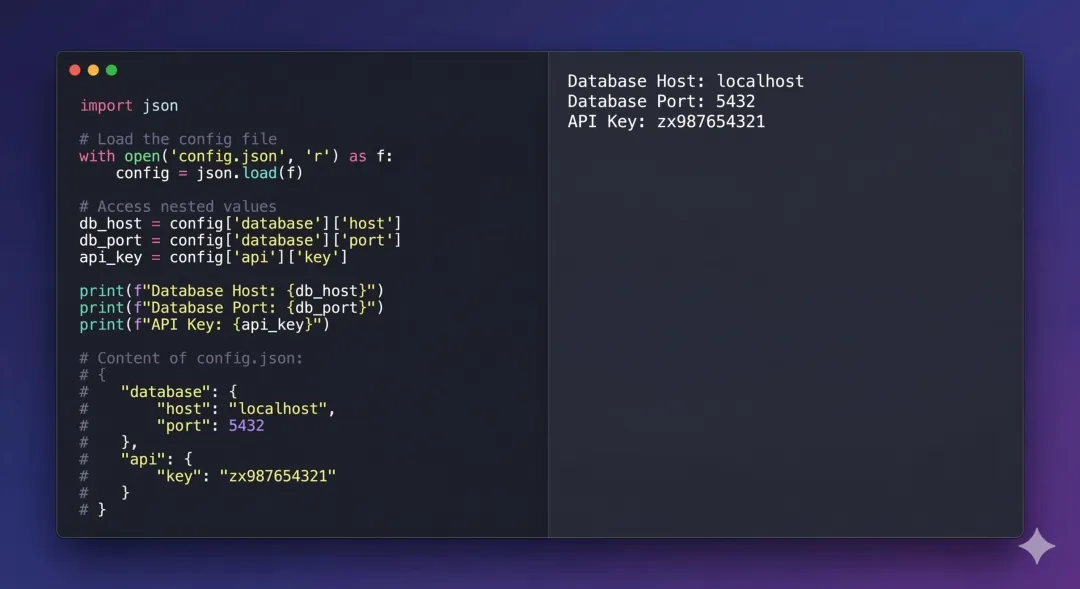
import jsonfrom pathlib import Pathconfig_file = Path("config.json")# 写入 JSON 文件config = { "app_name": "我的应用", "version": "1.0.0", "database": { "host": "localhost", "port": 5432, "name": "mydb" }, "features": ["auth", "api", "dashboard"]}with open(config_file, "w", encoding="utf-8") as f: json.dump(config, f, indent=2, ensure_ascii=False)# 读取 JSON 文件with open(config_file, "r", encoding="utf-8") as f: loaded_config = json.load(f)print(loaded_config["app_name"]) # 我的应用print(loaded_config["database"]["host"]) # localhost
六、实战:读取 JSON 配置并处理数据
我们来做一个完整的小案例:读取一份学生成绩 JSON 文件,计算平均分、找出最高分学生,并将结果写回新的 JSON 文件。
输入文件 students.json:
{ "class": "2025届前端班", "students": [ {"name": "Alice", "scores": {"math": 95, "english": 88, "python": 92}}, {"name": "Bob", "scores": {"math": 78, "english": 90, "python": 85}}, {"name": "Charlie", "scores": {"math": 88, "english": 76, "python": 94}}, {"name": "Diana", "scores": {"math": 92, "english": 95, "python": 89}} ]}
处理脚本 analyze.py:
import jsonfrom pathlib import Pathdef calculate_average(scores: dict) -> float: """计算各科平均分""" return sum(scores.values()) / len(scores)def analyze_students(input_file: str, output_file: str) -> None: """分析学生成绩并输出报告""" # 读取数据 with open(input_file, "r", encoding="utf-8") as f: data = json.load(f) class_name = data["class"] students = data["students"] # 处理每个学生的成绩 results = [] for student in students: avg = calculate_average(student["scores"]) results.append({ "name": student["name"], "scores": student["scores"], "average": round(avg, 2) }) # 按平均分排序(从高到低) results.sort(key=lambda s: s["average"], reverse=True) # 找出最高分学生 top_student = results[0] # 构建报告 report = { "class": class_name, "total_students": len(results), "top_student": top_student["name"], "top_average": top_student["average"], "rankings": results } # 写入结果文件 output_path = Path(output_file) with open(output_path, "w", encoding="utf-8") as f: json.dump(report, f, indent=2, ensure_ascii=False) print(f"✅ 分析完成!结果已保存到 {output_file}") print(f"🏆 最高分:{top_student['name']}(平均 {top_student['average']} 分)")if __name__ == "__main__": analyze_students("students.json", "report.json")
运行结果 report.json:
{ "class": "2025届前端班", "total_students": 4, "top_student": "Alice", "top_average": 91.67, "rankings": [ {"name": "Alice", "scores": {...}, "average": 91.67}, {"name": "Diana", "scores": {...}, "average": 92.0}, ... ]}
七、常见错误处理
import jsonfrom pathlib import Pathdef safe_read_json(filepath: str) -> dict | None: """带错误处理的 JSON 读取""" path = Path(filepath) if not path.exists(): print(f"❌ 文件不存在:{filepath}") return None if path.suffix != ".json": print(f"❌ 不是 JSON 文件:{filepath}") return None try: with open(path, "r", encoding="utf-8") as f: return json.load(f) except json.JSONDecodeError as e: print(f"❌ JSON 格式错误:{e}") return None except PermissionError: print(f"❌ 没有读取权限:{filepath}") return None
异常处理下一篇会详细讲,先有个印象。
小结
| |
|---|
| with open(f, "r", encoding="utf-8") as f: f.read() |
| with open(f, "w", encoding="utf-8") as f: f.write(...) |
| with open(f, "a", encoding="utf-8") as f: f.write(...) |
| Path("dir") / "subdir" / "file.json" |
| json.loads(string) |
| json.dumps(data, indent=2, ensure_ascii=False) |
| json.load(f) |
| json.dump(data, f, indent=2, ensure_ascii=False) |
3 个必记要点:
- 始终用 with open(...) 而不是手动 open() + close()
- 中文 JSON 必加 ensure_ascii=False
- 路径操作用 pathlib.Path,跨平台安全,API 优雅
下篇预告
第 08 篇:Python 异常处理:写出不会崩溃的代码
程序不可避免会遇到错误。下一篇讲 try-except-finally,教你写出健壮的代码——我们还会把这一篇的 JSON 读写代码包上完整的异常处理,形成可直接用于生产的代码模板。
 10个月宝宝每天需要喝多少奶粉?