当前位置:首页>python>Python Tkinter 外部API/HTTP接口集成:让桌面应用"联网"的完整指南

Python Tkinter 外部API/HTTP接口集成:让桌面应用"联网"的完整指南

  • 2026-04-15 16:17:29
Python Tkinter 外部API/HTTP接口集成:让桌面应用"联网"的完整指南

🤔 你有没有遇到过这种尴尬?

写了个挺好用的Tkinter小工具——查天气的、翻译文本的、抓股价的——结果数据全是硬编码。每次要更新数据,得手动改代码。同事看了直摇头:"这东西能联网不?"

能。当然能。

问题是,很多人一碰到"Tkinter + HTTP请求"就开始头疼。requests库一跑,界面直接卡死;多线程一上,回调写乱了;异常处理没做好,程序直接崩给用户看。这些坑,我在项目里基本都踩过。

今天这篇文章,咱们就把这件事从头捋清楚——从最简单的单次请求,到带缓存的异步架构,一步一步来。所有代码在Windows 10/11 + Python 3.9+环境下跑通验证过。


🧠 先搞清楚一个核心矛盾

Tkinter是单线程的。它有个主事件循环(mainloop),一直在那儿转,处理鼠标点击、键盘输入、界面刷新。只要你在主线程里做任何耗时操作——包括HTTP请求——整个界面就会冻住,用户以为程序崩了。

HTTP请求有多慢?快的几十毫秒,慢的能等好几秒。这段时间里,你的窗口连"拖动"都做不到。

所以,核心原则只有一条:HTTP请求必须放到子线程,结果通过线程安全的方式传回主线程

听起来简单。实现起来,细节很多。


🚀 方案一:最简单的线程+回调模式

先从一个实际场景出发——做个天气查询工具,调用开放天气API,输入城市名,显示当前温度和天气状况。

import tkinter as tkfrom tkinter import ttk, messageboximport threadingimport requestsimport jsonclassWeatherApp:def__init__(self, root):self.root = rootself.root.title("天气查询工具")self.root.geometry("420x320")self.root.resizable(FalseFalse)# --- 界面布局 ---        frame = ttk.Frame(root, padding="20")        frame.pack(fill=tk.BOTH, expand=True)        ttk.Label(frame, text="城市名称(英文):").grid(row=0, column=0, sticky=tk.W)self.city_var = tk.StringVar(value="Beijing")self.entry = ttk.Entry(frame, textvariable=self.city_var, width=25)self.entry.grid(row=0, column=1, padx=8, pady=8)self.btn = ttk.Button(frame, text="查询天气", command=self.start_query)self.btn.grid(row=1, column=0, columnspan=2, pady=10)# 进度提示self.status_var = tk.StringVar(value="就绪")        ttk.Label(frame, textvariable=self.status_var, foreground="gray").grid(            row=2, column=0, columnspan=2        )# 结果展示区self.result_text = tk.Text(frame, height=8, width=45, state=tk.DISABLED)self.result_text.grid(row=3, column=0, columnspan=2, pady=10)defstart_query(self):"""点击按钮时触发——注意这里只是启动线程,不做任何网络操作"""        city = self.city_var.get().strip()ifnot city:            messagebox.showwarning("提示""城市名不能为空")return# 禁用按钮,防止重复点击self.btn.config(state=tk.DISABLED)self.status_var.set("查询中,请稍候...")# 开子线程干活        t = threading.Thread(target=self._fetch_weather, args=(city,), daemon=True)        t.start()def_fetch_weather(self, city):"""子线程执行——绝对不能在这里直接操作任何Tkinter控件"""# 用wttr.in这个免费API,不需要key,适合演示        url = f"https://wttr.in/{city}?format=j1"try:            resp = requests.get(url, timeout=8)            resp.raise_for_status()            data = resp.json()            current = data["current_condition"][0]            temp_c = current["temp_C"]            feels_like = current["FeelsLikeC"]            desc = current["weatherDesc"][0]["value"]            humidity = current["humidity"]            result = (f"城市:{city}\n"f"当前温度:{temp_c}°C(体感 {feels_like}°C)\n"f"天气状况:{desc}\n"f"相对湿度:{humidity}%\n"            )# 用after()把结果传回主线程——这是关键self.root.after(0self._update_ui, result, None)except requests.exceptions.Timeout:self.root.after(0self._update_ui, None"请求超时,请检查网络")except requests.exceptions.ConnectionError:self.root.after(0self._update_ui, None"网络连接失败")except (KeyError, json.JSONDecodeError):self.root.after(0self._update_ui, None"数据解析失败,城市名可能有误")except Exception as e:self.root.after(0self._update_ui, Nonef"未知错误:{e}")def_update_ui(self, result, error):"""回到主线程,安全更新界面"""self.btn.config(state=tk.NORMAL)if error:self.status_var.set(f"错误:{error}")            messagebox.showerror("查询失败", error)else:self.status_var.set("查询成功")self.result_text.config(state=tk.NORMAL)self.result_text.delete(1.0, tk.END)self.result_text.insert(tk.END, result)self.result_text.config(state=tk.DISABLED)if __name__ == "__main__":    root = tk.Tk()    app = WeatherApp(root)    root.mainloop()
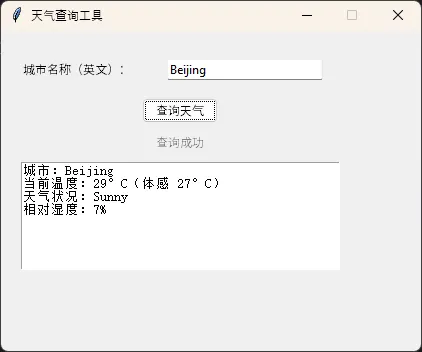
这段代码有几个地方值得细说。

root.after(0, callback, *args) 是整个方案的灵魂。after(0, ...) 意思是"尽快在主事件循环里执行这个函数",延迟为0毫秒。它是线程安全的——Tkinter内部做了同步处理。永远不要在子线程里直接调用 widget.config() 或者 widget.insert() 这类操作,在Windows上有时能跑,但偶发性崩溃会让你抓狂好几天。

daemon=True 让子线程跟随主线程退出,用户关窗口时不会因为后台线程还在跑而卡住。


🔄 方案二:Queue队列——更规范的生产者消费者模式

上面那个方案对付简单场景够用了。但如果你的应用需要频繁发请求、多个接口并发、或者实时轮询数据,用after直接回调会让代码越写越乱。

这时候,queue.Queue 是更好的选择。子线程往队列里扔数据,主线程定期来取——典型的生产者消费者模式。

import tkinter as tkfrom tkinter import ttkimport threadingimport queueimport requestsimport timeclassRealtimeStockMonitor:"""    模拟实时股价监控——每隔N秒自动刷新    演示用途,使用随机数模拟股价波动    """def__init__(self, root):self.root = rootself.root.title("实时数据监控面板")self.root.geometry("500x400")self.data_queue = queue.Queue()  # 线程间通信的管道self.running = Falseself._build_ui()# 启动队列消费者——每100ms检查一次队列self._poll_queue()def_build_ui(self):        top = ttk.Frame(self.root, padding=15)        top.pack(fill=tk.X)self.start_btn = ttk.Button(top, text="开始监控", command=self.start_monitor)self.start_btn.pack(side=tk.LEFT, padx=5)self.stop_btn = ttk.Button(top, text="停止", command=self.stop_monitor, state=tk.DISABLED)self.stop_btn.pack(side=tk.LEFT, padx=5)self.status_label = ttk.Label(top, text="未启动", foreground="gray")self.status_label.pack(side=tk.LEFT, padx=15)# 数据展示用Treeview        cols = ("时间""接口""状态""耗时(ms)")self.tree = ttk.Treeview(self.root, columns=cols, show="headings", height=14)for c in cols:self.tree.heading(c, text=c)self.tree.column(c, width=110, anchor=tk.CENTER)self.tree.pack(fill=tk.BOTH, expand=True, padx=15, pady=10)defstart_monitor(self):self.running = Trueself.start_btn.config(state=tk.DISABLED)self.stop_btn.config(state=tk.NORMAL)self.status_label.config(text="监控中...", foreground="green")# 启动后台工作线程        t = threading.Thread(target=self._worker, daemon=True)        t.start()defstop_monitor(self):self.running = Falseself.start_btn.config(state=tk.NORMAL)self.stop_btn.config(state=tk.DISABLED)self.status_label.config(text="已停止", foreground="gray")def_worker(self):"""后台线程:模拟轮询多个接口"""        endpoints = [            ("httpbin.org/get""https://httpbin.org/get"),            ("wttr.in状态""https://wttr.in/?format=3"),        ]whileself.running:for name, url in endpoints:ifnotself.running:break                start = time.time()try:                    resp = requests.get(url, timeout=5)                    elapsed = int((time.time() - start) * 1000)                    status = f"✓ {resp.status_code}"except Exception as e:                    elapsed = int((time.time() - start) * 1000)                    status = f"✗ {type(e).__name__}"# 把结果塞进队列,不直接操作UIself.data_queue.put({"time": time.strftime("%H:%M:%S"),"name": name,"status": status,"elapsed": elapsed                })# 每5秒轮询一次for _ inrange(50):ifnotself.running:break                time.sleep(0.1)def_poll_queue(self):"""主线程定期消费队列——这个函数会一直循环调用自己"""try:whileTrue:                item = self.data_queue.get_nowait()self.tree.insert(""0,  # 插到最顶部                    values=(item["time"], item["name"], item["status"], item["elapsed"])                )# 只保留最近50条记录                children = self.tree.get_children()iflen(children) > 50:self.tree.delete(children[-1])except queue.Empty:pass# 队列空了就算了,下次再来# 100ms后再检查一次,形成循环self.root.after(100self._poll_queue)if __name__ == "__main__":    root = tk.Tk()    app = RealtimeStockMonitor(root)    root.mainloop()
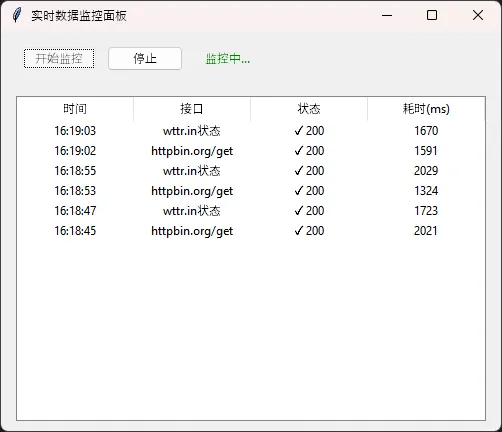
Queue方案的优雅之处在于解耦。后台线程只管往队列里放数据,完全不关心UI长啥样;主线程只管从队列里取数据更新界面,完全不关心数据怎么来的。两边互不干扰,扩展起来也方便——想加新的数据源,再起一个线程往同一个队列里推就行。


⚡ 方案三:加上本地缓存,减少无效请求

这是个很多教程不讲但实际项目里必须考虑的问题。

同样的接口,用户10秒内点了5次查询按钮——你真的需要发5次请求吗?大多数情况下,数据在短时间内根本不会变。缓存能显著降低接口压力,也能让用户体验更流畅(毕竟从内存读数据是微秒级的)。

import time  import threading  from typing importAnyOptionalimport requests  import tkinter as tk  from tkinter import ttk, scrolledtext  # 1. 缓存层(原样保留)  classSimpleAPICache:  """轻量级内存缓存,带 TTL 控制,线程安全"""def__init__(self):  self._cache: dict = {}  self._lock = threading.Lock()  defget(self, key: str) -> Optional[Any]:  withself._lock:  if key notinself._cache:  returnNone            data, expire_at = self._cache[key]  if time.time() > expire_at:  delself._cache[key]  returnNonereturn data  defset(self, key: str, value: Any, ttl: int = 60):  withself._lock:  self._cache[key] = (value, time.time() + ttl)  definvalidate(self, key: str):  withself._lock:  self._cache.pop(key, None)  defclear(self):  withself._lock:  self._cache.clear()  _cache = SimpleAPICache()  deffetch_with_cache(url: str, ttl: int = 120) -> tuple[dictbool]:  """      返回 (data, from_cache)    from_cache=True 表示本次命中缓存      """    cached = _cache.get(url)  if cached isnotNone:  return cached, True    resp = requests.get(url, timeout=8)      resp.raise_for_status()      data = resp.json()      _cache.set(url, data, ttl=ttl)  return data, False# 2. Tkinter 应用  classApp(tk.Tk):  # 演示用的公开 JSON API        PRESET_URLS = [  "https://jsonplaceholder.typicode.com/todos/1",  "https://jsonplaceholder.typicode.com/posts/1",  "https://jsonplaceholder.typicode.com/users/1",      ]  def__init__(self):  super().__init__()  self.title("SimpleAPICache · Tkinter 演示")  self.geometry("680x520")  self.resizable(TrueTrue)  self._build_ui()  def_build_ui(self):          pad = {"padx"10"pady"6}  # 顶部:URL 输入区          top = ttk.LabelFrame(self, text="请求配置", padding=8)          top.pack(fill="x", **pad)          ttk.Label(top, text="URL:").grid(row=0, column=0, sticky="w")  self.url_var = tk.StringVar(value=self.PRESET_URLS[0])          url_combo = ttk.Combobox(              top, textvariable=self.url_var,              values=self.PRESET_URLS, width=55        )          url_combo.grid(row=0, column=1, sticky="ew", padx=(60))          ttk.Label(top, text="TTL(秒):").grid(row=1, column=0, sticky="w", pady=(40))  self.ttl_var = tk.IntVar(value=30)          ttk.Spinbox(top, from_=5, to=600, textvariable=self.ttl_var, width=8).grid(              row=1, column=1, sticky="w", padx=(60), pady=(40)          )          top.columnconfigure(1, weight=1)  # 中部:按钮区          btn_frame = ttk.Frame(self)          btn_frame.pack(fill="x", **pad)  self.fetch_btn = ttk.Button(              btn_frame, text="发起请求 / 读缓存", command=self._on_fetch          )  self.fetch_btn.pack(side="left")          ttk.Button(              btn_frame, text="清除该 URL 缓存", command=self._on_invalidate          ).pack(side="left", padx=6)          ttk.Button(              btn_frame, text="清空全部缓存", command=self._on_clear_all          ).pack(side="left")  # 状态栏  self.status_var = tk.StringVar(value="就绪")          status_bar = ttk.Label(  self, textvariable=self.status_var,              relief="sunken", anchor="w", padding=(62)          )          status_bar.pack(fill="x", side="bottom")  # 进度条(不确定模式,请求时滚动)  self.progress = ttk.Progressbar(self, mode="indeterminate")  self.progress.pack(fill="x", padx=10)  # 结果展示区          result_frame = ttk.LabelFrame(self, text="响应结果", padding=8)          result_frame.pack(fill="both", expand=True, **pad)  self.result_text = scrolledtext.ScrolledText(              result_frame, wrap="word", font=("Consolas"10), state="disabled"        )  self.result_text.pack(fill="both", expand=True)  def_on_fetch(self):          url = self.url_var.get().strip()  ifnot url:  self._set_status("请输入 URL", error=True)  return# 禁用按钮,防止重复点击  self.fetch_btn.config(state="disabled")  self.progress.start(12)  self._set_status(f"请求中:{url}")  # 在后台线程执行网络请求,避免阻塞 UI                ttl = self.ttl_var.get()          threading.Thread(              target=self._worker,              args=(url, ttl),              daemon=True        ).start()  def_worker(self, url: str, ttl: int):  """后台线程:执行请求,结果通过 after() 回调到主线程"""try:              t0 = time.perf_counter()              data, from_cache = fetch_with_cache(url, ttl=ttl)              elapsed = time.perf_counter() - t0  # 回调到主线程更新 UI            self.after(0self._on_success, data, from_cache, elapsed)  except Exception as exc:  self.after(0self._on_error, str(exc))  def_on_success(self, data: dict, from_cache: bool, elapsed: float):          tag = "【缓存命中】"if from_cache else"【网络请求】"self._set_status(  f"{tag}  耗时 {elapsed * 1000:.1f} ms  |  "f"缓存条目数:{len(_cache._cache)}"        )  self._show_result(data, from_cache)  self._stop_loading()  def_on_error(self, msg: str):  self._set_status(f"请求失败:{msg}", error=True)  self._show_result({"error": msg}, from_cache=False)  self._stop_loading()  def_on_invalidate(self):          url = self.url_var.get().strip()          _cache.invalidate(url)  self._set_status(f"已清除缓存:{url}")  def_on_clear_all(self):          _cache.clear()  self._set_status("已清空全部缓存")  def_stop_loading(self):  self.progress.stop()  self.fetch_btn.config(state="normal")  def_set_status(self, msg: str, error: bool = False):  self.status_var.set(msg)  # 可在此根据 error 改变颜色(ttk 样式略)  def_show_result(self, data: Any, from_cache: bool):  import json          header = "# 来源:缓存\n"if from_cache else"# 来源:网络\n"        text = header + json.dumps(data, ensure_ascii=False, indent=2)  self.result_text.config(state="normal")  self.result_text.delete("1.0""end")  self.result_text.insert("end", text)  self.result_text.config(state="disabled")  # 3. 入口  if __name__ == "__main__":      app = App()      app.mainloop()
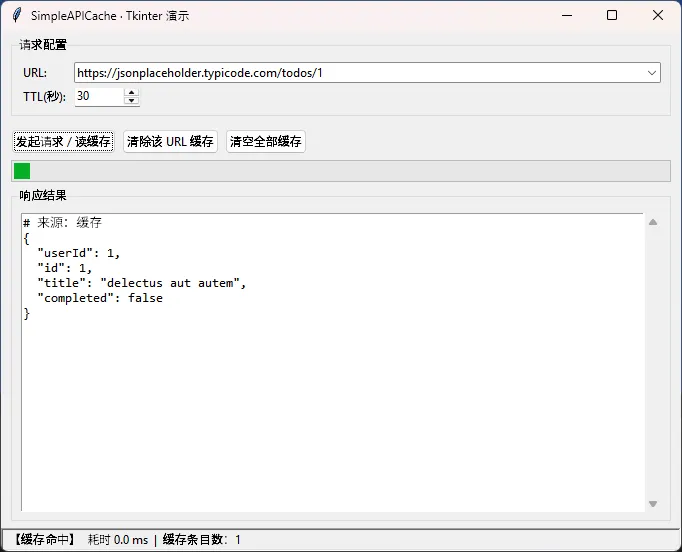
把这个缓存层插到方案一或方案二的_fetch_weather函数里,两行代码的事。天气数据设个120秒的TTL,汇率数据设300秒,基本上既保证了数据新鲜度,又避免了无谓的网络消耗。


🛑 踩坑预警:这几个问题最容易出现

坑一:在子线程里用messageboxmessagebox.showerror()看起来人畜无害,但它也是Tkinter控件,在子线程里调用同样会出问题。正确做法是把错误信息通过after()或Queue传回主线程,再弹框。

坑二:requests.Session的线程安全问题。如果你想复用Session(比如保持登录态),注意一个Session对象不要跨线程共享。要么每个线程创建自己的Session,要么用锁保护。

坑三:忘记处理应用关闭时的线程清理。用户点关闭按钮,主线程结束,但后台线程可能还在等待HTTP响应。虽然daemon=True能解决大部分情况,但对于有资源需要释放的场景(比如数据库连接),建议重写root.protocol("WM_DELETE_WINDOW", ...)做显式清理。

坑四:Windows下的SSL证书问题。某些企业内网环境会有自签名证书,requests会抛SSLError。临时解决可以加verify=False,但正式项目里应该用verify='/path/to/cert.pem'指定证书路径。


📦 完整项目结构建议

当你的Tkinter应用开始集成多个API时,代码结构就很重要了。我在项目里一般这样组织:

my_app/├── main.py              # 入口,只做窗口初始化├── ui/│   ├── main_window.py   # 主窗口│   └── widgets/         # 自定义控件├── services/│   ├── api_client.py    # 所有HTTP请求封装在这里│   └── cache.py         # 缓存层└── utils/    └── thread_helper.py # 线程工具函数

把HTTP请求全部收拢到api_client.py里,UI层只调用服务层的方法,不直接写requests.get。这样换接口、加缓存、改超时时间,改一个地方就够了。


💬 写在最后

Tkinter联网这件事,核心就三点:请求放子线程、结果用after()或Queue传回、异常要全部捕获。其他的缓存、结构、清理,都是在这个基础上的延伸。

我见过不少人把Tkinter应用写成"能跑但一碰就崩"的状态,大多数问题追根溯源,都是线程没处理好。把这篇文章里的模式吃透,应付日常的桌面工具开发,基本上够用了。

如果你在实际项目里遇到了特殊情况——比如需要WebSocket长连接、或者要处理大文件下载的进度条——欢迎在评论区说说你的场景,咱们可以具体分析。


相关标签#Python#Tkinter#桌面开发#HTTP接口#多线程

最新文章

随机文章

基本 文件 流程 错误 SQL 调试
  1. 请求信息 : 2026-04-16 01:59:06 HTTP/2.0 GET : https://f.mffb.com.cn/a/485947.html
  2. 运行时间 : 0.085864s [ 吞吐率:11.65req/s ] 内存消耗:4,646.17kb 文件加载:140
  3. 缓存信息 : 0 reads,0 writes
  4. 会话信息 : SESSION_ID=54c57d3ee5ff8646de263d5d34ef4056
  1. /yingpanguazai/ssd/ssd1/www/f.mffb.com.cn/public/index.php ( 0.79 KB )
  2. /yingpanguazai/ssd/ssd1/www/f.mffb.com.cn/vendor/autoload.php ( 0.17 KB )
  3. /yingpanguazai/ssd/ssd1/www/f.mffb.com.cn/vendor/composer/autoload_real.php ( 2.49 KB )
  4. /yingpanguazai/ssd/ssd1/www/f.mffb.com.cn/vendor/composer/platform_check.php ( 0.90 KB )
  5. /yingpanguazai/ssd/ssd1/www/f.mffb.com.cn/vendor/composer/ClassLoader.php ( 14.03 KB )
  6. /yingpanguazai/ssd/ssd1/www/f.mffb.com.cn/vendor/composer/autoload_static.php ( 4.90 KB )
  7. /yingpanguazai/ssd/ssd1/www/f.mffb.com.cn/vendor/topthink/think-helper/src/helper.php ( 8.34 KB )
  8. /yingpanguazai/ssd/ssd1/www/f.mffb.com.cn/vendor/topthink/think-validate/src/helper.php ( 2.19 KB )
  9. /yingpanguazai/ssd/ssd1/www/f.mffb.com.cn/vendor/topthink/think-orm/src/helper.php ( 1.47 KB )
  10. /yingpanguazai/ssd/ssd1/www/f.mffb.com.cn/vendor/topthink/think-orm/stubs/load_stubs.php ( 0.16 KB )
  11. /yingpanguazai/ssd/ssd1/www/f.mffb.com.cn/vendor/topthink/framework/src/think/Exception.php ( 1.69 KB )
  12. /yingpanguazai/ssd/ssd1/www/f.mffb.com.cn/vendor/topthink/think-container/src/Facade.php ( 2.71 KB )
  13. /yingpanguazai/ssd/ssd1/www/f.mffb.com.cn/vendor/symfony/deprecation-contracts/function.php ( 0.99 KB )
  14. /yingpanguazai/ssd/ssd1/www/f.mffb.com.cn/vendor/symfony/polyfill-mbstring/bootstrap.php ( 8.26 KB )
  15. /yingpanguazai/ssd/ssd1/www/f.mffb.com.cn/vendor/symfony/polyfill-mbstring/bootstrap80.php ( 9.78 KB )
  16. /yingpanguazai/ssd/ssd1/www/f.mffb.com.cn/vendor/symfony/var-dumper/Resources/functions/dump.php ( 1.49 KB )
  17. /yingpanguazai/ssd/ssd1/www/f.mffb.com.cn/vendor/topthink/think-dumper/src/helper.php ( 0.18 KB )
  18. /yingpanguazai/ssd/ssd1/www/f.mffb.com.cn/vendor/symfony/var-dumper/VarDumper.php ( 4.30 KB )
  19. /yingpanguazai/ssd/ssd1/www/f.mffb.com.cn/vendor/topthink/framework/src/think/App.php ( 15.30 KB )
  20. /yingpanguazai/ssd/ssd1/www/f.mffb.com.cn/vendor/topthink/think-container/src/Container.php ( 15.76 KB )
  21. /yingpanguazai/ssd/ssd1/www/f.mffb.com.cn/vendor/psr/container/src/ContainerInterface.php ( 1.02 KB )
  22. /yingpanguazai/ssd/ssd1/www/f.mffb.com.cn/app/provider.php ( 0.19 KB )
  23. /yingpanguazai/ssd/ssd1/www/f.mffb.com.cn/vendor/topthink/framework/src/think/Http.php ( 6.04 KB )
  24. /yingpanguazai/ssd/ssd1/www/f.mffb.com.cn/vendor/topthink/think-helper/src/helper/Str.php ( 7.29 KB )
  25. /yingpanguazai/ssd/ssd1/www/f.mffb.com.cn/vendor/topthink/framework/src/think/Env.php ( 4.68 KB )
  26. /yingpanguazai/ssd/ssd1/www/f.mffb.com.cn/app/common.php ( 0.03 KB )
  27. /yingpanguazai/ssd/ssd1/www/f.mffb.com.cn/vendor/topthink/framework/src/helper.php ( 18.78 KB )
  28. /yingpanguazai/ssd/ssd1/www/f.mffb.com.cn/vendor/topthink/framework/src/think/Config.php ( 5.54 KB )
  29. /yingpanguazai/ssd/ssd1/www/f.mffb.com.cn/config/app.php ( 0.95 KB )
  30. /yingpanguazai/ssd/ssd1/www/f.mffb.com.cn/config/cache.php ( 0.78 KB )
  31. /yingpanguazai/ssd/ssd1/www/f.mffb.com.cn/config/console.php ( 0.23 KB )
  32. /yingpanguazai/ssd/ssd1/www/f.mffb.com.cn/config/cookie.php ( 0.56 KB )
  33. /yingpanguazai/ssd/ssd1/www/f.mffb.com.cn/config/database.php ( 2.48 KB )
  34. /yingpanguazai/ssd/ssd1/www/f.mffb.com.cn/vendor/topthink/framework/src/think/facade/Env.php ( 1.67 KB )
  35. /yingpanguazai/ssd/ssd1/www/f.mffb.com.cn/config/filesystem.php ( 0.61 KB )
  36. /yingpanguazai/ssd/ssd1/www/f.mffb.com.cn/config/lang.php ( 0.91 KB )
  37. /yingpanguazai/ssd/ssd1/www/f.mffb.com.cn/config/log.php ( 1.35 KB )
  38. /yingpanguazai/ssd/ssd1/www/f.mffb.com.cn/config/middleware.php ( 0.19 KB )
  39. /yingpanguazai/ssd/ssd1/www/f.mffb.com.cn/config/route.php ( 1.89 KB )
  40. /yingpanguazai/ssd/ssd1/www/f.mffb.com.cn/config/session.php ( 0.57 KB )
  41. /yingpanguazai/ssd/ssd1/www/f.mffb.com.cn/config/trace.php ( 0.34 KB )
  42. /yingpanguazai/ssd/ssd1/www/f.mffb.com.cn/config/view.php ( 0.82 KB )
  43. /yingpanguazai/ssd/ssd1/www/f.mffb.com.cn/app/event.php ( 0.25 KB )
  44. /yingpanguazai/ssd/ssd1/www/f.mffb.com.cn/vendor/topthink/framework/src/think/Event.php ( 7.67 KB )
  45. /yingpanguazai/ssd/ssd1/www/f.mffb.com.cn/app/service.php ( 0.13 KB )
  46. /yingpanguazai/ssd/ssd1/www/f.mffb.com.cn/app/AppService.php ( 0.26 KB )
  47. /yingpanguazai/ssd/ssd1/www/f.mffb.com.cn/vendor/topthink/framework/src/think/Service.php ( 1.64 KB )
  48. /yingpanguazai/ssd/ssd1/www/f.mffb.com.cn/vendor/topthink/framework/src/think/Lang.php ( 7.35 KB )
  49. /yingpanguazai/ssd/ssd1/www/f.mffb.com.cn/vendor/topthink/framework/src/lang/zh-cn.php ( 13.70 KB )
  50. /yingpanguazai/ssd/ssd1/www/f.mffb.com.cn/vendor/topthink/framework/src/think/initializer/Error.php ( 3.31 KB )
  51. /yingpanguazai/ssd/ssd1/www/f.mffb.com.cn/vendor/topthink/framework/src/think/initializer/RegisterService.php ( 1.33 KB )
  52. /yingpanguazai/ssd/ssd1/www/f.mffb.com.cn/vendor/services.php ( 0.14 KB )
  53. /yingpanguazai/ssd/ssd1/www/f.mffb.com.cn/vendor/topthink/framework/src/think/service/PaginatorService.php ( 1.52 KB )
  54. /yingpanguazai/ssd/ssd1/www/f.mffb.com.cn/vendor/topthink/framework/src/think/service/ValidateService.php ( 0.99 KB )
  55. /yingpanguazai/ssd/ssd1/www/f.mffb.com.cn/vendor/topthink/framework/src/think/service/ModelService.php ( 2.04 KB )
  56. /yingpanguazai/ssd/ssd1/www/f.mffb.com.cn/vendor/topthink/think-trace/src/Service.php ( 0.77 KB )
  57. /yingpanguazai/ssd/ssd1/www/f.mffb.com.cn/vendor/topthink/framework/src/think/Middleware.php ( 6.72 KB )
  58. /yingpanguazai/ssd/ssd1/www/f.mffb.com.cn/vendor/topthink/framework/src/think/initializer/BootService.php ( 0.77 KB )
  59. /yingpanguazai/ssd/ssd1/www/f.mffb.com.cn/vendor/topthink/think-orm/src/Paginator.php ( 11.86 KB )
  60. /yingpanguazai/ssd/ssd1/www/f.mffb.com.cn/vendor/topthink/think-validate/src/Validate.php ( 63.20 KB )
  61. /yingpanguazai/ssd/ssd1/www/f.mffb.com.cn/vendor/topthink/think-orm/src/Model.php ( 23.55 KB )
  62. /yingpanguazai/ssd/ssd1/www/f.mffb.com.cn/vendor/topthink/think-orm/src/model/concern/Attribute.php ( 21.05 KB )
  63. /yingpanguazai/ssd/ssd1/www/f.mffb.com.cn/vendor/topthink/think-orm/src/model/concern/AutoWriteData.php ( 4.21 KB )
  64. /yingpanguazai/ssd/ssd1/www/f.mffb.com.cn/vendor/topthink/think-orm/src/model/concern/Conversion.php ( 6.44 KB )
  65. /yingpanguazai/ssd/ssd1/www/f.mffb.com.cn/vendor/topthink/think-orm/src/model/concern/DbConnect.php ( 5.16 KB )
  66. /yingpanguazai/ssd/ssd1/www/f.mffb.com.cn/vendor/topthink/think-orm/src/model/concern/ModelEvent.php ( 2.33 KB )
  67. /yingpanguazai/ssd/ssd1/www/f.mffb.com.cn/vendor/topthink/think-orm/src/model/concern/RelationShip.php ( 28.29 KB )
  68. /yingpanguazai/ssd/ssd1/www/f.mffb.com.cn/vendor/topthink/think-helper/src/contract/Arrayable.php ( 0.09 KB )
  69. /yingpanguazai/ssd/ssd1/www/f.mffb.com.cn/vendor/topthink/think-helper/src/contract/Jsonable.php ( 0.13 KB )
  70. /yingpanguazai/ssd/ssd1/www/f.mffb.com.cn/vendor/topthink/think-orm/src/model/contract/Modelable.php ( 0.09 KB )
  71. /yingpanguazai/ssd/ssd1/www/f.mffb.com.cn/vendor/topthink/framework/src/think/Db.php ( 2.88 KB )
  72. /yingpanguazai/ssd/ssd1/www/f.mffb.com.cn/vendor/topthink/think-orm/src/DbManager.php ( 8.52 KB )
  73. /yingpanguazai/ssd/ssd1/www/f.mffb.com.cn/vendor/topthink/framework/src/think/Log.php ( 6.28 KB )
  74. /yingpanguazai/ssd/ssd1/www/f.mffb.com.cn/vendor/topthink/framework/src/think/Manager.php ( 3.92 KB )
  75. /yingpanguazai/ssd/ssd1/www/f.mffb.com.cn/vendor/psr/log/src/LoggerTrait.php ( 2.69 KB )
  76. /yingpanguazai/ssd/ssd1/www/f.mffb.com.cn/vendor/psr/log/src/LoggerInterface.php ( 2.71 KB )
  77. /yingpanguazai/ssd/ssd1/www/f.mffb.com.cn/vendor/topthink/framework/src/think/Cache.php ( 4.92 KB )
  78. /yingpanguazai/ssd/ssd1/www/f.mffb.com.cn/vendor/psr/simple-cache/src/CacheInterface.php ( 4.71 KB )
  79. /yingpanguazai/ssd/ssd1/www/f.mffb.com.cn/vendor/topthink/think-helper/src/helper/Arr.php ( 16.63 KB )
  80. /yingpanguazai/ssd/ssd1/www/f.mffb.com.cn/vendor/topthink/framework/src/think/cache/driver/File.php ( 7.84 KB )
  81. /yingpanguazai/ssd/ssd1/www/f.mffb.com.cn/vendor/topthink/framework/src/think/cache/Driver.php ( 9.03 KB )
  82. /yingpanguazai/ssd/ssd1/www/f.mffb.com.cn/vendor/topthink/framework/src/think/contract/CacheHandlerInterface.php ( 1.99 KB )
  83. /yingpanguazai/ssd/ssd1/www/f.mffb.com.cn/app/Request.php ( 0.09 KB )
  84. /yingpanguazai/ssd/ssd1/www/f.mffb.com.cn/vendor/topthink/framework/src/think/Request.php ( 55.78 KB )
  85. /yingpanguazai/ssd/ssd1/www/f.mffb.com.cn/app/middleware.php ( 0.25 KB )
  86. /yingpanguazai/ssd/ssd1/www/f.mffb.com.cn/vendor/topthink/framework/src/think/Pipeline.php ( 2.61 KB )
  87. /yingpanguazai/ssd/ssd1/www/f.mffb.com.cn/vendor/topthink/think-trace/src/TraceDebug.php ( 3.40 KB )
  88. /yingpanguazai/ssd/ssd1/www/f.mffb.com.cn/vendor/topthink/framework/src/think/middleware/SessionInit.php ( 1.94 KB )
  89. /yingpanguazai/ssd/ssd1/www/f.mffb.com.cn/vendor/topthink/framework/src/think/Session.php ( 1.80 KB )
  90. /yingpanguazai/ssd/ssd1/www/f.mffb.com.cn/vendor/topthink/framework/src/think/session/driver/File.php ( 6.27 KB )
  91. /yingpanguazai/ssd/ssd1/www/f.mffb.com.cn/vendor/topthink/framework/src/think/contract/SessionHandlerInterface.php ( 0.87 KB )
  92. /yingpanguazai/ssd/ssd1/www/f.mffb.com.cn/vendor/topthink/framework/src/think/session/Store.php ( 7.12 KB )
  93. /yingpanguazai/ssd/ssd1/www/f.mffb.com.cn/vendor/topthink/framework/src/think/Route.php ( 23.73 KB )
  94. /yingpanguazai/ssd/ssd1/www/f.mffb.com.cn/vendor/topthink/framework/src/think/route/RuleName.php ( 5.75 KB )
  95. /yingpanguazai/ssd/ssd1/www/f.mffb.com.cn/vendor/topthink/framework/src/think/route/Domain.php ( 2.53 KB )
  96. /yingpanguazai/ssd/ssd1/www/f.mffb.com.cn/vendor/topthink/framework/src/think/route/RuleGroup.php ( 22.43 KB )
  97. /yingpanguazai/ssd/ssd1/www/f.mffb.com.cn/vendor/topthink/framework/src/think/route/Rule.php ( 26.95 KB )
  98. /yingpanguazai/ssd/ssd1/www/f.mffb.com.cn/vendor/topthink/framework/src/think/route/RuleItem.php ( 9.78 KB )
  99. /yingpanguazai/ssd/ssd1/www/f.mffb.com.cn/route/app.php ( 1.72 KB )
  100. /yingpanguazai/ssd/ssd1/www/f.mffb.com.cn/vendor/topthink/framework/src/think/facade/Route.php ( 4.70 KB )
  101. /yingpanguazai/ssd/ssd1/www/f.mffb.com.cn/vendor/topthink/framework/src/think/route/dispatch/Controller.php ( 4.74 KB )
  102. /yingpanguazai/ssd/ssd1/www/f.mffb.com.cn/vendor/topthink/framework/src/think/route/Dispatch.php ( 10.44 KB )
  103. /yingpanguazai/ssd/ssd1/www/f.mffb.com.cn/app/controller/Index.php ( 4.81 KB )
  104. /yingpanguazai/ssd/ssd1/www/f.mffb.com.cn/app/BaseController.php ( 2.05 KB )
  105. /yingpanguazai/ssd/ssd1/www/f.mffb.com.cn/vendor/topthink/think-orm/src/facade/Db.php ( 0.93 KB )
  106. /yingpanguazai/ssd/ssd1/www/f.mffb.com.cn/vendor/topthink/think-orm/src/db/connector/Mysql.php ( 5.44 KB )
  107. /yingpanguazai/ssd/ssd1/www/f.mffb.com.cn/vendor/topthink/think-orm/src/db/PDOConnection.php ( 52.47 KB )
  108. /yingpanguazai/ssd/ssd1/www/f.mffb.com.cn/vendor/topthink/think-orm/src/db/Connection.php ( 8.39 KB )
  109. /yingpanguazai/ssd/ssd1/www/f.mffb.com.cn/vendor/topthink/think-orm/src/db/ConnectionInterface.php ( 4.57 KB )
  110. /yingpanguazai/ssd/ssd1/www/f.mffb.com.cn/vendor/topthink/think-orm/src/db/builder/Mysql.php ( 16.58 KB )
  111. /yingpanguazai/ssd/ssd1/www/f.mffb.com.cn/vendor/topthink/think-orm/src/db/Builder.php ( 24.06 KB )
  112. /yingpanguazai/ssd/ssd1/www/f.mffb.com.cn/vendor/topthink/think-orm/src/db/BaseBuilder.php ( 27.50 KB )
  113. /yingpanguazai/ssd/ssd1/www/f.mffb.com.cn/vendor/topthink/think-orm/src/db/Query.php ( 15.71 KB )
  114. /yingpanguazai/ssd/ssd1/www/f.mffb.com.cn/vendor/topthink/think-orm/src/db/BaseQuery.php ( 45.13 KB )
  115. /yingpanguazai/ssd/ssd1/www/f.mffb.com.cn/vendor/topthink/think-orm/src/db/concern/TimeFieldQuery.php ( 7.43 KB )
  116. /yingpanguazai/ssd/ssd1/www/f.mffb.com.cn/vendor/topthink/think-orm/src/db/concern/AggregateQuery.php ( 3.26 KB )
  117. /yingpanguazai/ssd/ssd1/www/f.mffb.com.cn/vendor/topthink/think-orm/src/db/concern/ModelRelationQuery.php ( 20.07 KB )
  118. /yingpanguazai/ssd/ssd1/www/f.mffb.com.cn/vendor/topthink/think-orm/src/db/concern/ParamsBind.php ( 3.66 KB )
  119. /yingpanguazai/ssd/ssd1/www/f.mffb.com.cn/vendor/topthink/think-orm/src/db/concern/ResultOperation.php ( 7.01 KB )
  120. /yingpanguazai/ssd/ssd1/www/f.mffb.com.cn/vendor/topthink/think-orm/src/db/concern/WhereQuery.php ( 19.37 KB )
  121. /yingpanguazai/ssd/ssd1/www/f.mffb.com.cn/vendor/topthink/think-orm/src/db/concern/JoinAndViewQuery.php ( 7.11 KB )
  122. /yingpanguazai/ssd/ssd1/www/f.mffb.com.cn/vendor/topthink/think-orm/src/db/concern/TableFieldInfo.php ( 2.63 KB )
  123. /yingpanguazai/ssd/ssd1/www/f.mffb.com.cn/vendor/topthink/think-orm/src/db/concern/Transaction.php ( 2.77 KB )
  124. /yingpanguazai/ssd/ssd1/www/f.mffb.com.cn/vendor/topthink/framework/src/think/log/driver/File.php ( 5.96 KB )
  125. /yingpanguazai/ssd/ssd1/www/f.mffb.com.cn/vendor/topthink/framework/src/think/contract/LogHandlerInterface.php ( 0.86 KB )
  126. /yingpanguazai/ssd/ssd1/www/f.mffb.com.cn/vendor/topthink/framework/src/think/log/Channel.php ( 3.89 KB )
  127. /yingpanguazai/ssd/ssd1/www/f.mffb.com.cn/vendor/topthink/framework/src/think/event/LogRecord.php ( 1.02 KB )
  128. /yingpanguazai/ssd/ssd1/www/f.mffb.com.cn/vendor/topthink/think-helper/src/Collection.php ( 16.47 KB )
  129. /yingpanguazai/ssd/ssd1/www/f.mffb.com.cn/vendor/topthink/framework/src/think/facade/View.php ( 1.70 KB )
  130. /yingpanguazai/ssd/ssd1/www/f.mffb.com.cn/vendor/topthink/framework/src/think/View.php ( 4.39 KB )
  131. /yingpanguazai/ssd/ssd1/www/f.mffb.com.cn/vendor/topthink/framework/src/think/Response.php ( 8.81 KB )
  132. /yingpanguazai/ssd/ssd1/www/f.mffb.com.cn/vendor/topthink/framework/src/think/response/View.php ( 3.29 KB )
  133. /yingpanguazai/ssd/ssd1/www/f.mffb.com.cn/vendor/topthink/framework/src/think/Cookie.php ( 6.06 KB )
  134. /yingpanguazai/ssd/ssd1/www/f.mffb.com.cn/vendor/topthink/think-view/src/Think.php ( 8.38 KB )
  135. /yingpanguazai/ssd/ssd1/www/f.mffb.com.cn/vendor/topthink/framework/src/think/contract/TemplateHandlerInterface.php ( 1.60 KB )
  136. /yingpanguazai/ssd/ssd1/www/f.mffb.com.cn/vendor/topthink/think-template/src/Template.php ( 46.61 KB )
  137. /yingpanguazai/ssd/ssd1/www/f.mffb.com.cn/vendor/topthink/think-template/src/template/driver/File.php ( 2.41 KB )
  138. /yingpanguazai/ssd/ssd1/www/f.mffb.com.cn/vendor/topthink/think-template/src/template/contract/DriverInterface.php ( 0.86 KB )
  139. /yingpanguazai/ssd/ssd1/www/f.mffb.com.cn/runtime/temp/067d451b9a0c665040f3f1bdd3293d68.php ( 11.98 KB )
  140. /yingpanguazai/ssd/ssd1/www/f.mffb.com.cn/vendor/topthink/think-trace/src/Html.php ( 4.42 KB )
  1. CONNECT:[ UseTime:0.000508s ] mysql:host=127.0.0.1;port=3306;dbname=f_mffb;charset=utf8mb4
  2. SHOW FULL COLUMNS FROM `fenlei` [ RunTime:0.000581s ]
  3. SELECT * FROM `fenlei` WHERE `fid` = 0 [ RunTime:0.001969s ]
  4. SELECT * FROM `fenlei` WHERE `fid` = 63 [ RunTime:0.000483s ]
  5. SHOW FULL COLUMNS FROM `set` [ RunTime:0.000517s ]
  6. SELECT * FROM `set` [ RunTime:0.003199s ]
  7. SHOW FULL COLUMNS FROM `article` [ RunTime:0.000711s ]
  8. SELECT * FROM `article` WHERE `id` = 485947 LIMIT 1 [ RunTime:0.000491s ]
  9. UPDATE `article` SET `lasttime` = 1776275947 WHERE `id` = 485947 [ RunTime:0.003917s ]
  10. SELECT * FROM `fenlei` WHERE `id` = 66 LIMIT 1 [ RunTime:0.000256s ]
  11. SELECT * FROM `article` WHERE `id` < 485947 ORDER BY `id` DESC LIMIT 1 [ RunTime:0.000463s ]
  12. SELECT * FROM `article` WHERE `id` > 485947 ORDER BY `id` ASC LIMIT 1 [ RunTime:0.000553s ]
  13. SELECT * FROM `article` WHERE `id` < 485947 ORDER BY `id` DESC LIMIT 10 [ RunTime:0.001365s ]
  14. SELECT * FROM `article` WHERE `id` < 485947 ORDER BY `id` DESC LIMIT 10,10 [ RunTime:0.003069s ]
  15. SELECT * FROM `article` WHERE `id` < 485947 ORDER BY `id` DESC LIMIT 20,10 [ RunTime:0.001070s ]
0.087434s
