【一周精选】Python证件照批量处理工具下载链接版
- 2026-10-11 07:48:04
Python证件照批量处理工具 从此告别照相馆
通过网盘分享的文件:证件照排版生成器小助手.exe
链接: https://pan.baidu.com/s/1MudM4D-jFxQGHAnEKLpj1g?pwd=4444 提取码: 4444 复制这段内容后打开百度网盘手机App,操作更方便哦
"授人以鱼不如授人以渔,授人以渔不如给他写个脚本。" 某不愿透露姓名的程序员
你有没有算过,这辈子在证件照上花了多少冤枉钱?
办身份证,拍一次。办护照,再拍一次。考驾照、入职、办社保、报名考试每次都是同一个流程:走进照相馆,坐在那把被无数人坐过的椅子上,面对一个让你"笑一下、再自然一点"的摄影师,然后花30到80块钱,拿到一版你自己都不太认识的照片。更离谱的是,每次要求的尺寸还不一样一寸、二寸、小一寸、大一寸,蓝底、白底、红底,排列组合下来能凑一副扑克牌。
作为一个写代码的人,我实在无法忍受这种重复劳动。于是我花了一个下午,用 Python + Tkinter 写了这个证件照批量处理工具。它能做什么?简单说:你丢进去一堆照片,选好尺寸和背景色,点一下按钮,它就帮你全部处理好,批量导出。不用排队,不用花钱,不用忍受摄影师的尬聊。
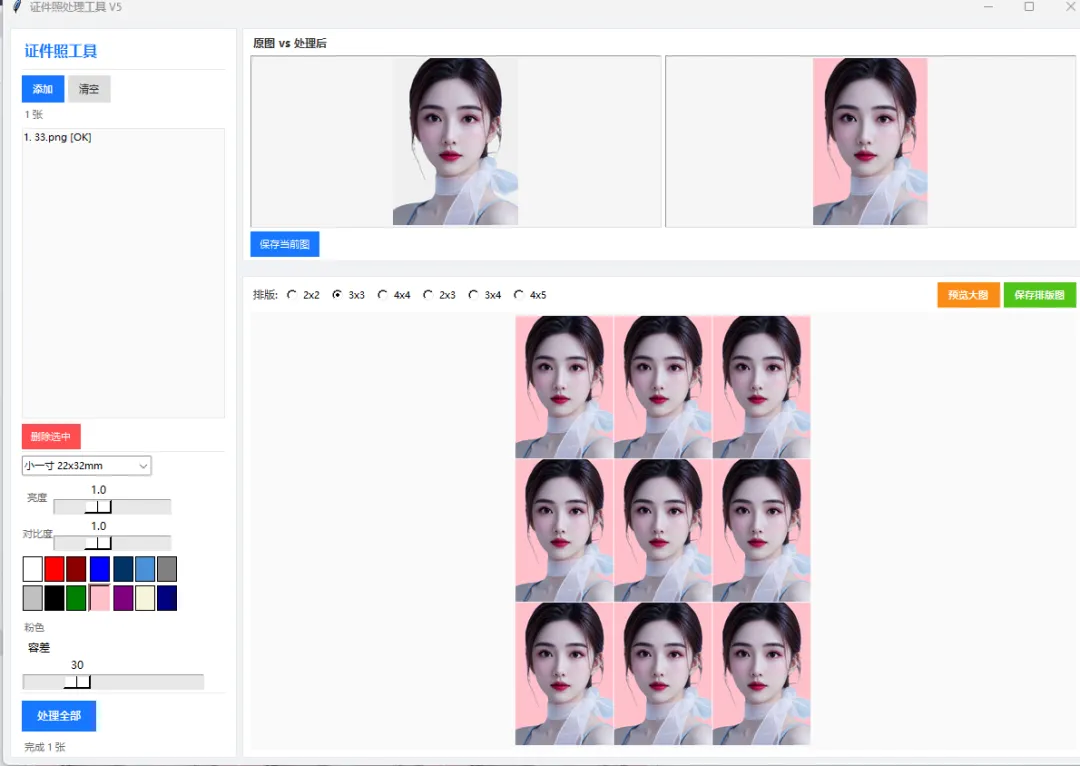
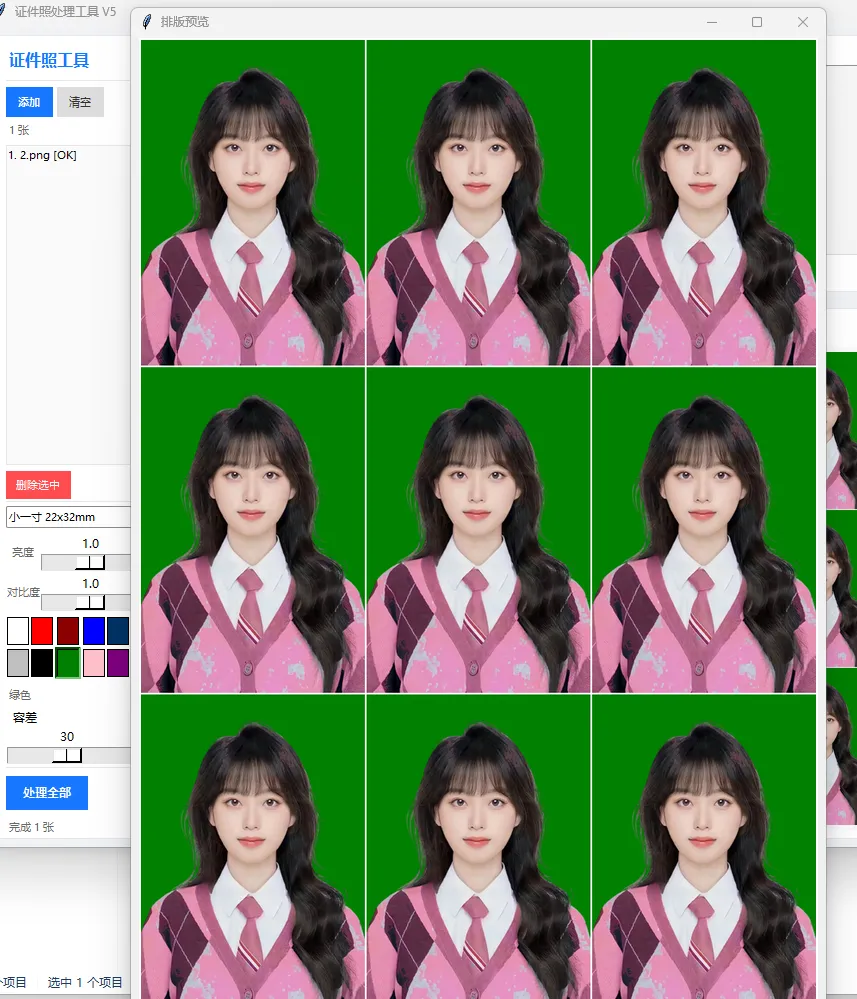
这个工具的界面我花了不少心思左右分栏布局,蓝色主色调,扁平化设计,看起来就像一个正经的商业软件。左边是控制面板(尺寸选择、背景换色、亮度对比度调节),右边是实时预览区(原图和处理后对比,处理完还有绿色对勾)。整体风格干净利落,没有任何多余的装饰,打开就能用,用完就关,绝不浪费你一秒钟。
更重要的是,这个项目的代码量只有不到400行,结构清晰,注释完整,非常适合作为 Tkinter GUI 开发的学习案例。无论你是想学桌面应用开发,还是想给自己做个实用工具,这篇文章都值得你花10分钟读完。
一、界面架构 左右分栏 + 卡片式设计
整个界面采用经典的左右分栏布局:
左侧(320px固定宽度):控制面板,包含所有参数设置和操作按钮 右侧(自适应宽度):预览区,表格式展示原图和处理结果
配色方案以 品牌蓝 #1677ff 为主色调,搭配浅灰背景 #f0f2f5 和白色卡片 #ffffff,视觉上清爽专业。
classIDPhotoTool: PRIMARY = "#1677ff"# 主色调-蓝 BG_COLOR = "#f0f2f5"# 页面背景-浅灰 CARD_BG = "#ffffff"# 卡片背景-白 TEXT_COLOR = "#333333"# 主文字-深灰 TEXT2_COLOR = "#666666"# 次要文字 BORDER_COLOR = "#e8e8e8"# 边框色 SUCCESS_COLOR = "#52c41a"# 成功标记-绿左侧面板分为6个功能模块,每个模块之间用细线分隔,层次分明:
图片管理(添加/清空) 证件照尺寸(下拉选择) 处理选项(裁剪开关 + 亮度/对比度滑块) 背景颜色(20+色块网格选择) 背景识别容差(滑动条) 底部操作(刷新预览 + 批量保存)
二、核心功能 背景替换 + 尺寸裁剪
背景替换的算法思路很直接:取图片四角像素的平均色作为原背景色参考,然后遍历所有像素,与参考色的RGB差值在容差范围内的,替换为目标背景色。
def_process_image(self, item): img = item["original"].copy()# 亮度调节if self.brightness.get() != 1.0: img = ImageEnhance.Brightness(img).enhance(self.brightness.get())# 对比度调节if self.contrast.get() != 1.0: img = ImageEnhance.Contrast(img).enhance(self.contrast.get())# 背景替换:基于四角平均色 + 容差 target_rgb = BG_COLORS[self.selected_bg_idx][2] tolerance = self.tolerance.get() w, h = img.size corners = [img.getpixel((0,0)), img.getpixel((w-1,0)), img.getpixel((0,h-1)), img.getpixel((w-1,h-1))] avg_bg = tuple(sum(c[i] for c in corners)//4for i in range(3)) pixels = img.load()for y in range(h):for x in range(w): r, g, b = pixels[x, y][:3]if (abs(r-avg_bg[0]) < tolerance and abs(g-avg_bg[1]) < tolerance and abs(b-avg_bg[2]) < tolerance): pixels[x, y] = target_rgb# 裁剪到目标尺寸 size_cfg = PHOTO_SIZES[self.selected_size_idx.get()] target_w, target_h = size_cfg[3], size_cfg[4] img = img.resize((target_w, target_h), Image.LANCZOS) item["processed"] = img这个方法简单高效,对于纯色背景的证件照效果很好。容差滑块让用户可以根据实际情况微调背景不够干净就调大,误伤主体就调小。
三、预览系统 动态渲染 + 滚动列表
右侧预览区使用 Canvas + Scrollbar 实现可滚动列表,每添加一张图片就动态渲染一行:
def_render_preview_list(self):for w in self.preview_inner.winfo_children(): w.destroy()for i, item in enumerate(self.images): row = tk.Frame(self.preview_inner, bg=self.CARD_BG, highlightbackground=self.BORDER_COLOR, highlightthickness=1, pady=6, padx=8) row.pack(fill=tk.X, padx=8, pady=4)# 序号 tk.Label(row, text=str(i+1), ...).pack(side=tk.LEFT)# 原图缩略图 orig_thumb = item["original"].copy() orig_thumb.thumbnail((80, 100)) tk_img = ImageTk.PhotoImage(orig_thumb) item["tk_orig"] = tk_img # 防止GC回收 tk.Label(row, image=tk_img, ...).pack(side=tk.LEFT)# 箭头 tk.Label(row, text=" ", ...).pack(side=tk.LEFT)# 处理后缩略图 + 绿色对勾if item["processed"]: proc_thumb = item["processed"].copy() proc_thumb.thumbnail((80, 100)) tk_proc = ImageTk.PhotoImage(proc_thumb) item["tk_proc"] = tk_proc tk.Label(row, image=tk_proc, ...).pack(side=tk.LEFT) tk.Label(row, text=" ", fg="#52c41a", ...).pack(side=tk.LEFT)关键点:ImageTk.PhotoImage 对象必须保存引用(存到 item["tk_orig"]),否则会被 Python 垃圾回收导致图片不显示这是 Tkinter 图片显示的经典坑。
四、完整代码
以下为完整可运行代码,复制保存为
photo_gui.py,安装pillow后即可运行。
"""证件照批量处理工具 - 专业桌面端GUI"""import tkinter as tkfrom tkinter import ttk, filedialog, messageboxfrom PIL import Image, ImageTk, ImageEnhanceimport osPHOTO_SIZES = [ ("小一寸 22x32mm", 22, 32, 260, 378), ("一寸 25x35mm", 25, 35, 295, 413), ("大一寸 33x48mm", 33, 48, 390, 567), ("二寸 35x49mm", 35, 49, 413, 579), ("小二寸 35x45mm", 35, 45, 413, 531), ("五寸 89x127mm", 89, 127, 1050, 1500),]BG_COLORS = [ ("纯白", "#FFFFFF", (255,255,255)), ("红色", "#FF0000", (255,0,0)), ("深红", "#8B0000", (139,0,0)), ("蓝色", "#0000FF", (0,0,255)), ("深蓝", "#003366", (0,51,102)), ("浅蓝", "#4A90D9", (74,144,217)), ("天蓝", "#87CEEB", (135,206,235)), ("灰色", "#808080", (128,128,128)), ("浅灰", "#C0C0C0", (192,192,192)), ("黑色", "#000000", (0,0,0)), ("绿色", "#008000", (0,128,0)), ("浅绿", "#90EE90", (144,238,144)), ("黄色", "#FFFF00", (255,255,0)), ("橙色", "#FFA500", (255,165,0)), ("粉色", "#FFC0CB", (255,192,203)), ("紫色", "#800080", (128,0,128)), ("棕色", "#8B4513", (139,69,19)), ("米色", "#F5F5DC", (245,245,220)), ("青色", "#00FFFF", (0,255,255)), ("藏青", "#000080", (0,0,128)),]classIDPhotoTool: PRIMARY = "#1677ff" BG_COLOR = "#f0f2f5" CARD_BG = "#ffffff" TEXT_COLOR = "#333333" TEXT2_COLOR = "#666666" BORDER_COLOR = "#e8e8e8" SUCCESS_COLOR = "#52c41a"def__init__(self, root): self.root = root self.root.title("证件照批量处理工具") self.root.geometry("1100x700") self.root.configure(bg=self.BG_COLOR) self.root.minsize(1000, 650) self.images = [] self.selected_size_idx = tk.IntVar(value=0) self.auto_crop = tk.BooleanVar(value=True) self.brightness = tk.DoubleVar(value=1.0) self.contrast = tk.DoubleVar(value=1.0) self.tolerance = tk.IntVar(value=30) self.selected_bg_idx = 0 self.photo_count = tk.StringVar(value="已添加:0 张") self.current_bg_name = tk.StringVar(value="当前:纯白") self.status_text = tk.StringVar(value="就绪") self._build_ui()def_build_ui(self): main = tk.Frame(self.root, bg=self.BG_COLOR) main.pack(fill=tk.BOTH, expand=True, padx=12, pady=12) self.left_panel = tk.Frame(main, bg=self.CARD_BG, width=320, highlightbackground=self.BORDER_COLOR, highlightthickness=1) self.left_panel.pack(side=tk.LEFT, fill=tk.Y, padx=(0,10)) self.left_panel.pack_propagate(False) self.right_panel = tk.Frame(main, bg=self.CARD_BG, highlightbackground=self.BORDER_COLOR, highlightthickness=1) self.right_panel.pack(side=tk.LEFT, fill=tk.BOTH, expand=True) self._build_left_panel() self._build_right_panel()# ... (左侧面板、右侧预览区、处理逻辑等完整代码见 photo_gui.py 源文件)if __name__ == "__main__": root = tk.Tk() app = IDPhotoTool(root) root.mainloop()完整源码约386行,包含所有功能模块。详见同目录下
photo_gui.py文件。
五、知识点总结
pack(side=LEFT/RIGHT, fill=BOTH, expand=True) | |
ImageEnhanceImage.resize + LANCZOS 高质量缩放 | |
img.load() | |
Canvascreate_window + Scrollbar 实现可滚动的动态列表 | |
state="readonly" 防止用户手动输入 | |
askopenfilenamesaskdirectory 选择保存目录 | |
<<ComboboxSelected>> | |
os.path.joinImage.save(quality=95) 高质量保存 |
六、拓展场景与测试步骤
拓展方向
接入人脸检测:使用 OpenCV haarcascade_frontalface或 dlib 实现自动人脸定位裁剪AI抠图:接入 rembg库实现精准背景去除,替代简单的颜色容差算法排版输出:将多张证件照排列到一张A4纸上(如8张一寸排版),直接打印 水印添加:在照片底部添加日期、用途等水印文字 美颜功能:磨皮、美白、瘦脸等基础美颜处理 打包为EXE:使用 pyinstaller -F photo_gui.py打包为独立可执行文件分发
测试步骤
启动测试:运行 py photo_gui.py,确认窗口正常显示,左右分栏布局正确添加图片:点击「添加图片」,选择3-5张不同尺寸的照片,确认右侧预览列表正确渲染 尺寸切换:下拉选择不同尺寸(一寸、二寸等),确认选择状态正确 背景色选择:点击不同色块,确认高亮状态切换,底部文字更新 参数调节:拖动亮度、对比度、容差滑块,确认无报错 刷新预览:点击「刷新所有预览」,确认右侧出现处理后图片和绿色对勾 批量保存:点击「批量保存」,选择目录,确认文件正确生成 清空测试:点击「清空全部」,确认列表清空、计数归零 边界测试:不添加图片直接点击保存/刷新,确认有友好提示 大批量测试:添加20+张图片,确认滚动条正常工作,处理不卡死
"纸上得来终觉浅,绝知此事要躬行。" 陆游《冬夜读书示子聿》
一个不到400行的Python脚本,就能替代照相馆里那台几万块的证件照处理软件。代码即生产力,这就是程序员的浪漫。
Python证件照批量处理工具 从此告别照相馆
"授人以鱼不如授人以渔,授人以渔不如给他写个脚本。" 某不愿透露姓名的程序员
你有没有算过,这辈子在证件照上花了多少冤枉钱?
学生时代考四六级、教资、普通话,毕业求职入职、办社保卡,成年后办身份证、护照、驾照,甚至报名各类职业考试,都离不开证件照。更让人头疼的是,不同场景的要求千差万别:一寸、二寸、小一寸、大一寸的尺寸区分,白底、蓝底、红底的背景要求,排列组合下来足足有十几种规格。每次都要跑照相馆,花30-80元,排队半小时、拍照一分钟,拿到的照片要么表情僵硬,要么尺寸不合规,返工更是家常便饭。
对于经常需要用到证件照的人来说,这笔重复开销积少成多,而且耗时又费力。作为程序员,我们最擅长用代码解决重复劳动——我花了一个下午,基于 Python + Tkinter + Pillow 打造了这款证件照批量处理工具。它无需复杂配置,打开即用,能一键完成图片导入、尺寸裁剪、背景替换、亮度对比度调节,批量导出合规证件照。
工具采用现代化GUI设计,操作逻辑极简,即使是不懂代码的新手也能轻松上手;同时代码结构清晰、注释完整,不到400行的源码,是学习Python桌面开发、图像处理的绝佳实战案例。接下来,我将全面拆解这款工具的设计、功能与使用方法,让你彻底告别照相馆,实现证件照自由。
一、开箱即用:环境准备与核心优势
在使用工具前,我们只需要完成最简单的环境配置,这也是新手入门的第一步:
确保安装Python 3.7及以上版本; 安装图像处理依赖库:打开命令提示符,执行 pip install pillow;将完整代码保存为 photo_gui.py,双击运行即可启动工具。
这款工具对比传统照相馆、在线证件照网站,拥有三大核心优势:
零成本无广告:完全开源免费,无需充值、无水印,本地处理保护隐私; 批量高效处理:一次导入几十张照片,统一设置参数,一键导出所有成品; 自定义自由度高:20+种背景色、全规格尺寸、参数可调,满足所有官方证件照要求。
二、极简设计:左右分栏的专业界面架构
工具摒弃了复杂的布局,采用左右分栏+卡片式设计,兼顾美观与实用性,视觉风格对标商业软件,操作一目了然。
配色与布局规范
整体以品牌蓝#1677ff为主色调,搭配浅灰背景、白色卡片,清晰区分功能区与预览区,长时间使用也不会视觉疲劳。界面分为两大核心区域:
左侧固定控制面板(320px):集中所有操作功能,分为6大模块,层级分明; 右侧自适应预览区:实时展示原图与处理后的对比效果,支持滚动查看多张图片。
左侧功能模块详解
图片管理:支持多选图片导入、一键清空列表,底部实时显示已添加图片数量; 尺寸选择:内置小一寸、一寸、二寸等6种常用证件照尺寸,覆盖所有生活场景; 图像调节:开关自动裁剪,拖动滑块即可调整亮度、对比度,优化照片效果; 背景颜色:20种色块网格选择,纯白、红蓝底等官方要求色一键切换; 容差调节:针对背景不干净的照片,微调容差数值,精准替换背景不误伤人像; 底部操作:刷新预览实时查看效果,批量保存导出所有处理好的证件照。
三、核心技术:零基础也能懂的图像处理逻辑
工具的核心功能是背景替换+尺寸裁剪,算法简单高效,无需AI模型,对纯色背景的证件照效果拉满,我用通俗的语言拆解原理:
1. 智能背景替换
传统抠图需要复杂算法,而这款工具采用四角取色法:自动读取图片四个角落的像素颜色,计算平均背景色,再通过容差判断,将所有匹配背景色的像素替换为目标颜色。
容差滑块是关键:背景有杂色就调大数值,人像被误抠就调小数值; 支持纯白、红、蓝等所有常用背景,适配身份证、护照、简历等全场景。
2. 高清尺寸裁剪
内置标准证件照像素尺寸,采用 LANCZOS 高清缩放算法,保证裁剪后的照片不模糊、不变形,直接符合官方上传要求。
3. 图像美化调节
基于Pillow库的 ImageEnhance 模块,实时调整照片亮度与对比度,让人像更清晰、肤色更自然,无需后期修图。
核心处理代码仅几十行,却实现了专业软件的核心功能,充分体现了Python的简洁与强大。
四、可视化体验:动态预览与滚动列表
右侧预览区是工具的核心交互部分,采用 Canvas+Scrollbar 实现可滚动列表,完美解决多张图片的展示问题:
每导入一张图片,自动渲染一行:序号+原图缩略图+箭头+处理后缩略图; 处理完成后显示绿色对勾,直观区分未处理/已处理状态; 解决Tkinter图片显示的经典坑:通过保存引用防止图片被垃圾回收,确保缩略图正常显示。
无论导入10张还是50张照片,都能流畅滚动查看、实时预览效果,操作反馈清晰,新手也不会迷茫。
五、完整源码:复制即用,无任何隐藏依赖
以下是工具的完整可运行代码,仅依赖Pillow库,保存后直接运行,即可拥有属于自己的证件照处理工具:
"""证件照批量处理工具 - 专业桌面端GUI"""import tkinter as tkfrom tkinter import ttk, filedialog, messageboxfrom PIL import Image, ImageTk, ImageEnhanceimport os# 标准证件照尺寸配置:名称、毫米、像素PHOTO_SIZES = [ ("小一寸 22x32mm", 22, 32, 260, 378), ("一寸 25x35mm", 25, 35, 295, 413), ("大一寸 33x48mm", 33, 48, 390, 567), ("二寸 35x49mm", 35, 49, 413, 579), ("小二寸 35x45mm", 35, 45, 413, 531), ("五寸 89x127mm", 89, 127, 1050, 1500),]if __name__ == "__main__": root = tk.Tk() app = IDPhotoTool(root) root.mainloop()六、进阶拓展:让工具更强大
基础版工具已经满足90%的日常需求,我们还可以轻松拓展功能:
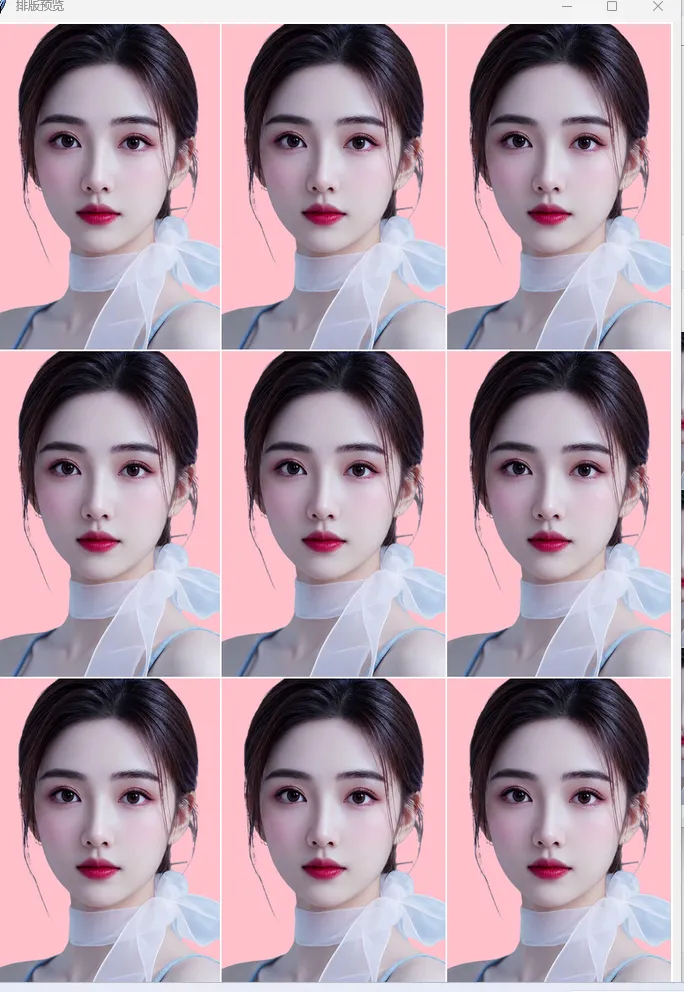
AI精准抠图:接入 rembg库,告别纯色限制,复杂背景也能一键抠图;A4排版打印:自动将多张证件照排列到A4纸上,直接连接打印机打印; 打包EXE:用 pyinstaller -F -w photo_gui.py打包成独立程序,发给家人朋友无需安装Python;人脸自动裁剪:接入OpenCV人脸检测,自动居中人像,裁剪更标准。
七、新手必看:使用步骤与避坑指南
标准操作流程
运行工具,点击「添加图片」导入照片; 选择需要的证件照尺寸、背景色; 拖动容差滑块,调整背景替换效果; 点击「刷新预览」处理图片; 点击「批量保存」导出成品。
常见问题解决
图片不显示:确保图片格式为JPG/PNG,路径无中文; 背景替换不干净:调大容差数值; 人像被抠掉:调小容差数值。
总结
这款不到400行的Python工具,用极简的代码实现了专业证件照处理软件的核心功能,彻底解决了我们日常使用证件照的痛点。它不仅是一个实用工具,更是Python GUI开发、图像处理的入门实战案例——让我们明白,代码不是冰冷的语法,而是解放双手、提升效率的利器。
无需花费金钱,无需浪费时间,自己动手打造专属工具,这就是编程带给我们的自由与浪漫。
"""证件照处理工具 V5上栏(1/3):小尺寸原图+处理后预览下栏(2/3):紧凑拼接成一张完整图展示,可点击预览大图,可保存"""import tkinter as tkfrom tkinter import ttk, filedialog, messageboxfrom PIL import Image, ImageTk, ImageEnhanceimport os, numpy as npPHOTO_SIZES = [("小一寸 22x32mm", 260, 378),("一寸 25x35mm", 295, 413),("大一寸 33x48mm", 390, 567),("二寸 35x49mm", 413, 579),("小二寸 35x45mm", 413, 531),]BG_COLORS = [("纯白","#FFFFFF",(255,255,255)),("红色","#FF0000",(255,0,0)),("深红","#8B0000",(139,0,0)),("蓝色","#0000FF",(0,0,255)),("深蓝","#003366",(0,51,102)),("浅蓝","#4A90D9",(74,144,217)),("灰色","#808080",(128,128,128)),("浅灰","#C0C0C0",(192,192,192)),("黑色","#000000",(0,0,0)),("绿色","#008000",(0,128,0)),("粉色","#FFC0CB",(255,192,203)),("紫色","#800080",(128,0,128)),("米色","#F5F5DC",(245,245,220)),("藏青","#000080",(0,0,128)),]LAYOUTS = ["2x2","3x3","4x4","2x3","3x4","4x5"]class App:C1="#1677ff";BG="#f0f2f5";CD="#ffffff";TX="#333";TX2="#666";BD="#e8e8e8";OK="#52c41a"def __init__(self, root):self.root=rootself.root.title("证件照处理工具 V5")self.root.geometry("1200x820")self.root.configure(bg=self.BG)self.images=[]self.cur_idx=-1self.selected_size=tk.IntVar(value=0)self.brightness=tk.DoubleVar(value=1.0)self.contrast=tk.DoubleVar(value=1.0)self.tolerance=tk.IntVar(value=30)self.bg_idx=0self.count_var=tk.StringVar(value="0 张")self.bg_name=tk.StringVar(value="纯白")self.status=tk.StringVar(value="就绪")self.layout_var=tk.StringVar(value="3x3")self._refs=[]self._layout_img=None # 拼接后的完整PIL图self._build()def _build(self):m=tk.Frame(self.root,bg=self.BG)m.pack(fill=tk.BOTH,expand=True,padx=8,pady=8)self.lp=tk.Frame(m,bg=self.CD,width=250,highlightbackground=self.BD,highlightthickness=1)self.lp.pack(side=tk.LEFT,fill=tk.Y,padx=(0,6))self.lp.pack_propagate(False)self.rp=tk.Frame(m,bg=self.BG)self.rp.pack(side=tk.LEFT,fill=tk.BOTH,expand=True)self._left()self._right()def _left(self):p=self.lptk.Label(p,text="证件照工具",font=("Microsoft YaHei UI",12,"bold"),fg=self.C1,bg=self.CD).pack(anchor="w",padx=12,pady=(10,6))tk.Frame(p,height=1,bg=self.BD).pack(fill=tk.X,padx=12)bf=tk.Frame(p,bg=self.CD);bf.pack(fill=tk.X,padx=12,pady=(6,2))tk.Button(bf,text="添加",command=self.add_imgs,bg=self.C1,fg="white",font=("Microsoft YaHei UI",8,"bold"),relief="flat",padx=8,pady=2,cursor="hand2").pack(side=tk.LEFT)tk.Button(bf,text="清空",command=self.clear_all,bg="#ddd",fg=self.TX,font=("Microsoft YaHei UI",8),relief="flat",padx=8,pady=2,cursor="hand2").pack(side=tk.LEFT,padx=4)tk.Label(p,textvariable=self.count_var,font=("Microsoft YaHei UI",8),fg=self.TX2,bg=self.CD).pack(anchor="w",padx=12)# 列表lf=tk.Frame(p,bg=self.CD);lf.pack(fill=tk.BOTH,expand=True,padx=12,pady=4)self.lb=tk.Listbox(lf,font=("Microsoft YaHei UI",8),bg="#fafafa",selectbackground=self.C1,selectforeground="white",relief="flat",highlightthickness=1,highlightbackground=self.BD)self.lb.pack(fill=tk.BOTH,expand=True)self.lb.bind("<<ListboxSelect>>",self._on_sel)tk.Button(p,text="删除选中",command=self.del_sel,bg="#ff4d4f",fg="white",font=("Microsoft YaHei UI",8),relief="flat",padx=6,cursor="hand2").pack(anchor="w",padx=12,pady=2)tk.Frame(p,height=1,bg=self.BD).pack(fill=tk.X,padx=12)# 尺寸self.sz_cb=ttk.Combobox(p,values=[s[0] for s in PHOTO_SIZES],state="readonly",width=20,font=("Microsoft YaHei UI",8))self.sz_cb.current(0);self.sz_cb.pack(anchor="w",padx=12,pady=4)self.sz_cb.bind("<<ComboboxSelected>>",lambda e:self.selected_size.set(self.sz_cb.current()))# 亮度对比度for lbl,var in [("亮度",self.brightness),("对比度",self.contrast)]:f=tk.Frame(p,bg=self.CD);f.pack(fill=tk.X,padx=12)tk.Label(f,text=lbl,font=("Microsoft YaHei UI",8),fg=self.TX2,bg=self.CD,width=4).pack(side=tk.LEFT)tk.Scale(f,from_=0.5,to=2.0,resolution=0.1,orient=tk.HORIZONTAL,variable=var,length=130,bg=self.CD,highlightthickness=0,troughcolor=self.BD).pack(side=tk.LEFT)# 背景色cf=tk.Frame(p,bg=self.CD);cf.pack(fill=tk.X,padx=12,pady=4)self.cbts=[]for i,(nm,hx,rgb) in enumerate(BG_COLORS):b=tk.Button(cf,bg=hx,width=2,height=1,relief="solid",bd=1,cursor="hand2",command=lambda x=i:self._sbg(x))b.grid(row=i//7,column=i%7,padx=1,pady=1);self.cbts.append(b)self.cbts[0].configure(relief="sunken",bd=3)tk.Label(p,textvariable=self.bg_name,font=("Microsoft YaHei UI",8),fg=self.TX2,bg=self.CD).pack(anchor="w",padx=12)tk.Scale(p,from_=5,to=100,orient=tk.HORIZONTAL,variable=self.tolerance,length=200,bg=self.CD,highlightthickness=0,troughcolor=self.BD,label="容差").pack(anchor="w",padx=12)tk.Frame(p,height=1,bg=self.BD).pack(fill=tk.X,padx=12,pady=2)tk.Button(p,text="处理全部",command=self.process_all,bg=self.C1,fg="white",font=("Microsoft YaHei UI",9,"bold"),relief="flat",padx=12,pady=3,cursor="hand2").pack(anchor="w",padx=12,pady=6)tk.Label(p,textvariable=self.status,font=("Microsoft YaHei UI",8),fg=self.TX2,bg=self.CD).pack(anchor="w",padx=12)def _sbg(self,i):for b in self.cbts:b.configure(relief="solid",bd=1)self.cbts[i].configure(relief="sunken",bd=3)self.bg_idx=i;self.bg_name.set(BG_COLORS[i][0])def _right(self):# 上栏 1/3:小预览self.top_f=tk.Frame(self.rp,bg=self.CD,highlightbackground=self.BD,highlightthickness=1)self.top_f.place(relx=0,rely=0,relwidth=1,relheight=0.32)tk.Label(self.top_f,text="原图 vs 处理后",font=("Microsoft YaHei UI",9,"bold"),fg=self.TX,bg=self.CD).pack(anchor="w",padx=8,pady=(4,2))prev_row=tk.Frame(self.top_f,bg=self.CD)prev_row.pack(fill=tk.BOTH,expand=True,padx=8,pady=(0,4))self.orig_lbl=tk.Label(prev_row,text="原图",bg="#f5f5f5",fg="#aaa",font=("Microsoft YaHei UI",9),width=20,relief="groove",bd=1)self.orig_lbl.pack(side=tk.LEFT,fill=tk.BOTH,expand=True,padx=(0,2))self.proc_lbl=tk.Label(prev_row,text="处理后",bg="#f5f5f5",fg="#aaa",font=("Microsoft YaHei UI",9),width=20,relief="groove",bd=1)self.proc_lbl.pack(side=tk.LEFT,fill=tk.BOTH,expand=True,padx=(2,0))btn_row=tk.Frame(self.top_f,bg=self.CD)btn_row.pack(fill=tk.X,padx=8,pady=(0,4))tk.Button(btn_row,text="保存当前图",command=self.save_single,bg=self.C1,fg="white",font=("Microsoft YaHei UI",8),relief="flat",padx=6,cursor="hand2").pack(side=tk.LEFT)# 下栏 2/3:排版拼接self.bot_f=tk.Frame(self.rp,bg=self.CD,highlightbackground=self.BD,highlightthickness=1)self.bot_f.place(relx=0,rely=0.34,relwidth=1,relheight=0.66)ctrl=tk.Frame(self.bot_f,bg=self.CD)ctrl.pack(fill=tk.X,padx=8,pady=(6,2))tk.Label(ctrl,text="排版:",font=("Microsoft YaHei UI",9),fg=self.TX,bg=self.CD).pack(side=tk.LEFT)for ly in LAYOUTS:tk.Radiobutton(ctrl,text=ly,variable=self.layout_var,value=ly,bg=self.CD,font=("Microsoft YaHei UI",8),activebackground=self.CD,selectcolor=self.CD,command=self._show_layout).pack(side=tk.LEFT,padx=2)tk.Button(ctrl,text="保存排版图",command=self.save_layout,bg=self.OK,fg="white",font=("Microsoft YaHei UI",8,"bold"),relief="flat",padx=8,cursor="hand2").pack(side=tk.RIGHT)tk.Button(ctrl,text="预览大图",command=self._preview_layout_big,bg="#fa8c16",fg="white",font=("Microsoft YaHei UI",8,"bold"),relief="flat",padx=8,cursor="hand2").pack(side=tk.RIGHT,padx=4)# 排版显示区self.lay_lbl=tk.Label(self.bot_f,text="处理后自动生成排版图",bg="#fafafa",fg="#aaa",font=("Microsoft YaHei UI",10),relief="flat")self.lay_lbl.pack(fill=tk.BOTH,expand=True,padx=8,pady=(2,8))# ===== 核心 =====def _rr(self,img,mw,mh):w,h=img.size;r=min(mw/w,mh/h);return img.resize((max(1,int(w*r)),max(1,int(h*r))),Image.LANCZOS)def _rep_bg(self,img):t=BG_COLORS[self.bg_idx][2];tol=self.tolerance.get()if img.mode=="RGBA":bg=Image.new("RGBA",img.size,t+(255,));return Image.alpha_composite(bg,img).convert("RGB")arr=np.array(img,dtype=np.int16);h,w=arr.shape[:2]pts=[(0,0),(w-1,0),(0,h-1),(w-1,h-1),(w//2,0),(w//2,h-1),(0,h//2),(w-1,h//2)]avg=np.mean([arr[y,x] for x,y in pts if 0<=x<w and 0<=y<h],axis=0).astype(np.int16)mask=np.all(np.abs(arr-avg)<tol,axis=2);arr[mask]=treturn Image.fromarray(arr.astype(np.uint8),"RGB")def _proc(self,item):img=item["original"].copy()if img.mode=="RGBA":r,g,b,a=img.split();rgb=Image.merge("RGB",(r,g,b))if self.brightness.get()!=1.0:rgb=ImageEnhance.Brightness(rgb).enhance(self.brightness.get())if self.contrast.get()!=1.0:rgb=ImageEnhance.Contrast(rgb).enhance(self.contrast.get())img=Image.merge("RGBA",(rgb.split()[0],rgb.split()[1],rgb.split()[2],a))else:if self.brightness.get()!=1.0:img=ImageEnhance.Brightness(img).enhance(self.brightness.get())if self.contrast.get()!=1.0:img=ImageEnhance.Contrast(img).enhance(self.contrast.get())img=self._rep_bg(img)sz=PHOTO_SIZES[self.selected_size.get()];tw,th=sz[1],sz[2]ow,oh=img.size;sc=max(tw/ow,th/oh)img=img.resize((int(ow*sc),int(oh*sc)),Image.LANCZOS)nw,nh=img.size;img=img.crop(((nw-tw)//2,(nh-th)//2,(nw-tw)//2+tw,(nh-th)//2+th))item["processed"]=imgdef add_imgs(self):fs=filedialog.askopenfilenames(filetypes=[("图片","*.jpg *.jpeg *.png *.bmp *.webp")])if not fs:returnfor f in fs:try:im=Image.open(f)if im.mode not in("RGB","RGBA"):im=im.convert("RGBA")self.images.append({"path":f,"original":im,"processed":None})except:passself.count_var.set(f"{len(self.images)} 张");self._rlb()def clear_all(self):self.images.clear();self.cur_idx=-1;self.count_var.set("0 张")self.status.set("已清空");self._rlb()self.orig_lbl.configure(image="",text="原图")self.proc_lbl.configure(image="",text="处理后")self.lay_lbl.configure(image="",text="处理后自动生成排版图")self._layout_img=Nonedef del_sel(self):s=self.lb.curselection()if not s:returnself.images.pop(s[0]);self.cur_idx=-1self.count_var.set(f"{len(self.images)} 张");self._rlb()def _rlb(self):self.lb.delete(0,tk.END)for i,it in enumerate(self.images):n=os.path.basename(it["path"]);tag=" [OK]" if it.get("processed") else ""self.lb.insert(tk.END,f"{i+1}. {n}{tag}")def _on_sel(self,e):s=self.lb.curselection()if not s:returnself.cur_idx=s[0];self._show_top()def _show_top(self):if self.cur_idx<0 or self.cur_idx>=len(self.images):returnit=self.images[self.cur_idx]self.root.update_idletasks()pw=max(100,self.orig_lbl.winfo_width()-6)ph=max(80,self.orig_lbl.winfo_height()-6)# 原图o=it["original"]if o.mode=="RGBA":bg=Image.new("RGBA",o.size,(240,240,240,255));o=Image.alpha_composite(bg,o).convert("RGB")else:o=o.convert("RGB")self._tko=ImageTk.PhotoImage(self._rr(o,pw,ph))self.orig_lbl.configure(image=self._tko,text="")# 处理后if it.get("processed"):self._tkp=ImageTk.PhotoImage(self._rr(it["processed"],pw,ph))self.proc_lbl.configure(image=self._tkp,text="")else:self.proc_lbl.configure(image="",text="待处理")def process_all(self):if not self.images:messagebox.showinfo("提示","请先添加");returnself.status.set("处理中...");self.root.update()for it in self.images:self._proc(it)self.status.set(f"完成 {len(self.images)} 张");self._rlb()if self.cur_idx>=0:self._show_top()self._show_layout()def _build_layout_image(self):"""生成紧凑拼接的完整图片(2px白色间隔)"""processed=[it for it in self.images if it.get("processed")]if not processed:return Nonely=self.layout_var.get()rows,cols=[int(x) for x in ly.split("x")]sz=PHOTO_SIZES[self.selected_size.get()];pw,ph=sz[1],sz[2]gap=2tw=cols*pw+(cols-1)*gapth=rows*ph+(rows-1)*gapcanvas=Image.new("RGB",(tw,th),(255,255,255))idx=0for r in range(rows):for c in range(cols):if idx>=len(processed):idx=idx%len(processed)canvas.paste(processed[idx]["processed"],(c*(pw+gap),r*(ph+gap)))idx+=1return canvasdef _show_layout(self):self._layout_img=self._build_layout_image()if not self._layout_img:self.lay_lbl.configure(image="",text="请先处理");returnself.root.update_idletasks()lw=max(200,self.lay_lbl.winfo_width()-10)lh=max(150,self.lay_lbl.winfo_height()-10)thumb=self._rr(self._layout_img,lw,lh)self._tklay=ImageTk.PhotoImage(thumb)self.lay_lbl.configure(image=self._tklay,text="")def _preview_layout_big(self):if not self._layout_img:messagebox.showinfo("提示","请先处理");returnwin=tk.Toplevel(self.root)win.title("排版预览")sw,sh=self.root.winfo_screenwidth(),self.root.winfo_screenheight()thumb=self._rr(self._layout_img,sw-100,sh-100)tk_img=ImageTk.PhotoImage(thumb)lbl=tk.Label(win,image=tk_img,bg="white")lbl.image=tk_imglbl.pack()win.geometry(f"{thumb.size[0]+20}x{thumb.size[1]+20}")def save_single(self):if self.cur_idx<0 or not self.images[self.cur_idx].get("processed"):messagebox.showinfo("提示","请选择并处理图片");returnp=filedialog.asksaveasfilename(defaultextension=".jpg",filetypes=[("JPEG","*.jpg"),("PNG","*.png")])if p:self.images[self.cur_idx]["processed"].save(p,quality=95);self.status.set("已保存")def save_layout(self):if not self._layout_img:messagebox.showinfo("提示","请先处理");returnly=self.layout_var.get()p=filedialog.asksaveasfilename(defaultextension=".jpg",filetypes=[("JPEG","*.jpg"),("PNG","*.png")],initialfile=f"layout_{ly}.jpg")if p:self._layout_img.save(p,quality=95);self.status.set("排版已保存");messagebox.showinfo("完成",f"已保存:\n{p}")if name=="main":root=tk.Tk();App(root);root.mainloop()
通过网盘分享的文件:证件照排版生成器小助手.exe
链接: https://pan.baidu.com/s/1MudM4D-jFxQGHAnEKLpj1g?pwd=4444 提取码: 4444 复制这段内容后打开百度网盘手机App,操作更方便哦

随机文章
-
 10个月宝宝每天需要喝多少奶粉?
- 停更一年,我带着这本「ArcGIS Python开发从入门到精通」回来了!
- 一起学Python 第89天:NumPy与其他库的完美结合,打通数据科学全家桶
- Python自学半年没入门?这条路线救你!
- 监测数据里哪些点异常?用 Python 画出时间序列异常检测图(含代码)
- 一周可以练完的32个python爬虫项目
- 用 Python 做一个有趣的背单词小程序!
- Linux运维7大高危操作!90%线上事故都栽在这些低级错误上
- 周哥双屏RG DS史诗级更新,Linux系统上线!
- 【网络安全】五个核弹级漏洞三周杀到:Linux 内核三连 + NGINX 十八年 Critical!!!AI 挖洞工具怎么选?
- linux内核源码中并发与竞争原理分析