当前位置:首页>python>名师讲堂|使用 Python 基于 LandScan 数据测算城市多中心指标(商玉萍版本)

名师讲堂|使用 Python 基于 LandScan 数据测算城市多中心指标(商玉萍版本)

  • 2026-07-02 16:48:43
名师讲堂|使用 Python 基于 LandScan 数据测算城市多中心指标(商玉萍版本)

由于借助 AI 工具学习编程已经变得非常容易了,因此之后的课程就不再默认进行视频讲解了,如果特别需要视频讲解也可以联系李老师预约讲解~讲义材料学习过程中遇到的问题也可以及时与李老师联系。

购买 RStata 名师讲堂会员即可参加该课程啦(之前的和未来的都可以参加)!

价格:2800/年 或者 4800/长期

购买会员可以从这里下单:https://rstata.duanshu.com/#/card/list/

名师讲堂会员权益:

  1. 参加每个月 3~4 次的名师讲堂课程;
  2. 参加平台上的其他 R 语言和 Stata 的课程;
  3. 以会员折扣价购买我们分享的数据资料(10 元/份);
  4. 课程内外的提问解答服务(课程外的尽量帮忙解决)。

* 如果发票可添加小编微信 r_stata2 (RStata 李老师)开具。如需数据资料,购买后可添加小编微信免费领取数据折扣卡。

更多关于 RStata 会员的更多信息可添加微信号 r_stata2 咨询:

课程主页(点击文末的阅读原文即可跳转):https://rstata.duanshu.com/#/brief/course/eb9f29edaadb45728360ba8f6aa0c399


今天给大家介绍如何使用 Python 基于 LandScan 全球人口栅格数据,按照商玉萍(2022)论文中的方法,同时测算城市多中心结构的 5 大指标,包括中心数量、帕累托指数、多中心指数(含距离)以及去中心化指标。

一、指标来源与计算原理

1.1 数据来源

本方法使用的人口数据为美国能源部橡树岭国家实验室提供的 LandScan 全球人口密度栅格数据,空间分辨率约为 1 km × 1 km(坐标参考系转换后约 820 m)。

1.2 文献来源

5 大指标均来自以下论文:

商玉萍. 中国城市多中心空间战略的创新绩效研究——基于集聚经济与舒适度的视角 [J]. 经济学(季刊), 2022.

该论文从集聚经济与舒适度双重视角,考察城市多中心空间战略对创新绩效的影响,所使用的多中心测量指标体系是目前文献中最为系统的之一。

1.3 五大指标定义

变量名
中文名
含义
center
城市中心数量
识别出的有效城市中心(高密度聚集区)数量
pareto
帕累托指数
各中心人口规模的秩-规模幂律回归系数(绝对值),越小表示多中心越均衡
poly
多中心指数
纳入距离的人口规模标准差指数,越小表示分布越均衡
sub3
去中心化指标(3 km)
CBD 3 千米以外的人口占城市总人口的比例
sub5
去中心化指标(5 km)
CBD 5 千米以外的人口占城市总人口的比例

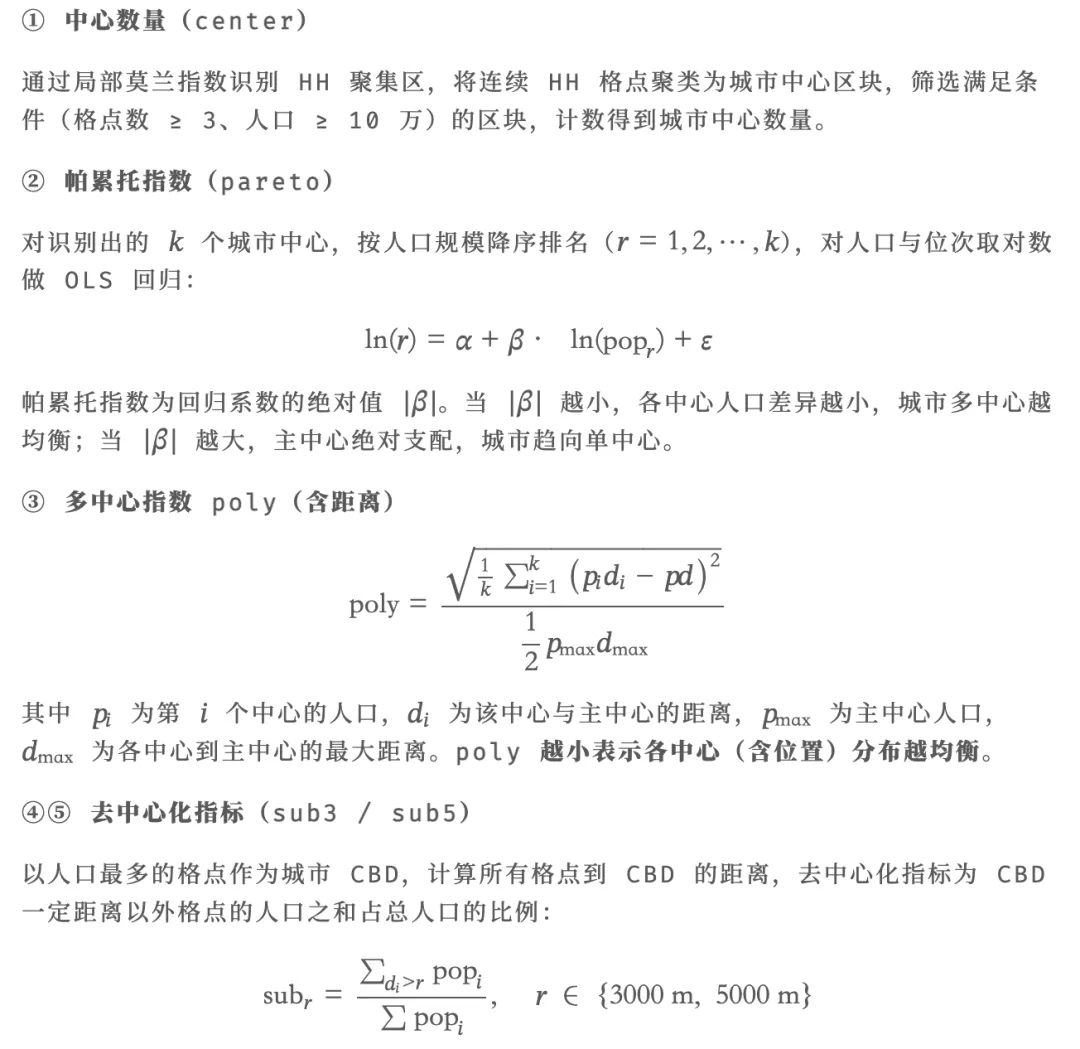
1.4 各指标计算方法

1.5 计算流程总览

整个计算分为以下步骤:

  1. 坐标系转换:将 LandScan 栅格数据投影到等面积坐标系(Albers 投影),确保距离计算准确;
  2. 裁剪与掩膜:按城市行政边界裁剪栅格,获取该城市范围内的人口格点;
  3. 栅格转点:将栅格像元转为空间点数据;
  4. 构建点邻接:使用 1000 m 距离阈值构建邻接关系,生成空间权重矩阵;
  5. 局部 Moran's I 检验:使用 R spdep::localmoran(conditional=TRUE) 的条件正态近似法(Sokal 1998)计算每个格点的局部莫兰指数和 p 值,识别统计显著的 HH 聚集区格点;
  6. 聚类成中心:将 HH 格点按空间邻接分组,形成连续的"高密度区块";
  7. 筛选有效中心:要求每个区块格点数 ≥ 3、总人口 ≥ 100,000;
  8. 计算 5 大指标:center、pareto、poly、sub3、sub5。

1.6 参数设定说明

ANALYSIS_PARAMS = {
"sig_level"0.05,   # 局部莫兰指数显著性阈值
"min_cells"3,      # 中心最小格点数(过滤噪点)
"min_pop"100000,   # 中心最小人口(单位:人),论文基准为 10 万
"dist_nb"1000# 邻接距离阈值(米)
}
for k, v in ANALYSIS_PARAMS.items():
print(f"  {k}{v}")

关于 dist_nb = 1000 的设定:LandScan 数据经 Albers 投影后分辨率约为 820 m。相邻格点(上下左右)的距离约为 820 m,对角线方向约为 820 × √2 ≈ 1159 m。将阈值设为 1000 m,可精确选取边邻接格点,不会错误地把对角线邻居算进来。


二、使用 reticulate 创建与管理 Python 虚拟环境

在 R 中通过 reticulate 包来调用 Python,最好的实践是为项目创建一个专属的 Python 虚拟环境,将所需依赖隔离到独立空间,避免与系统 Python(如 Anaconda)发生版本冲突。

重要说明(避免"已初始化"报错):reticulate 在 R 会话中只能绑定一次 Python——一旦某个 {python} 代码块运行,Python 解释器就被锁定,之后再调用 use_virtualenv() 会报错:

ERROR: The requested version of Python cannot be used, as another version has already been initialized.

因此,虚拟环境的激活必须在所有 {python} 代码块之前完成。本文档的解决方案是在 setup chunk 中通过 Sys.setenv(RETICULATE_PYTHON = ...) 提前锁定 Python 路径,这是 reticulate 选取 Python 的最高优先级入口。

2.1 安装 reticulate(仅首次)

# 设置 CRAN 镜像(knit 时 R 处于非交互模式,不会自动选择镜像)
options(repos = c(CRAN = "https://mirrors.tuna.tsinghua.edu.cn/CRAN/"))
# 仅在尚未安装时才安装,避免每次 knit 都重装
if (!requireNamespace("reticulate", quietly = TRUE)) {
  install.packages("reticulate")
  message("reticulate 安装完成!")
else {
  message("reticulate 已安装,版本:", packageVersion("reticulate"))
}

2.2 虚拟环境初始化原理(已在 setup chunk 中完成)

本文档的 setup chunk(隐藏运行)包含如下逻辑:

library(reticulate)
.venv_name   <-".venv"
.venv_python <- virtualenv_python(.venv_name)
# 虚拟环境不存在时自动创建
if(!file.exists(.venv_python)){
  virtualenv_create(.venv_name)
  .venv_python <- virtualenv_python(.venv_name)
}
# 通过环境变量抢先锁定 Python(优先级最高,早于任何 {python} chunk)
Sys.setenv(RETICULATE_PYTHON = .venv_python)
use_virtualenv(.venv_name, required =TRUE)

这样做的关键在于:knitr 在处理第一个 {python} chunk 时,reticulate 已经通过 RETICULATE_PYTHON 环境变量知道要使用 .venv,不会再去碰 Anaconda。

2.3 在虚拟环境中安装 Python 包(仅首次)

# 检查关键包是否已安装,缺失的才安装
py_pkgs <- c(
"numpy""pandas""geopandas""rasterio",
"scipy""scikit-learn""libpysal""pyreadstat"
)
installed <- py_list_packages(".venv")$package
need_install <- setdiff(py_pkgs, installed)
if (length(need_install) > 0) {
  virtualenv_install(".venv", packages = need_install)
  message("已安装缺失的包:"paste(need_install, collapse = ", "))
else {
  message("所有 Python 包已就绪,无需安装")
}

2.4 验证激活状态

# 验证当前绑定的 Python 路径(应指向 .venv 目录)
py_config()

2.5 查看已安装的包

# 列出虚拟环境中已安装的包
pkgs <- py_list_packages(".venv")
# 只显示我们关心的包
key_pkgs <- c("numpy""pandas""geopandas""rasterio""libpysal""scipy""scikit-learn""pyreadstat")
pkgs[pkgs$package %in% key_pkgs, c("package""version")]

2.6 虚拟环境管理常用命令

查看所有已创建的虚拟环境
virtualenv_list()
删除虚拟环境(当不再需要时)
virtualenv_remove(".venv")
升级某个包
virtualenv_install(".venv", packages = "geopandas", ignore_installed = TRUE)

三、全局路径与参数配置

3.1 导入依赖包与参数设定

import numpy as np
import pandas as pd
import geopandas as gpd
import rasterio
from rasterio.mask import mask
from scipy.stats import norm
from sklearn.linear_model import LinearRegression
from libpysal.weights import DistanceBand, lag_spatial
import os
import re
from pathlib import Path
# 等面积投影(Albers,适合中国范围计算)
MYCRS = "+proj=aea +lat_0=0 +lon_0=105 +lat_1=25 +lat_2=47 +x_0=0 +y_0=0 +ellps=krass +units=m +no_defs"
PATH = {
"pop_tif""pop-tif2",           # 已重投影到 mycrs 的 tif 文件夹
"city_shp""2021行政区划/市.shp"# 2021 年市级行政区划
}
ANALYSIS_PARAMS = {
"sig_level"0.05,
"min_cells"3,
"min_pop"100000,
"dist_nb"1000
}

数据预处理提示:如果你的 LandScan tif 文件还是 WGS84 坐标系,需要先转换到 MYCRS

import rasterio
from rasterio.warp import calculate_default_transform, reproject, Resampling
defreproject_raster(input_path, output_path, dst_crs):
with rasterio.open(input_path) as src:
        transform, width, height = calculate_default_transform(
            src.crs, dst_crs, src.width, src.height, *src.bounds
        )
        kwargs = src.meta.copy()
        kwargs.update({
'crs': dst_crs,
'transform': transform,
'width': width,
'height': height
        })
with rasterio.open(output_path, 'w', **kwargs) as dst:
for i inrange(1, src.count + 1):
                reproject(
                    source=rasterio.band(src, i),
                    destination=rasterio.band(dst, i),
                    src_transform=src.transform,
                    src_crs=src.crs,
                    dst_transform=transform,
                    dst_crs=dst_crs,
                    resampling=Resampling.nearest
                )

四、单城市演示计算(北京市,2020 年)

4.1 读取城市边界与人口栅格

# 读取并转换投影坐标系
city_all = gpd.read_file(PATH['city_shp'])
city_all = city_all.to_crs(MYCRS)
city_all['city_code'] = city_all['市代码']
city_all['city_name'] = city_all['市']
# 筛选示例城市(北京、天津、石家庄)
demo_cities = [110000120000130100]
city_demo = city_all[city_all['city_code'].isin(demo_cities)]
# 筛选北京市
city_beijing = city_demo[city_demo['city_code'] == 110000]
print(city_beijing)

4.2 栅格转点函数

defraster_to_points(raster_path, city_geom):
"""读取栅格数据,按城市边界裁剪,并转换为点数据
    Notes
    -----
    使用 all_touched=True 保留所有与边界多边形接触的像元,
    与 R terra::mask(touches=TRUE) 的意图一致。
    int32 栅格的 nodata 值无法被 np.isnan() 检测,
    需先转为 float64 再替换 nodata 为 NaN。
    """
# all_touched=True:保留所有与边界多边形接触的像元
# 与 R terra::mask(touches=TRUE) 的意图一致
with rasterio.open(raster_path) as src:
        nodata_val = src.nodata  # 通常是 -2147483648 (int32 最小值)
        out_image, out_transform = mask(src, [city_geom], crop=True, all_touched=True)
# 将栅格数据转为 float64 以支持 NaN
# 关键:int32 类型的栅格 nodata=-2147483648,np.isnan() 对 int 无效
    data = out_image[0].astype(np.float64)
if nodata_val isnotNone:
        data[data == nodata_val] = np.nan
# 获取非空像元的坐标和值(只保留非 NaN 的格点)
    rows, cols = np.where(~np.isnan(data))
    values = data[rows, cols]
# 转换为地理坐标
    xs, ys = rasterio.transform.xy(out_transform, rows, cols)
# 创建 GeoDataFrame
    gdf = gpd.GeoDataFrame(
        {'pop': values},
        geometry=gpd.points_from_xy(xs, ys),
        crs=MYCRS
    )
# 只去掉 NaN,保留 pop=0 的格点(与 R 的 drop_na(pop) 一致)
# pop=0 的格点会影响 LISA 分类中的中位数计算
    gdf = gdf.dropna(subset=['pop']).reset_index(drop=True)
return gdf
# 读取 2020 年人口栅格
pop_file = os.path.join(PATH['pop_tif'], "2020.tif")
pts = raster_to_points(pop_file, city_beijing.geometry.iloc[0])
print(pts.head())

4.3 构建空间权重矩阵

defbuild_spatial_weights(coords, threshold=1000):
"""构建距离阈值空间权重矩阵"""
    w = DistanceBand.from_array(coords, threshold=threshold, silence_warnings=True)
    w.transform = 'r'# 行标准化
return w
# 提取坐标并构建权重矩阵
coords = np.column_stack([pts.geometry.x, pts.geometry.y])
w = build_spatial_weights(coords, ANALYSIS_PARAMS['dist_nb'])

参数说明

  • transform = 'r':行标准化权重。若一个格点有 4 个邻居,则每个邻居权重 = 1/4;有 2 个邻居则权重 = 1/2。

4.4 局部 Moran's I 检验

局部 Moran's I 的核心作用:找出人口高密度且周围也是高密度的区域(HH 聚集区),这正是城市中心的候选位置。
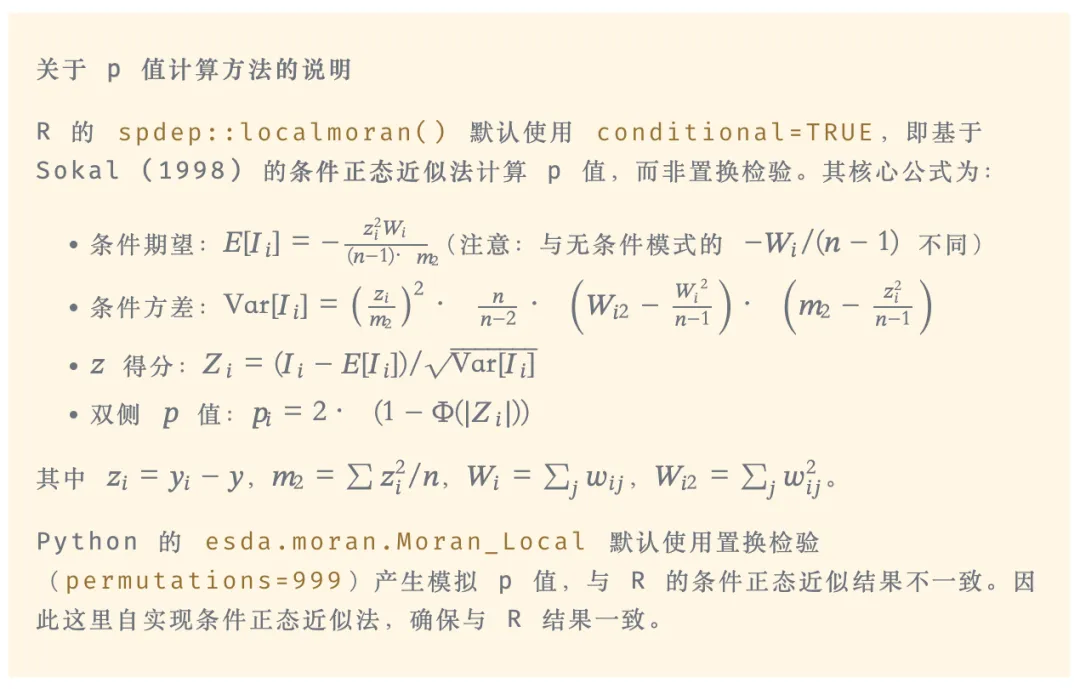
def_local_moran_conditional_p(y, w):
"""
    使用 R spdep::localmoran(conditional=TRUE) 的条件正态近似法计算 LISA p 值。
    完全复现 R spdep::localmoran 源码中 conditional=TRUE 的计算逻辑:
        Ii     = (zi / m2) * lag(zi)           其中 zi = y - mean(y), m2 = sum(z^2)/n
        E[Ii]  = -(zi^2 * Wi) / ((n-1) * m2)   条件期望(与 unconditional 的 -Wi/(n-1) 不同)
        Var[Ii] = (zi/m2)^2 * (n/(n-2)) * (Wi2 - Wi^2/(n-1)) * (m2 - zi^2/(n-1))
        z_score = (Ii - E[Ii]) / sqrt(Var[Ii])
        p_i = 2 * (1 - Φ(|z_score|))
    """
    y = np.asarray(y, dtype=np.float64)
    n = len(y)
    z = y - y.mean()  # 中心化变量
    m2 = np.sum(z ** 2) / n  # mlvar=TRUE 时的方差
# Ii = (z / m2) * lag(z)
    z_lag = lag_spatial(w, z)
    Ii = (z / m2) * z_lag
# Wi 和 Wi2
    Wi = np.zeros(n)
    Wi2 = np.zeros(n)
for i inrange(n):
iflen(w.neighbors[i]) > 0:
            weights_i = np.array(w.weights[i])
            Wi[i] = np.sum(weights_i)
            Wi2[i] = np.sum(weights_i ** 2)
# 条件期望:E[Ii] = -(z_i^2 * Wi) / ((n-1) * m2)
    E_Ii = -(z ** 2 * Wi) / ((n - 1) * m2)
# 条件方差(Sokal 1998)
    zi_over_m2 = z / m2
    var_Ii = (zi_over_m2 ** 2) * (n / (n - 2)) * (Wi2 - Wi ** 2 / (n - 1)) * (m2 - z ** 2 / (n - 1))
    var_Ii = np.maximum(var_Ii, 0.0)
# z 得分与双侧 p 值
    z_score = np.where(var_Ii > 0, (Ii - E_Ii) / np.sqrt(var_Ii), 0.0)
    p_val = 2.0 * norm.sf(np.abs(z_score))
return p_val, Ii
deflocal_moran_lisa(pop_values, w, sig_level=0.05):
"""计算局部 Moran's I 并进行 LISA 分类(条件正态近似法)"""
# 使用条件正态近似法计算 LISA p 值
    p_values, Ii = _local_moran_conditional_p(pop_values, w)
# 计算空间滞后(邻居加权平均)
    lag_val = lag_spatial(w, pop_values)
# 分类
    med = np.median(pop_values)
    self_hl = np.where(pop_values > med, 'H''L')
    nbr_hl = np.where(lag_val > med, 'H''L')
# HH 类型:自身高 + 邻居高 + 显著
    sig = p_values < sig_level
    types = np.where((sig) & (self_hl == 'H') & (nbr_hl == 'H'), 'HH''other')
return p_values, lag_val, types
# 计算局部莫兰指数
p_values, lag_val, types = local_moran_lisa(pts['pop'].values, w)
pts['p_val'] = p_values
pts['sig'] = p_values < ANALYSIS_PARAMS['sig_level']
pts['type'] = types

局部莫兰指数结果包含:

列名
含义
Ii
局部莫兰指数值
p_val
条件正态近似双侧 p 值
type
LISA 类型(HH 或 other)

4.5 提取 HH 格点并聚类成中心

# 筛选 HH 格点
hh = pts[pts['type'] == 'HH'].copy()
print(f"HH 格点数量: {len(hh)}")
# 对 HH 格点再次做空间邻接,将连续区域标为同一 cluster
defcluster_centers(hh_gdf, dist_nb=1000):
"""对 HH 格点进行空间聚类,识别城市中心"""
iflen(hh_gdf) == 0:
return pd.DataFrame()
    coords = np.column_stack([hh_gdf.geometry.x, hh_gdf.geometry.y])
# 构建邻接关系
    w_hh = DistanceBand.from_array(coords, threshold=dist_nb, silence_warnings=True)
# 获取连通分量(聚类)
    components = w_hh.component_labels
    hh_gdf = hh_gdf.copy()
    hh_gdf['cluster'] = components
# 按 cluster 汇总
    centers = hh_gdf.groupby('cluster').agg({
'pop''sum',
'geometry'lambda x: (np.mean(x.x), np.mean(x.y))
    }).reset_index()
    centers['n'] = hh_gdf.groupby('cluster').size().values
    centers['x'] = centers['geometry'].apply(lambda p: p[0])
    centers['y'] = centers['geometry'].apply(lambda p: p[1])
    centers = centers.drop('geometry', axis=1)
return centers
centers = cluster_centers(hh, ANALYSIS_PARAMS['dist_nb'])
# 筛选有效中心(人口≥10万,格点数≥3)
centers = centers[(centers['n'] >= ANALYSIS_PARAMS['min_cells']) & 
                  (centers['pop'] >= ANALYSIS_PARAMS['min_pop'])]
print(centers)

4.6 计算 5 大指标

此处代码需下载讲义材料查看~

五、批量串行计算(全国所有城市 × 所有年份)

5.1 封装核心计算函数

将以上步骤封装为函数,接收城市代码和人口 tif 文件路径,返回该城市该年份的 5 大指标:

defcalc_paper_indicators(city_code, pop_file, city_all, lw=None, params=None):
"""计算单个城市单年份的 5 大指标"""
if params isNone:
        params = ANALYSIS_PARAMS
try:
# 获取当前城市
        city = city_all[city_all['city_code'] == city_code]
iflen(city) == 0:
return pd.DataFrame()
        city_geom = city.geometry.iloc[0]
        city_name = city['city_name'].iloc[0]
# 栅格转点
        pts = raster_to_points(pop_file, city_geom)
iflen(pts) == 0:
return pd.DataFrame()
# 构建空间权重矩阵(如果未提供)
        coords = np.column_stack([pts.geometry.x, pts.geometry.y])
if lw isNone:
            w = build_spatial_weights(coords, params['dist_nb'])
else:
            w = lw
# 局部 Moran's I 和 LISA 分类(条件正态近似法)
        p_values, lag_val, types = local_moran_lisa(pts['pop'].values, w, params['sig_level'])
        pts['type'] = types
# 筛选 HH 格点
        hh = pts[pts['type'] == 'HH'].copy()
iflen(hh) < params['min_cells']:
return pd.DataFrame()
# 聚类识别中心
        centers = cluster_centers(hh, params['dist_nb'])
        centers = centers[(centers['n'] >= params['min_cells']) & 
                          (centers['pop'] >= params['min_pop'])]
iflen(centers) == 0:
return pd.DataFrame()
# 计算指标
        center_n = len(centers)
        pareto = calc_pareto_index(centers)
        poly = calc_polycentric_index(centers)
        cbd_idx = pts['pop'].idxmax()
        cbd_geom = pts.loc[cbd_idx, 'geometry']
        sub_results = calc_decentralization(pts, cbd_geom)
# 提取年份
        year_match = re.search(r'(\d{4})', os.path.basename(pop_file))
        year = int(year_match.group(1)) if year_match elseNone
return pd.DataFrame({
'year': [year],
'city_code': [city_code],
'city_name': [city_name],
'center': [center_n],
'pareto': [round(pareto, 4)],
'poly': [round(poly, 4)],
'sub3': [round(sub_results['sub3'], 4)],
'sub5': [round(sub_results['sub5'], 4)],
'total_pop': [pts['pop'].sum()]
        })
except Exception as e:
print(f"计算失败: {city_code}{pop_file}, 错误: {e}")
return pd.DataFrame()
# 测试函数
result = calc_paper_indicators(110000, pop_file, city_demo)
print(result)

5.2 加载全部城市与年份文件

# 加载城市数据
city_all = gpd.read_file(PATH['city_shp'])
city_all = city_all.to_crs(MYCRS)
city_all['city_code'] = city_all['市代码']
city_all['city_name'] = city_all['市']
# 索引所有年份 tif 文件
pop_files = sorted(Path(PATH['pop_tif']).glob("*.tif"))
print(f"找到 {len(pop_files)} 个年份文件")

5.3 串行计算所有城市

此处代码需下载讲义材料查看~

六、改进算法:预计算空间权重矩阵

6.1 为什么可以改进?

在上面的批量计算中,对同一个城市,每个年份都重新计算了一次空间权重矩阵。但实际上,空间权重矩阵只取决于城市边界的形状——它与年份无关,只要城市行政边界不变(本项目使用 2021 年固定边界),同一城市所有年份的权重矩阵完全相同。

因此,可以先把所有城市的权重矩阵计算并保存好,然后在计算各年数据时直接读取,显著减少重复计算。

对于一个有 NNN 个城市、TTT 个年份的数据集:

方法
权重矩阵计算次数
原始方法
N×TN \times TN×T
改进方法
NNN
(预计算一次)

当 T=25T = 25T=25(2000~2024 年)时,改进方法可将权重矩阵的计算量缩减为原来的 1/25

6.2 预计算并保存所有城市的权重矩阵

import pickle
defcompute_lw(city_code, city_all, sample_pop_file, output_dir="lwres"):
"""预计算单个城市的空间权重矩阵"""
try:
        city = city_all[city_all['city_code'] == city_code]
iflen(city) == 0:
returnNone
        city_geom = city.geometry.iloc[0]
# 使用样本人口文件确定格点位置
        pts = raster_to_points(sample_pop_file, city_geom)
iflen(pts) == 0:
returnNone
        coords = np.column_stack([pts.geometry.x, pts.geometry.y])
        w = build_spatial_weights(coords, ANALYSIS_PARAMS['dist_nb'])
# 保存权重矩阵
        os.makedirs(output_dir, exist_ok=True)
        output_path = os.path.join(output_dir, f"{city_code}.pkl")
withopen(output_path, 'wb'as f:
            pickle.dump(w, f)
return w
except Exception as e:
print(f"权重矩阵计算失败: {city_code}, 错误: {e}")
returnNone
# 串行计算所有城市的权重矩阵
# (joblib.Parallel 在 reticulate 环境下无法序列化 __main__ 中定义的函数,
#   因此 Rmd 中使用串行循环;如需并行请使用独立的 batch_calculate.py 脚本)
sample_pop_file = os.path.join(PATH['pop_tif'], "2020.tif")
for code in city_demo['city_code'].unique():
    compute_lw(code, city_demo, sample_pop_file)
print("======== 所有城市权重矩阵计算完成,保存在 lwres/ ========")

6.3 使用预计算权重矩阵的改进版计算函数

改进版函数从外部接收 lw 参数,不在函数内部重新计算权重矩阵:

defload_lw(city_code, lw_dir="lwres"):
"""加载预计算的空间权重矩阵"""
    lw_path = os.path.join(lw_dir, f"{city_code}.pkl")
if os.path.exists(lw_path):
withopen(lw_path, 'rb'as f:
return pickle.load(f)
returnNone
defcalc_paper_indicators2(current_city, pop_file, lw, params=None):
"""改进版计算函数(接受外部 lw)"""
if params isNone:
        params = ANALYSIS_PARAMS
try:
        city_geom = current_city.geometry.iloc[0]
        city_code = current_city['city_code'].iloc[0]
        city_name = current_city['city_name'].iloc[0]
# 栅格转点
        pts = raster_to_points(pop_file, city_geom)
iflen(pts) == 0:
return pd.DataFrame()
# 直接使用传入的 lw(条件正态近似法)
        p_values, lag_val, types = local_moran_lisa(pts['pop'].values, lw, params['sig_level'])
        pts['type'] = types
# 筛选 HH 格点
        hh = pts[pts['type'] == 'HH'].copy()
iflen(hh) < params['min_cells']:
return pd.DataFrame()
# 聚类识别中心
        centers = cluster_centers(hh, params['dist_nb'])
        centers = centers[(centers['n'] >= params['min_cells']) & 
                          (centers['pop'] >= params['min_pop'])]
iflen(centers) == 0:
return pd.DataFrame()
# 计算指标
        center_n = len(centers)
        pareto = calc_pareto_index(centers)
        poly = calc_polycentric_index(centers)
        cbd_idx = pts['pop'].idxmax()
        cbd_geom = pts.loc[cbd_idx, 'geometry']
        sub_results = calc_decentralization(pts, cbd_geom)
        year_match = re.search(r'(\d{4})', os.path.basename(pop_file))
        year = int(year_match.group(1)) if year_match elseNone
return pd.DataFrame({
'year': [year],
'city_code': [city_code],
'city_name': [city_name],
'center': [center_n],
'pareto': [round(pareto, 4)],
'poly': [round(poly, 4)],
'sub3': [round(sub_results['sub3'], 4)],
'sub5': [round(sub_results['sub5'], 4)],
'total_pop': [pts['pop'].sum()]
        })
except Exception as e:
return pd.DataFrame()
# 测试改进版函数
city_demo_single = city_demo[city_demo['city_code'] == 110000]
lw_demo = load_lw(110000)
result = calc_paper_indicators2(city_demo_single, pop_file, lw=lw_demo)
print(result)

6.4 使用改进算法批量计算全部数据

此处代码需下载讲义材料查看~

6.5 合并所有结果并保存

defmerge_results(input_dir="resb", output_file="results.dta"):
"""合并所有结果文件"""
    all_files = list(Path(input_dir).glob("*.csv"))
iflen(all_files) == 0:
print("未找到结果文件")
return pd.DataFrame()
    dfs = [pd.read_csv(f) for f in all_files]
    result = pd.concat(dfs, ignore_index=True)
# 保存为 dta 格式(需要 pyreadstat)
try:
import pyreadstat
        pyreadstat.write_dta(result, output_file)
print(f"结果已保存为: {output_file}")
except ImportError:
# 如果没有 pyreadstat,保存为 CSV
        result.to_csv(output_file.replace('.dta''.csv'), index=False)
print(f"结果已保存为 CSV 格式")
return result
# 合并结果
final_result = merge_results("resb""2000~2024年各城市多中心指标(商玉萍版本).dta")
print(final_result.head())

最终结果数据集包含如下变量:

变量名
说明
year
年份(2000~2024)
city_code
行政区划代码(2021 年版)
city_name
城市名称
center
有效城市中心数量
pareto
帕累托指数,越小越均衡
poly
含距离的多中心指数,越小越均衡
sub3
CBD 3 千米以外的人口占比
sub5
CBD 5 千米以外的人口占比
total_pop
城市总人口

通常,paretopoly 值越小,代表各中心的人口分布越均衡(均等);sub3sub5 越大,代表城市人口越去中心化。


七、稳健性检验:放宽中心人口门槛至 1 万人

商玉萍(2022)论文中提供了一项稳健性检验:将"总人口在 10 万人以上"的条件改为"总人口在 1 万人以上",重新确定每个城市的中心数量(2center)作为稳健性指标。

这一操作的实现方式非常简单,只需将 ANALYSIS_PARAMS['min_pop'] 改为 10000,其余代码完全不变:

此处代码需下载讲义材料查看~

如何参加课程?

购买 RStata 名师讲堂会员即可参加该课程啦(之前的和未来的都可以参加)!

价格:2800/年 或者 4800/长期

购买会员可以从这里下单:https://rstata.duanshu.com/#/card/list/

名师讲堂会员权益:

  1. 参加每个月 3~4 次的名师讲堂课程;
  2. 参加平台上的其他 R 语言和 Stata 的课程;
  3. 以会员折扣价购买我们分享的数据资料(10 元/份);
  4. 课程内外的提问解答服务(课程外的尽量帮忙解决)。

* 如果发票可添加小编微信 r_stata2 (RStata 李老师)开具。如需数据资料,购买后可添加小编微信免费领取数据折扣卡。

更多关于 RStata 会员的更多信息可添加微信号 r_stata2 咨询:

课程主页(点击文末的阅读原文即可跳转):https://rstata.duanshu.com/#/brief/course/eb9f29edaadb45728360ba8f6aa0c399


最新文章

随机文章

基本 文件 流程 错误 SQL 调试
  1. 请求信息 : 2026-07-03 14:00:16 HTTP/2.0 GET : https://f.mffb.com.cn/a/494471.html
  2. 运行时间 : 0.175466s [ 吞吐率:5.70req/s ] 内存消耗:4,689.28kb 文件加载:140
  3. 缓存信息 : 0 reads,0 writes
  4. 会话信息 : SESSION_ID=7fc0965078af63e3b416b8e0a09fc361
  1. /yingpanguazai/ssd/ssd1/www/f.mffb.com.cn/public/index.php ( 0.79 KB )
  2. /yingpanguazai/ssd/ssd1/www/f.mffb.com.cn/vendor/autoload.php ( 0.17 KB )
  3. /yingpanguazai/ssd/ssd1/www/f.mffb.com.cn/vendor/composer/autoload_real.php ( 2.49 KB )
  4. /yingpanguazai/ssd/ssd1/www/f.mffb.com.cn/vendor/composer/platform_check.php ( 0.90 KB )
  5. /yingpanguazai/ssd/ssd1/www/f.mffb.com.cn/vendor/composer/ClassLoader.php ( 14.03 KB )
  6. /yingpanguazai/ssd/ssd1/www/f.mffb.com.cn/vendor/composer/autoload_static.php ( 4.90 KB )
  7. /yingpanguazai/ssd/ssd1/www/f.mffb.com.cn/vendor/topthink/think-helper/src/helper.php ( 8.34 KB )
  8. /yingpanguazai/ssd/ssd1/www/f.mffb.com.cn/vendor/topthink/think-validate/src/helper.php ( 2.19 KB )
  9. /yingpanguazai/ssd/ssd1/www/f.mffb.com.cn/vendor/topthink/think-orm/src/helper.php ( 1.47 KB )
  10. /yingpanguazai/ssd/ssd1/www/f.mffb.com.cn/vendor/topthink/think-orm/stubs/load_stubs.php ( 0.16 KB )
  11. /yingpanguazai/ssd/ssd1/www/f.mffb.com.cn/vendor/topthink/framework/src/think/Exception.php ( 1.69 KB )
  12. /yingpanguazai/ssd/ssd1/www/f.mffb.com.cn/vendor/topthink/think-container/src/Facade.php ( 2.71 KB )
  13. /yingpanguazai/ssd/ssd1/www/f.mffb.com.cn/vendor/symfony/deprecation-contracts/function.php ( 0.99 KB )
  14. /yingpanguazai/ssd/ssd1/www/f.mffb.com.cn/vendor/symfony/polyfill-mbstring/bootstrap.php ( 8.26 KB )
  15. /yingpanguazai/ssd/ssd1/www/f.mffb.com.cn/vendor/symfony/polyfill-mbstring/bootstrap80.php ( 9.78 KB )
  16. /yingpanguazai/ssd/ssd1/www/f.mffb.com.cn/vendor/symfony/var-dumper/Resources/functions/dump.php ( 1.49 KB )
  17. /yingpanguazai/ssd/ssd1/www/f.mffb.com.cn/vendor/topthink/think-dumper/src/helper.php ( 0.18 KB )
  18. /yingpanguazai/ssd/ssd1/www/f.mffb.com.cn/vendor/symfony/var-dumper/VarDumper.php ( 4.30 KB )
  19. /yingpanguazai/ssd/ssd1/www/f.mffb.com.cn/vendor/topthink/framework/src/think/App.php ( 15.30 KB )
  20. /yingpanguazai/ssd/ssd1/www/f.mffb.com.cn/vendor/topthink/think-container/src/Container.php ( 15.76 KB )
  21. /yingpanguazai/ssd/ssd1/www/f.mffb.com.cn/vendor/psr/container/src/ContainerInterface.php ( 1.02 KB )
  22. /yingpanguazai/ssd/ssd1/www/f.mffb.com.cn/app/provider.php ( 0.19 KB )
  23. /yingpanguazai/ssd/ssd1/www/f.mffb.com.cn/vendor/topthink/framework/src/think/Http.php ( 6.04 KB )
  24. /yingpanguazai/ssd/ssd1/www/f.mffb.com.cn/vendor/topthink/think-helper/src/helper/Str.php ( 7.29 KB )
  25. /yingpanguazai/ssd/ssd1/www/f.mffb.com.cn/vendor/topthink/framework/src/think/Env.php ( 4.68 KB )
  26. /yingpanguazai/ssd/ssd1/www/f.mffb.com.cn/app/common.php ( 0.03 KB )
  27. /yingpanguazai/ssd/ssd1/www/f.mffb.com.cn/vendor/topthink/framework/src/helper.php ( 18.78 KB )
  28. /yingpanguazai/ssd/ssd1/www/f.mffb.com.cn/vendor/topthink/framework/src/think/Config.php ( 5.54 KB )
  29. /yingpanguazai/ssd/ssd1/www/f.mffb.com.cn/config/app.php ( 0.95 KB )
  30. /yingpanguazai/ssd/ssd1/www/f.mffb.com.cn/config/cache.php ( 0.78 KB )
  31. /yingpanguazai/ssd/ssd1/www/f.mffb.com.cn/config/console.php ( 0.23 KB )
  32. /yingpanguazai/ssd/ssd1/www/f.mffb.com.cn/config/cookie.php ( 0.56 KB )
  33. /yingpanguazai/ssd/ssd1/www/f.mffb.com.cn/config/database.php ( 2.48 KB )
  34. /yingpanguazai/ssd/ssd1/www/f.mffb.com.cn/vendor/topthink/framework/src/think/facade/Env.php ( 1.67 KB )
  35. /yingpanguazai/ssd/ssd1/www/f.mffb.com.cn/config/filesystem.php ( 0.61 KB )
  36. /yingpanguazai/ssd/ssd1/www/f.mffb.com.cn/config/lang.php ( 0.91 KB )
  37. /yingpanguazai/ssd/ssd1/www/f.mffb.com.cn/config/log.php ( 1.35 KB )
  38. /yingpanguazai/ssd/ssd1/www/f.mffb.com.cn/config/middleware.php ( 0.19 KB )
  39. /yingpanguazai/ssd/ssd1/www/f.mffb.com.cn/config/route.php ( 1.89 KB )
  40. /yingpanguazai/ssd/ssd1/www/f.mffb.com.cn/config/session.php ( 0.57 KB )
  41. /yingpanguazai/ssd/ssd1/www/f.mffb.com.cn/config/trace.php ( 0.34 KB )
  42. /yingpanguazai/ssd/ssd1/www/f.mffb.com.cn/config/view.php ( 0.82 KB )
  43. /yingpanguazai/ssd/ssd1/www/f.mffb.com.cn/app/event.php ( 0.25 KB )
  44. /yingpanguazai/ssd/ssd1/www/f.mffb.com.cn/vendor/topthink/framework/src/think/Event.php ( 7.67 KB )
  45. /yingpanguazai/ssd/ssd1/www/f.mffb.com.cn/app/service.php ( 0.13 KB )
  46. /yingpanguazai/ssd/ssd1/www/f.mffb.com.cn/app/AppService.php ( 0.26 KB )
  47. /yingpanguazai/ssd/ssd1/www/f.mffb.com.cn/vendor/topthink/framework/src/think/Service.php ( 1.64 KB )
  48. /yingpanguazai/ssd/ssd1/www/f.mffb.com.cn/vendor/topthink/framework/src/think/Lang.php ( 7.35 KB )
  49. /yingpanguazai/ssd/ssd1/www/f.mffb.com.cn/vendor/topthink/framework/src/lang/zh-cn.php ( 13.70 KB )
  50. /yingpanguazai/ssd/ssd1/www/f.mffb.com.cn/vendor/topthink/framework/src/think/initializer/Error.php ( 3.31 KB )
  51. /yingpanguazai/ssd/ssd1/www/f.mffb.com.cn/vendor/topthink/framework/src/think/initializer/RegisterService.php ( 1.33 KB )
  52. /yingpanguazai/ssd/ssd1/www/f.mffb.com.cn/vendor/services.php ( 0.14 KB )
  53. /yingpanguazai/ssd/ssd1/www/f.mffb.com.cn/vendor/topthink/framework/src/think/service/PaginatorService.php ( 1.52 KB )
  54. /yingpanguazai/ssd/ssd1/www/f.mffb.com.cn/vendor/topthink/framework/src/think/service/ValidateService.php ( 0.99 KB )
  55. /yingpanguazai/ssd/ssd1/www/f.mffb.com.cn/vendor/topthink/framework/src/think/service/ModelService.php ( 2.04 KB )
  56. /yingpanguazai/ssd/ssd1/www/f.mffb.com.cn/vendor/topthink/think-trace/src/Service.php ( 0.77 KB )
  57. /yingpanguazai/ssd/ssd1/www/f.mffb.com.cn/vendor/topthink/framework/src/think/Middleware.php ( 6.72 KB )
  58. /yingpanguazai/ssd/ssd1/www/f.mffb.com.cn/vendor/topthink/framework/src/think/initializer/BootService.php ( 0.77 KB )
  59. /yingpanguazai/ssd/ssd1/www/f.mffb.com.cn/vendor/topthink/think-orm/src/Paginator.php ( 11.86 KB )
  60. /yingpanguazai/ssd/ssd1/www/f.mffb.com.cn/vendor/topthink/think-validate/src/Validate.php ( 63.20 KB )
  61. /yingpanguazai/ssd/ssd1/www/f.mffb.com.cn/vendor/topthink/think-orm/src/Model.php ( 23.55 KB )
  62. /yingpanguazai/ssd/ssd1/www/f.mffb.com.cn/vendor/topthink/think-orm/src/model/concern/Attribute.php ( 21.05 KB )
  63. /yingpanguazai/ssd/ssd1/www/f.mffb.com.cn/vendor/topthink/think-orm/src/model/concern/AutoWriteData.php ( 4.21 KB )
  64. /yingpanguazai/ssd/ssd1/www/f.mffb.com.cn/vendor/topthink/think-orm/src/model/concern/Conversion.php ( 6.44 KB )
  65. /yingpanguazai/ssd/ssd1/www/f.mffb.com.cn/vendor/topthink/think-orm/src/model/concern/DbConnect.php ( 5.16 KB )
  66. /yingpanguazai/ssd/ssd1/www/f.mffb.com.cn/vendor/topthink/think-orm/src/model/concern/ModelEvent.php ( 2.33 KB )
  67. /yingpanguazai/ssd/ssd1/www/f.mffb.com.cn/vendor/topthink/think-orm/src/model/concern/RelationShip.php ( 28.29 KB )
  68. /yingpanguazai/ssd/ssd1/www/f.mffb.com.cn/vendor/topthink/think-helper/src/contract/Arrayable.php ( 0.09 KB )
  69. /yingpanguazai/ssd/ssd1/www/f.mffb.com.cn/vendor/topthink/think-helper/src/contract/Jsonable.php ( 0.13 KB )
  70. /yingpanguazai/ssd/ssd1/www/f.mffb.com.cn/vendor/topthink/think-orm/src/model/contract/Modelable.php ( 0.09 KB )
  71. /yingpanguazai/ssd/ssd1/www/f.mffb.com.cn/vendor/topthink/framework/src/think/Db.php ( 2.88 KB )
  72. /yingpanguazai/ssd/ssd1/www/f.mffb.com.cn/vendor/topthink/think-orm/src/DbManager.php ( 8.52 KB )
  73. /yingpanguazai/ssd/ssd1/www/f.mffb.com.cn/vendor/topthink/framework/src/think/Log.php ( 6.28 KB )
  74. /yingpanguazai/ssd/ssd1/www/f.mffb.com.cn/vendor/topthink/framework/src/think/Manager.php ( 3.92 KB )
  75. /yingpanguazai/ssd/ssd1/www/f.mffb.com.cn/vendor/psr/log/src/LoggerTrait.php ( 2.69 KB )
  76. /yingpanguazai/ssd/ssd1/www/f.mffb.com.cn/vendor/psr/log/src/LoggerInterface.php ( 2.71 KB )
  77. /yingpanguazai/ssd/ssd1/www/f.mffb.com.cn/vendor/topthink/framework/src/think/Cache.php ( 4.92 KB )
  78. /yingpanguazai/ssd/ssd1/www/f.mffb.com.cn/vendor/psr/simple-cache/src/CacheInterface.php ( 4.71 KB )
  79. /yingpanguazai/ssd/ssd1/www/f.mffb.com.cn/vendor/topthink/think-helper/src/helper/Arr.php ( 16.63 KB )
  80. /yingpanguazai/ssd/ssd1/www/f.mffb.com.cn/vendor/topthink/framework/src/think/cache/driver/File.php ( 7.84 KB )
  81. /yingpanguazai/ssd/ssd1/www/f.mffb.com.cn/vendor/topthink/framework/src/think/cache/Driver.php ( 9.03 KB )
  82. /yingpanguazai/ssd/ssd1/www/f.mffb.com.cn/vendor/topthink/framework/src/think/contract/CacheHandlerInterface.php ( 1.99 KB )
  83. /yingpanguazai/ssd/ssd1/www/f.mffb.com.cn/app/Request.php ( 0.09 KB )
  84. /yingpanguazai/ssd/ssd1/www/f.mffb.com.cn/vendor/topthink/framework/src/think/Request.php ( 55.78 KB )
  85. /yingpanguazai/ssd/ssd1/www/f.mffb.com.cn/app/middleware.php ( 0.25 KB )
  86. /yingpanguazai/ssd/ssd1/www/f.mffb.com.cn/vendor/topthink/framework/src/think/Pipeline.php ( 2.61 KB )
  87. /yingpanguazai/ssd/ssd1/www/f.mffb.com.cn/vendor/topthink/think-trace/src/TraceDebug.php ( 3.40 KB )
  88. /yingpanguazai/ssd/ssd1/www/f.mffb.com.cn/vendor/topthink/framework/src/think/middleware/SessionInit.php ( 1.94 KB )
  89. /yingpanguazai/ssd/ssd1/www/f.mffb.com.cn/vendor/topthink/framework/src/think/Session.php ( 1.80 KB )
  90. /yingpanguazai/ssd/ssd1/www/f.mffb.com.cn/vendor/topthink/framework/src/think/session/driver/File.php ( 6.27 KB )
  91. /yingpanguazai/ssd/ssd1/www/f.mffb.com.cn/vendor/topthink/framework/src/think/contract/SessionHandlerInterface.php ( 0.87 KB )
  92. /yingpanguazai/ssd/ssd1/www/f.mffb.com.cn/vendor/topthink/framework/src/think/session/Store.php ( 7.12 KB )
  93. /yingpanguazai/ssd/ssd1/www/f.mffb.com.cn/vendor/topthink/framework/src/think/Route.php ( 23.73 KB )
  94. /yingpanguazai/ssd/ssd1/www/f.mffb.com.cn/vendor/topthink/framework/src/think/route/RuleName.php ( 5.75 KB )
  95. /yingpanguazai/ssd/ssd1/www/f.mffb.com.cn/vendor/topthink/framework/src/think/route/Domain.php ( 2.53 KB )
  96. /yingpanguazai/ssd/ssd1/www/f.mffb.com.cn/vendor/topthink/framework/src/think/route/RuleGroup.php ( 22.43 KB )
  97. /yingpanguazai/ssd/ssd1/www/f.mffb.com.cn/vendor/topthink/framework/src/think/route/Rule.php ( 26.95 KB )
  98. /yingpanguazai/ssd/ssd1/www/f.mffb.com.cn/vendor/topthink/framework/src/think/route/RuleItem.php ( 9.78 KB )
  99. /yingpanguazai/ssd/ssd1/www/f.mffb.com.cn/route/app.php ( 1.72 KB )
  100. /yingpanguazai/ssd/ssd1/www/f.mffb.com.cn/vendor/topthink/framework/src/think/facade/Route.php ( 4.70 KB )
  101. /yingpanguazai/ssd/ssd1/www/f.mffb.com.cn/vendor/topthink/framework/src/think/route/dispatch/Controller.php ( 4.74 KB )
  102. /yingpanguazai/ssd/ssd1/www/f.mffb.com.cn/vendor/topthink/framework/src/think/route/Dispatch.php ( 10.44 KB )
  103. /yingpanguazai/ssd/ssd1/www/f.mffb.com.cn/app/controller/Index.php ( 4.81 KB )
  104. /yingpanguazai/ssd/ssd1/www/f.mffb.com.cn/app/BaseController.php ( 2.05 KB )
  105. /yingpanguazai/ssd/ssd1/www/f.mffb.com.cn/vendor/topthink/think-orm/src/facade/Db.php ( 0.93 KB )
  106. /yingpanguazai/ssd/ssd1/www/f.mffb.com.cn/vendor/topthink/think-orm/src/db/connector/Mysql.php ( 5.44 KB )
  107. /yingpanguazai/ssd/ssd1/www/f.mffb.com.cn/vendor/topthink/think-orm/src/db/PDOConnection.php ( 52.47 KB )
  108. /yingpanguazai/ssd/ssd1/www/f.mffb.com.cn/vendor/topthink/think-orm/src/db/Connection.php ( 8.39 KB )
  109. /yingpanguazai/ssd/ssd1/www/f.mffb.com.cn/vendor/topthink/think-orm/src/db/ConnectionInterface.php ( 4.57 KB )
  110. /yingpanguazai/ssd/ssd1/www/f.mffb.com.cn/vendor/topthink/think-orm/src/db/builder/Mysql.php ( 16.58 KB )
  111. /yingpanguazai/ssd/ssd1/www/f.mffb.com.cn/vendor/topthink/think-orm/src/db/Builder.php ( 24.06 KB )
  112. /yingpanguazai/ssd/ssd1/www/f.mffb.com.cn/vendor/topthink/think-orm/src/db/BaseBuilder.php ( 27.50 KB )
  113. /yingpanguazai/ssd/ssd1/www/f.mffb.com.cn/vendor/topthink/think-orm/src/db/Query.php ( 15.71 KB )
  114. /yingpanguazai/ssd/ssd1/www/f.mffb.com.cn/vendor/topthink/think-orm/src/db/BaseQuery.php ( 45.13 KB )
  115. /yingpanguazai/ssd/ssd1/www/f.mffb.com.cn/vendor/topthink/think-orm/src/db/concern/TimeFieldQuery.php ( 7.43 KB )
  116. /yingpanguazai/ssd/ssd1/www/f.mffb.com.cn/vendor/topthink/think-orm/src/db/concern/AggregateQuery.php ( 3.26 KB )
  117. /yingpanguazai/ssd/ssd1/www/f.mffb.com.cn/vendor/topthink/think-orm/src/db/concern/ModelRelationQuery.php ( 20.07 KB )
  118. /yingpanguazai/ssd/ssd1/www/f.mffb.com.cn/vendor/topthink/think-orm/src/db/concern/ParamsBind.php ( 3.66 KB )
  119. /yingpanguazai/ssd/ssd1/www/f.mffb.com.cn/vendor/topthink/think-orm/src/db/concern/ResultOperation.php ( 7.01 KB )
  120. /yingpanguazai/ssd/ssd1/www/f.mffb.com.cn/vendor/topthink/think-orm/src/db/concern/WhereQuery.php ( 19.37 KB )
  121. /yingpanguazai/ssd/ssd1/www/f.mffb.com.cn/vendor/topthink/think-orm/src/db/concern/JoinAndViewQuery.php ( 7.11 KB )
  122. /yingpanguazai/ssd/ssd1/www/f.mffb.com.cn/vendor/topthink/think-orm/src/db/concern/TableFieldInfo.php ( 2.63 KB )
  123. /yingpanguazai/ssd/ssd1/www/f.mffb.com.cn/vendor/topthink/think-orm/src/db/concern/Transaction.php ( 2.77 KB )
  124. /yingpanguazai/ssd/ssd1/www/f.mffb.com.cn/vendor/topthink/framework/src/think/log/driver/File.php ( 5.96 KB )
  125. /yingpanguazai/ssd/ssd1/www/f.mffb.com.cn/vendor/topthink/framework/src/think/contract/LogHandlerInterface.php ( 0.86 KB )
  126. /yingpanguazai/ssd/ssd1/www/f.mffb.com.cn/vendor/topthink/framework/src/think/log/Channel.php ( 3.89 KB )
  127. /yingpanguazai/ssd/ssd1/www/f.mffb.com.cn/vendor/topthink/framework/src/think/event/LogRecord.php ( 1.02 KB )
  128. /yingpanguazai/ssd/ssd1/www/f.mffb.com.cn/vendor/topthink/think-helper/src/Collection.php ( 16.47 KB )
  129. /yingpanguazai/ssd/ssd1/www/f.mffb.com.cn/vendor/topthink/framework/src/think/facade/View.php ( 1.70 KB )
  130. /yingpanguazai/ssd/ssd1/www/f.mffb.com.cn/vendor/topthink/framework/src/think/View.php ( 4.39 KB )
  131. /yingpanguazai/ssd/ssd1/www/f.mffb.com.cn/vendor/topthink/framework/src/think/Response.php ( 8.81 KB )
  132. /yingpanguazai/ssd/ssd1/www/f.mffb.com.cn/vendor/topthink/framework/src/think/response/View.php ( 3.29 KB )
  133. /yingpanguazai/ssd/ssd1/www/f.mffb.com.cn/vendor/topthink/framework/src/think/Cookie.php ( 6.06 KB )
  134. /yingpanguazai/ssd/ssd1/www/f.mffb.com.cn/vendor/topthink/think-view/src/Think.php ( 8.38 KB )
  135. /yingpanguazai/ssd/ssd1/www/f.mffb.com.cn/vendor/topthink/framework/src/think/contract/TemplateHandlerInterface.php ( 1.60 KB )
  136. /yingpanguazai/ssd/ssd1/www/f.mffb.com.cn/vendor/topthink/think-template/src/Template.php ( 46.61 KB )
  137. /yingpanguazai/ssd/ssd1/www/f.mffb.com.cn/vendor/topthink/think-template/src/template/driver/File.php ( 2.41 KB )
  138. /yingpanguazai/ssd/ssd1/www/f.mffb.com.cn/vendor/topthink/think-template/src/template/contract/DriverInterface.php ( 0.86 KB )
  139. /yingpanguazai/ssd/ssd1/www/f.mffb.com.cn/runtime/temp/067d451b9a0c665040f3f1bdd3293d68.php ( 11.98 KB )
  140. /yingpanguazai/ssd/ssd1/www/f.mffb.com.cn/vendor/topthink/think-trace/src/Html.php ( 4.42 KB )
  1. CONNECT:[ UseTime:0.000566s ] mysql:host=127.0.0.1;port=3306;dbname=f_mffb;charset=utf8mb4
  2. SHOW FULL COLUMNS FROM `fenlei` [ RunTime:0.000793s ]
  3. SELECT * FROM `fenlei` WHERE `fid` = 0 [ RunTime:0.000286s ]
  4. SELECT * FROM `fenlei` WHERE `fid` = 63 [ RunTime:0.000282s ]
  5. SHOW FULL COLUMNS FROM `set` [ RunTime:0.000474s ]
  6. SELECT * FROM `set` [ RunTime:0.000196s ]
  7. SHOW FULL COLUMNS FROM `article` [ RunTime:0.000578s ]
  8. SELECT * FROM `article` WHERE `id` = 494471 LIMIT 1 [ RunTime:0.000642s ]
  9. UPDATE `article` SET `lasttime` = 1783058417 WHERE `id` = 494471 [ RunTime:0.017705s ]
  10. SELECT * FROM `fenlei` WHERE `id` = 66 LIMIT 1 [ RunTime:0.000355s ]
  11. SELECT * FROM `article` WHERE `id` < 494471 ORDER BY `id` DESC LIMIT 1 [ RunTime:0.000524s ]
  12. SELECT * FROM `article` WHERE `id` > 494471 ORDER BY `id` ASC LIMIT 1 [ RunTime:0.000493s ]
  13. SELECT * FROM `article` WHERE `id` < 494471 ORDER BY `id` DESC LIMIT 10 [ RunTime:0.016369s ]
  14. SELECT * FROM `article` WHERE `id` < 494471 ORDER BY `id` DESC LIMIT 10,10 [ RunTime:0.001015s ]
  15. SELECT * FROM `article` WHERE `id` < 494471 ORDER BY `id` DESC LIMIT 20,10 [ RunTime:0.000856s ]
0.177104s