嵌入式Linux必知:几个超实用C语言小片段
- 2026-09-09 04:27:38
嵌入式Linux必知:几个超实用C语言小片段大家好,我是杂烩君。 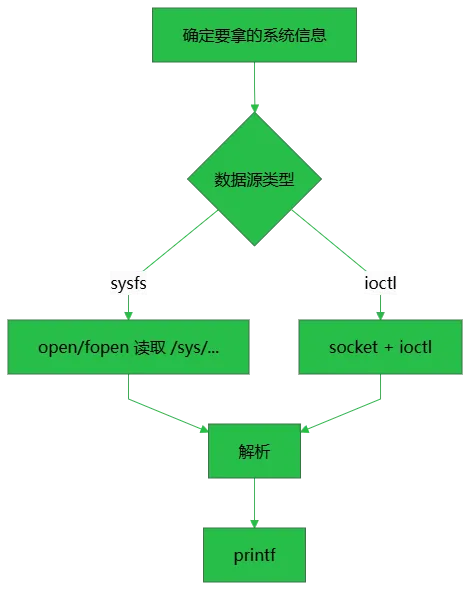

来源:嵌入式大杂烩
版权归原作者所有,如有侵权,请联系删除。 ▍推荐阅读 从夯到拉,锐评32个AI编程工具! 用VSCode打造嵌入式Linux开发的终极IDE B-52轰炸机内部,没有MCU的时代,一台纯机械设备,竟能计算天空坐标 →点关注,不迷路←
这篇整理几个在嵌入式Linux项目里高频用到的 C 语言小片段。它们都属于“排障/打点/设备信息”的基础能力:能快速把关键上下文打进日志,定位问题会省很多时间。
先放一个通用思路:无论从 sysfs 读文件,还是用 ioctl 拿网卡信息,核心都是“选数据源 → 读取 → 解析 → 格式化输出”。
一、获取内存信息
内存信息经常用来做“是否内存紧张”的快速判断:比如日志里每隔一段时间打点一次 MemAvailable,很多内存泄漏/缓存膨胀的问题会更容易抓到趋势。
代码:
#include<stdio.h>#include<string.h>#define PROC_MEMINFO "/proc/meminfo"intget_meminfo_kb(long *total_kb, long *avail_kb){ FILE *fp = fopen(PROC_MEMINFO, "r");if (NULL == fp) {printf("fopen error\n");return-1; }char line[256] = {0};long total = -1;long avail = -1;while (NULL != fgets(line, sizeof(line), fp)) {if (0 == strncmp(line, "MemTotal:", 9)) {sscanf(line, "MemTotal: %ld kB", &total); }elseif (0 == strncmp(line, "MemAvailable:", 13)) {sscanf(line, "MemAvailable: %ld kB", &avail); }if (total >= 0 && avail >= 0) {break; } } fclose(fp);if (total < 0 || avail < 0) {printf("parse error\n");return-1; } *total_kb = total; *avail_kb = avail;return0;}intmain(void){long total_kb = 0;long avail_kb = 0; get_meminfo_kb(&total_kb, &avail_kb);printf("mem_total = %ld kB, mem_available = %ld kB\n", total_kb, avail_kb);return0;}注意点:
不同内核字段可能略有差异,但 MemTotal/MemAvailable在多数发行版都能拿到。
二、获取CPU温度
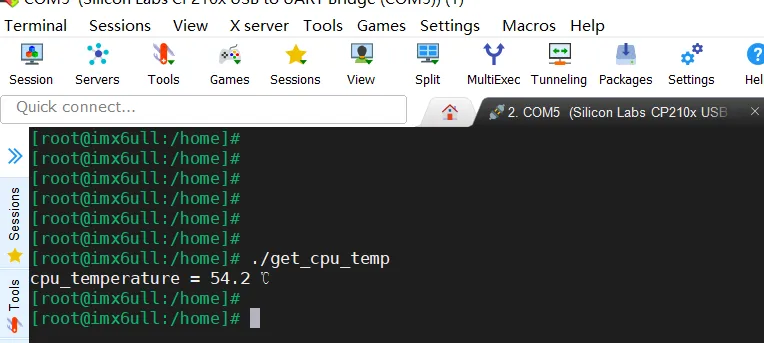
应用可以定时获取 CPU 温度,比如性能异常、频繁重启、降频等场景,温度往往是第一批要确认的指标。
代码:
#include<stdio.h> #include<unistd.h>#include<stdlib.h>#include<string.h>#include<errno.h>#define CPU_TEMP_FILE0 "/sys/devices/virtual/thermal/thermal_zone0/temp"structcpu_temperature{int integer_part;int decimal_part;};typedefstructcpu_temperaturecpu_temperature_t;cpu_temperature_tget_cpu_temperature(constchar *_cpu_temp_file){ FILE *fp = NULL;cpu_temperature_t cpu_temperature = {0};int temp = 0; fp = fopen(_cpu_temp_file, "r");if (NULL == fp) {printf("fopen file error\n");return cpu_temperature; }fscanf(fp, "%d", &temp); cpu_temperature.integer_part = temp / 1000; cpu_temperature.decimal_part = temp % 1000 / 100; fclose(fp);return cpu_temperature;}intmain(int arc, char *argv[]){cpu_temperature_t cpu_temperature = {0}; cpu_temperature = get_cpu_temperature(CPU_TEMP_FILE0);printf("cpu_temperature = %d.%d ℃\n", cpu_temperature.integer_part, cpu_temperature.decimal_part);return0;}运行结果:
注意点:
路径不固定:不同平台 thermal_zoneX可能不同,建议把路径做成可配置(本文保持写死路径,便于演示)。单位:多数 sysfs 温度是“毫摄氏度”,常见为 42000 表示 42.0℃。 采样频率:日志里打点别太密(例如 1s~10s 一次),避免 I/O 噪声影响定位。
三、获取文件大小
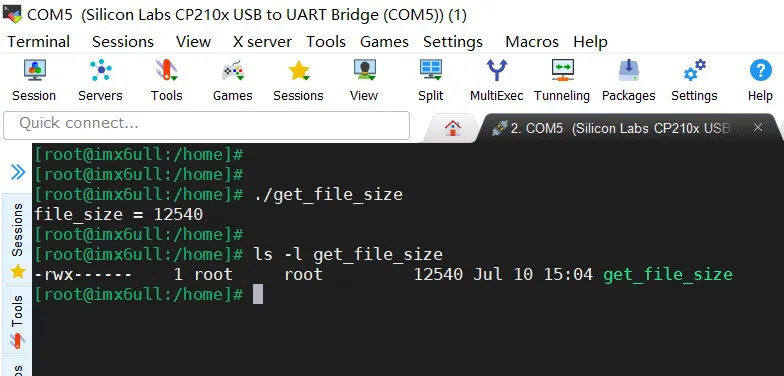
有时候需要先知道文件大小:例如发送文件、预分配缓冲区、做进度条等。
代码:
#include<sys/stat.h> #include<unistd.h> #include<stdio.h> longget_file_size(constchar *_file_name){ FILE * fp = fopen(_file_name, "r");if (NULL == fp) {printf("fopen error\n");return-1; } fseek(fp, 0L, SEEK_END);long size = ftell(fp); fclose(fp);return size;}intmain(){#define FILE_NAME "./get_file_size"long file_size = get_file_size(FILE_NAME);printf("file_size = %ld\n", file_size);return0;}运行结果:
注意点:
这个例子用了 fseek/ftell,对“普通文件”足够直观;更严谨的方式是stat()(本节不展开)。如果你读的是二进制文件,Windows 上建议用 "rb";Linux 上"r"通常也能工作。
四、获取时间戳
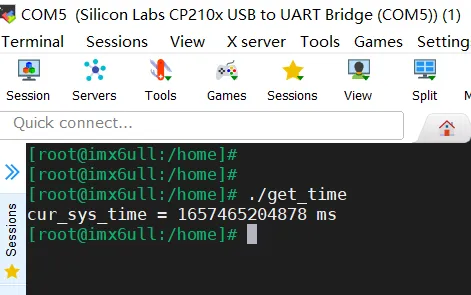
时间戳最常见用途是给日志打点:把多线程/多进程事件串起来,排障效率会明显提升。
代码:
#include<stdio.h> #include<unistd.h>#include<stdlib.h>#include<string.h>#include<errno.h>#include<sys/time.h>#include<time.h>longlongget_sys_time_ms(void){longlong time_ms = 0;structtimevalsys_current_time; gettimeofday(&sys_current_time, NULL); time_ms = ((longlong)sys_current_time.tv_sec*1000000 + sys_current_time.tv_usec) / 1000;return time_ms;}intmain(int arc, char *argv[]){longlong cur_sys_time = get_sys_time_ms();printf("cur_sys_time = %lld ms\n", cur_sys_time);return0;}运行结果:
注意点:
gettimeofday()取的是“墙上时间”(可能被 NTP/手动改时间影响)。如果你要测耗时/间隔,更推荐clock_gettime(CLOCK_MONOTONIC, ...)统一单位很重要:本文返回毫秒,日志可直接对齐排序。
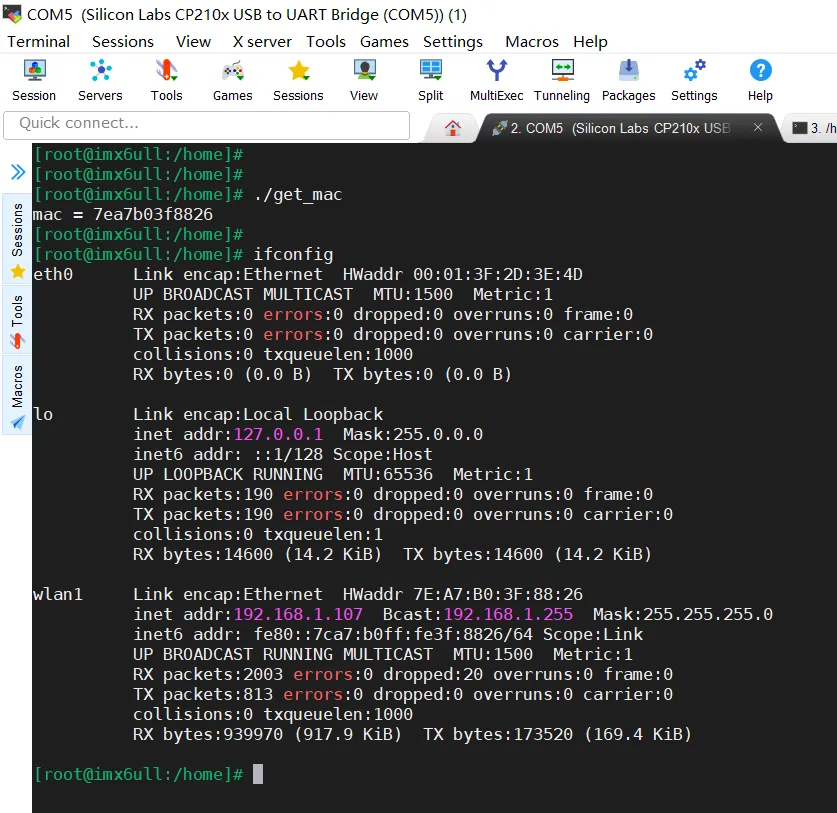
五、获取MAC
MAC 地址经常被用作设备唯一标识(或参与生成设备 ID)。这里用 ioctl(SIOCGIFHWADDR) 从指定网卡获取。
代码:
#include<stdio.h>#include<stdint.h>#include<net/if.h>#include<sys/socket.h>#include<sys/ioctl.h>#include<arpa/inet.h>#include<unistd.h>#include<string.h>intget_netif_mac(constchar *_ifr_name, char *_mac){int32_t ret = -1;structifreqm_ifreq;int32_t sock = 0; sock = socket(AF_INET, SOCK_STREAM, 0);if (sock < 0) {printf("socket err\r\n");goto err; }strncpy(m_ifreq.ifr_name, _ifr_name, IFNAMSIZ); m_ifreq.ifr_name[IFNAMSIZ - 1] = 0; ret = ioctl(sock,SIOCGIFHWADDR, &m_ifreq);if (ret < 0) {printf("ioctl err:%d\r\n",ret);goto err; }snprintf((char *)_mac, 32, "%02x%02x%02x%02x%02x%02x", (uint8_t)m_ifreq.ifr_hwaddr.sa_data[0], (uint8_t)m_ifreq.ifr_hwaddr.sa_data[1], (uint8_t)m_ifreq.ifr_hwaddr.sa_data[2], (uint8_t)m_ifreq.ifr_hwaddr.sa_data[3], (uint8_t)m_ifreq.ifr_hwaddr.sa_data[4], (uint8_t)m_ifreq.ifr_hwaddr.sa_data[5]);return0;err:return-1;}intmain(int argc, char **argv){char mac_str[32] = {0}; get_netif_mac("wlan1", mac_str);printf("mac = %s\n", mac_str);return0;}运行结果:
注意点:
网卡名在不同系统可能是 eth0/wlan0,也可能是enp0s3这类“可预测命名”。ifr_name有长度限制(IFNAMSIZ),拷贝时要注意结尾\0。socket()只用于拿到 fd 给 ioctl 用,不需要真正发包。
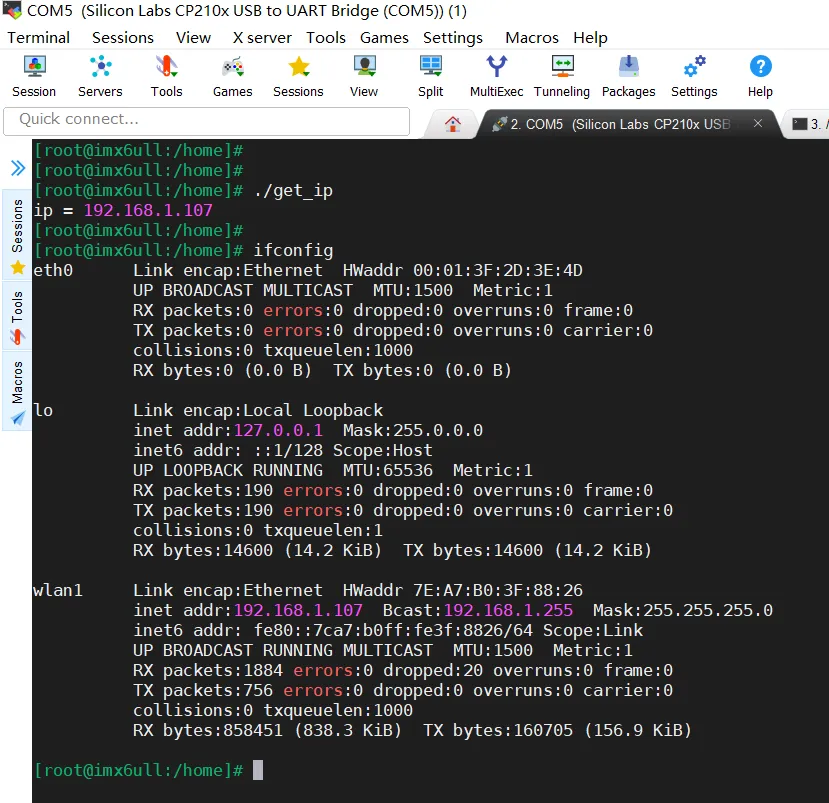
六、获取IP
有时候需要获取本机 IP 做显示、上报、或者打印在启动日志里,现场排障会方便很多。这里用 ioctl(SIOCGIFADDR) 获取指定网卡的 IPv4 地址。
代码:
#include<stdio.h>#include<net/if.h>#include<sys/socket.h>#include<sys/ioctl.h>#include<arpa/inet.h>#include<unistd.h>#include<string.h>intget_local_ip(constchar *_ifr_name, char *_ip){int ret = -1;int sockfd;structsockaddr_insin;structifreqifr; sockfd = socket(AF_INET, SOCK_DGRAM, 0);if (-1 == sockfd) {printf("socket error\n");return ret; }strncpy(ifr.ifr_name, _ifr_name, IFNAMSIZ); ifr.ifr_name[IFNAMSIZ - 1] = 0;if (ioctl(sockfd, SIOCGIFADDR, &ifr) < 0) {printf("ioctl error\n"); close(sockfd);return ret; }memcpy(&sin, &ifr.ifr_addr, sizeof(sin));int ip_len = snprintf(_ip, 32, "%s", inet_ntoa(sin.sin_addr)); close(sockfd); ret = ip_len;return ret;}intmain(int argc, char **argv){char ip_str[32] = {0}; get_local_ip("wlan1", ip_str);printf("ip = %s\n", ip_str);return0;}运行结果:
注意点:
这个方式拿到的是“接口当前配置的 IPv4”。如果网卡还没拿到地址(DHCP 未完成)会失败。 更全面(支持 IPv6/多地址)的做法是 getifaddrs(),但 ioctl 版在嵌入式里更常见、依赖更少。
七、获取磁盘剩余空间
磁盘空间不足会导致“写文件失败/升级失败/日志丢失”等一堆诡异问题。落盘前先检查一次剩余空间,能少踩很多坑。
代码:
#include<stdio.h>#include<sys/statvfs.h>unsignedlonglongget_fs_free_bytes(constchar *path){structstatvfsst;if (0 != statvfs(path, &st)) {printf("statvfs error\n");return0; }return (unsignedlonglong)st.f_bsize * (unsignedlonglong)st.f_bavail;}intmain(void){unsignedlonglong free_bytes = get_fs_free_bytes("/");printf("free_bytes = %llu\n", free_bytes);return0;}注意点:
statvfs()可拿到文件系统块大小和可用块数,换算成字节即可。嵌入式里常见分区是 /、/data、/userdata等,按实际挂载点传入。
八、获取CPU使用率(采样计算)
CPU 使用率建议用“采样两次再算差值”的方式,避免读到的是累计值。
代码:
#include<stdio.h>#include<unistd.h>#define PROC_STAT "/proc/stat"staticintread_cpu_stat(unsignedlonglong *idle, unsignedlonglong *total){ FILE *fp = fopen(PROC_STAT, "r");if (NULL == fp) {printf("fopen error\n");return-1; }unsignedlonglong user=0,nice=0,system=0,idle_v=0,iowait=0,irq=0,softirq=0,steal=0;int ret = fscanf(fp, "cpu %llu %llu %llu %llu %llu %llu %llu %llu", &user,&nice,&system,&idle_v,&iowait,&irq,&softirq,&steal); fclose(fp);if (8 != ret) {printf("fscanf error\n");return-1; } *idle = idle_v + iowait; *total = user + nice + system + idle_v + iowait + irq + softirq + steal;return0;}intmain(void){unsignedlonglong idle1=0,total1=0,idle2=0,total2=0; read_cpu_stat(&idle1, &total1); usleep(200 * 1000); read_cpu_stat(&idle2, &total2);unsignedlonglong idle_delta = idle2 - idle1;unsignedlonglong total_delta = total2 - total1;double cpu_usage = 0;if (total_delta > 0) { cpu_usage = (double)(total_delta - idle_delta) * 100.0 / (double)total_delta; }printf("cpu_usage = %.2f %%\n", cpu_usage);return0;}注意点:
/proc/stat的cpu行是从开机累计到现在的 tick,需要间隔一小段时间读两次再计算。
以上就是本次分享的几个小代码片段。可以这些能力做成一个小工具库(带统一的错误码/日志宏),工程里随手就能复用。
如果觉得文章有帮助,麻烦帮忙转发,谢谢!
END
作者:ZhengNL
本文来自网友投稿或网络内容,如有侵犯您的权益请联系我们删除,联系邮箱:596563534@qq.com 。
