当前位置:首页>Linux>ComfyUI_Linux_部署完全教程

ComfyUI_Linux_部署完全教程

  • 2026-08-21 19:17:24
ComfyUI_Linux_部署完全教程

ComfyUI Linux 服务器部署完全教程:从安装到多模型实战(RTX A6000 生产环境)

本文基于 Ubuntu 22.04 + NVIDIA RTX A6000 + Python venv 的真实生产环境,手把手教你完成 ComfyUI 的完整部署、模型配置、插件安装和实战出图。不同于常见的 Windows 桌面教程,本文聚焦服务器级部署,涵盖远程访问、多模型管理、后台服务等运维实战内容,适合需要在 Linux 服务器上搭建 AI 绘图平台的开发者或运维人员。


📋 文章目录

  • 前言
  • 一、环境准备
  • 二、安装 Python 虚拟环境(venv)
  • 三、安装 PyTorch(CUDA 11.8)
  • 四、下载 ComfyUI 源码
  • 五、安装 ComfyUI 依赖
  • 六、启动 ComfyUI 与远程访问配置
  • 七、模型下载与目录配置
  • 八、安装自定义节点(插件)
  • 九、实战:使用 ComfyUI 生成图片
  • 十、运维进阶:Systemd 服务与防火墙
  • 十一、常见问题排查
  • 总结
  • 📬 资料领取与交流

前言

ComfyUI 是一款基于节点式工作流的 Stable Diffusion 前端工具,相比 WebUI(Automatic1111),它的优势在于:

  • 工作流灵活
    :通过连接节点构建复杂的图像生成流程,支持文生图、图生图、视频生成、图像编辑等多种场景
  • 显存优化
    :出色的显存管理机制,同等硬件下能加载更大的模型
  • 生态丰富
    :支持 Flux、SDXL、Qwen Image、LTX Video 等主流模型,社区插件活跃

本文的环境是一台真实运行的生产服务器,配置如下:

项目
配置
操作系统
Ubuntu 22.04.5 LTS
GPU
NVIDIA RTX A6000(48GB 显存)
内存
128GB
磁盘
18TB(/data 分区)
Python
3.10.12
PyTorch
2.7.1+cu118
CUDA
11.8
ComfyUI 安装路径
/data/ai/ComfyUI-master

为什么选 venv 而不是 Conda? 服务器环境下 venv 更轻量,不会引入额外的 Conda 依赖层,且与系统 Python 兼容性更好。对于运维场景,venv 是更干净的选择。


一、环境准备

1.1 硬件要求

ComfyUI 对硬件有一定要求,以下是参考配置:

级别
GPU
显存
适用场景
最低
RTX 3060
8GB
SD 1.5 基础出图
推荐
RTX 3090/4090
24GB
SDXL、Flux 出图
专业
RTX A6000/A100
48GB/80GB
多模型并行、大批量生成

本文环境为 RTX A6000(48GB 显存),可以流畅运行 Flux Dev、Qwen Image Edit 等大参数模型。

1.2 检查 NVIDIA 驱动

# 查看 GPU 信息nvidia-smi# 确认驱动版本(需 >= 520.61.05 以支持 CUDA 11.8)nvidia-smi | grep "Driver Version"

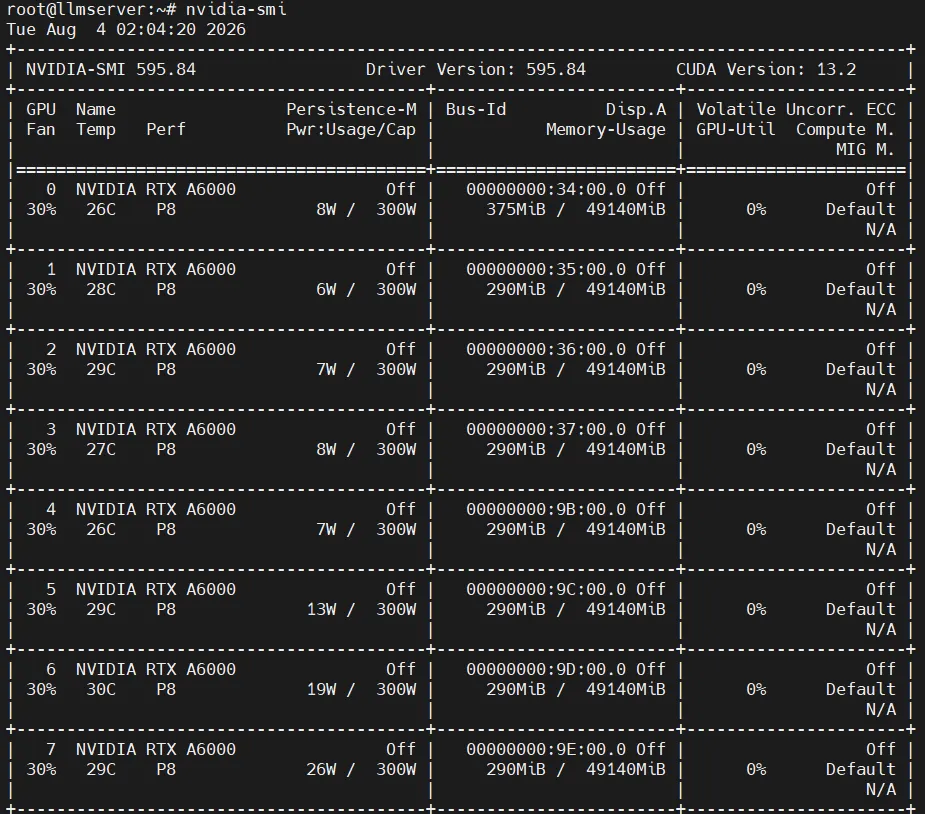
正常输出应显示 GPU 型号、显存、驱动版本和 CUDA 版本:

坑点提示:如果遇到 Failed to initialize NVML: Driver/library version mismatch,说明内核模块版本与用户态库不匹配。通常是驱动更新后未重启,执行 sudo reboot 重启服务器即可解决。

1.3 确认 Python 版本

Ubuntu 22.04 自带 Python 3.10,满足 ComfyUI 要求:

python3 --version# 输出: Python 3.10.12

如果系统 Python 版本过低,建议使用 pyenv 安装 Python 3.10+。


二、安装 Python 虚拟环境(venv)

2.1 安装 python3-venv

Ubuntu 系统默认可能未安装 venv 模块:

sudo apt updatesudo apt install -y python3-venv python3-pip

2.2 创建虚拟环境

选择一个合适的目录存放虚拟环境,本文使用 /data/ai/venv

# 创建项目目录mkdir -p /data/ai# 创建虚拟环境python3 -m venv /data/ai/venv

2.3 激活虚拟环境

source /data/ai/venv/bin/activate

激活后,终端前缀会显示 (venv)

(venv) root@llmserver:/data/ai#

提示:后续所有 pip install 命令都需要在激活 venv 的状态下执行。也可以直接使用 /data/ai/venv/bin/pip 和 /data/ai/venv/bin/python 来操作,无需激活。

2.4 升级 pip

/data/ai/venv/bin/pip install --upgrade pip

三、安装 PyTorch(CUDA 11.8)

PyTorch 是 ComfyUI 的核心计算框架,需要根据 CUDA 版本选择对应的安装命令。

3.1 确认 CUDA 版本

nvidia-smi | grep "CUDA Version"# 输出: CUDA Version: 11.8

3.2 安装 PyTorch(CUDA 11.8 版)

/data/ai/venv/bin/pip install torch torchvision torchaudio --index-url https://download.pytorch.org/whl/cu118

版本说明:本文安装的是 PyTorch 2.7.1+cu118。如果 NVIDIA 驱动支持更高版本 CUDA(如 12.1/12.4),也可以选择对应的 PyTorch 版本,命令中将 cu118 替换为 cu121 或 cu124 即可。

3.3 验证安装

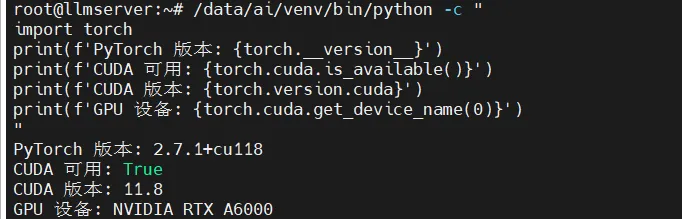
/data/ai/venv/bin/python -"import torchprint(f'PyTorch 版本: {torch.__version__}')print(f'CUDA 可用: {torch.cuda.is_available()}')print(f'CUDA 版本: {torch.version.cuda}')print(f'GPU 设备: {torch.cuda.get_device_name(0)}')"

正常输出:

PyTorch 版本: 2.7.1+cu118CUDA 可用: TrueCUDA 版本: 11.8GPU 设备: NVIDIA RTX A6000

四、下载 ComfyUI 源码

4.1 方式一:Git 克隆(推荐)

# 安装 git(如果尚未安装)sudo apt install -y git# 克隆 ComfyUI 源码cd /data/aigit clone https://github.com/comfyanonymous/ComfyUI.git ComfyUI-master

4.2 方式二:下载 ZIP 包

如果服务器无法访问 GitHub 或没有 Git,可以从官网下载 ZIP 包:

cd /data/aiwget https://github.com/comfyanonymous/ComfyUI/archive/refs/heads/master.zip -O ComfyUI.zipunzip ComfyUI.zipmv ComfyUI-master ComfyUI-master  # 如果解压后名称不同,重命名

也可以从 ComfyUI Releases 页面下载指定版本。

4.3 目录结构说明

下载完成后,ComfyUI 的主要目录结构如下:

/data/ai/ComfyUI-master/├── main.py                 # 启动入口├── comfy/                  # 核心代码├── comfy_extras/           # 扩展功能├── models/                 # 模型存放目录(核心!)│   ├── checkpoints/        # 基础模型(SD 1.5, SDXL)│   ├── diffusion_models/   # 扩散模型(Flux, Qwen Image)│   ├── loras/              # LoRA 微调模型│   ├── vae/                # VAE 编码/解码器│   ├── controlnet/         # ControlNet 模型│   ├── clip/               # CLIP 文本编码器│   └── ...├── custom_nodes/           # 自定义节点(插件)├── output/                 # 生成图片输出目录├── input/                  # 输入图片目录(图生图用)├── requirements.txt        # Python 依赖清单└── extra_model_paths.yaml.example  # 外部模型路径配置模板

五、安装 ComfyUI 依赖

5.1 安装系统依赖

部分 Python 包需要系统级依赖:

sudo apt install -y libgl1 libglib2.0-0 libsm6 libxext6 libxrender-dev

5.2 安装 Python 依赖

cd /data/ai/ComfyUI-master/data/ai/venv/bin/pip install -r requirements.txt

等待安装完成(通常 3-5 分钟)。主要依赖包括:

包名
用途
torch / torchvision
深度学习框架
safetensors
安全模型文件加载
transformers
HuggingFace 模型支持
kornia
计算机视觉运算
accelerate
分布式加速
einops
张量操作

5.3 验证依赖完整性

/data/ai/venv/bin/pip list | grep -iE 'torch|safetensors|transformers|kornia|accelerate'

六、启动 ComfyUI 与远程访问配置

6.1 基本启动

cd /data/ai/ComfyUI-master/data/ai/venv/bin/python main.py

默认监听 127.0.0.1:8188,只能在本机访问。

6.2 远程访问配置(重点!)

服务器环境下通常需要远程访问,通过 --listen 参数监听所有网络接口:

/data/ai/venv/bin/python main.py --listen 0.0.0.0 --port 8188

启动后,终端会输出:

Total VRAM 49140 MB, total RAM 127948 MBDevice: cuda:0 NVIDIA RTX A6000...To see the GUI go to: http://0.0.0.0:8188

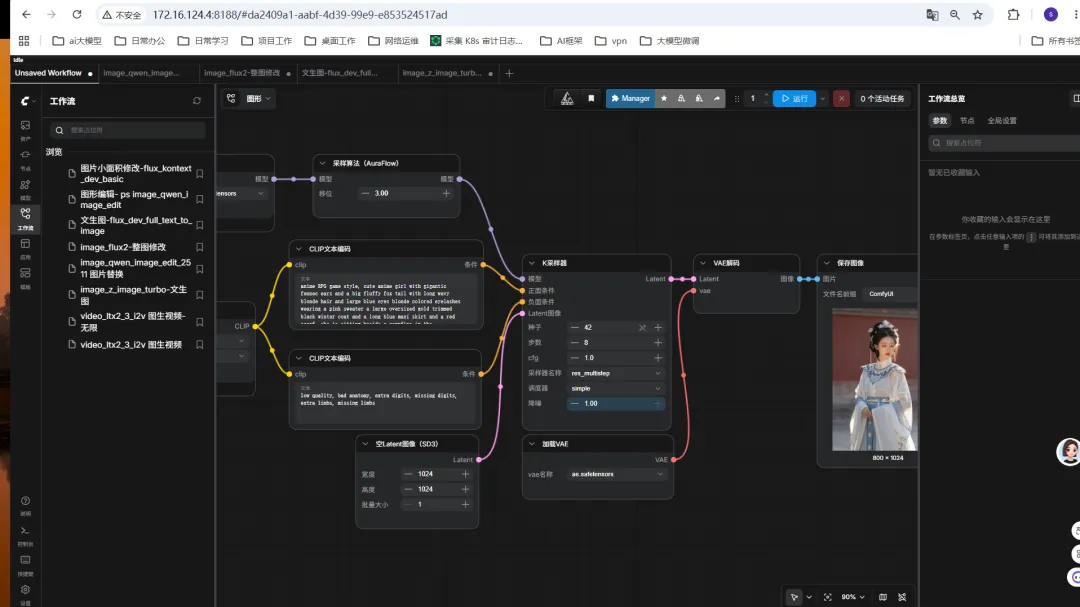
此时在任意电脑的浏览器中访问 http://服务器IP:8188 即可打开 ComfyUI 界面:

http://172.16.124.4:8188

6.3 常用启动参数

参数
说明
示例
--listen
监听地址
--listen 0.0.0.0
(允许远程访问)
--port
监听端口
--port 8188
--lowvram
低显存模式
显存不足时使用,自动管理显存
--highvram
高显存模式
显存充足时使用,模型常驻显存
--cpu-vram
CPU 兜底
显存不够时借用内存
--preview-method
预览方式
--preview-method auto
(支持 Latent 预览)
--output-directory
输出目录
自定义图片保存路径
--disable-metadata
禁用元数据
不在图片中嵌入工作流信息

完整启动命令示例:

/data/ai/venv/bin/python main.py \  --listen 0.0.0.0 \  --port 8188 \  --preview-method auto

6.4 后台运行(nohup 方式)

临时后台运行可以使用 nohup

cd /data/ai/ComfyUI-masternohup /data/ai/venv/bin/python main.py --listen 0.0.0.0 --port 8188 > /data/ai/comfyui.log 2>&1 &# 查看进程ps aux | grep main.py# 查看日志tail -f /data/ai/comfyui.log# 停止服务kill (pgrep -f "main.py --listen")# 重新启动cd /data/ai/ComfyUI-master/data/ai/venv/bin/python main.py --listen 0.0.0.0 --port 8188

八、安装自定义节点(插件)

自定义节点(Custom Nodes)是 ComfyUI 的扩展插件,用于增强功能。本环境安装了以下 9 个插件:

8.1 已安装插件清单

插件名称
GitHub 地址
功能说明
ComfyUI-Manager
github.com/ltdrdata/ComfyUI-Manager
🔧 插件管理器,可视化安装/更新/删除节点
ComfyUI-Impact-Pack
github.com/ltdrdata/ComfyUI-Impact-Pack
🎯 高级检测、修复、放大等增强功能
ComfyUI_IPAdapter_plus
github.com/cubiq/ComfyUI_IPAdapter_plus
🖼️ 图像风格迁移、面部一致性
comfyui_controlnet_aux
(社区)
🎮 ControlNet 预处理器(姿态/边缘/深度)
comfyui-kjnodes
(社区)
🔗 工具节点集合(遮罩、批量操作等)
comfyui_layerstyle
(社区)
🎨 图层样式(混合模式、蒙版等)
comfyui_tinyterranodes
(社区)
📐 精简工具节点
rgthree-comfy
github.com/rgthree/rgthree-comfy
⚡ 上下文节点、批处理、Mute/Bypass 快捷操作
seedvr2_videoupscaler
(社区)
🎬 视频超分辨率放大

8.2 通过 ComfyUI-Manager 安装(推荐)

安装 ComfyUI-Manager 后,可以直接在 Web 界面中管理插件:

  1. 浏览器访问 ComfyUI 界面
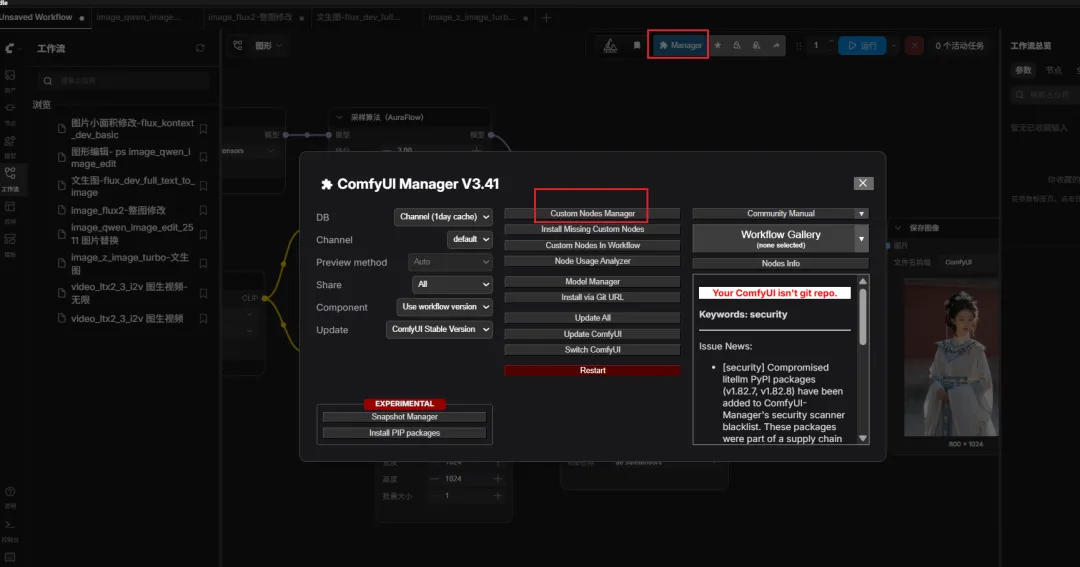
  2. 点击底部面板的 「Manager」 按钮
  3. 选择 「Install Custom Nodes」
  4. 搜索需要的插件名称,点击 Install
  5. 安装完成后点击 Restart 重启 ComfyUI

8.3 手动安装插件(Git Clone)

也可以通过命令行手动安装:

cd /data/ai/ComfyUI-master/custom_nodes# 安装 ComfyUI-Manager(必须最先安装)git clone https://github.com/ltdrdata/ComfyUI-Manager.git# 安装 Impact Packgit clone https://github.com/ltdrdata/ComfyUI-Impact-Pack.git# 安装 IPAdapter Plusgit clone https://github.com/cubiq/ComfyUI_IPAdapter_plus.git# 安装 ControlNet 辅助节点git clone https://github.com/Fannovel16/comfyui_controlnet_aux.git# 安装 rgthree-comfygit clone https://github.com/rgthree/rgthree-comfy.git

安装后需要安装各插件的 Python 依赖:

# 批量安装插件依赖for dir in /data/ai/ComfyUI-master/custom_nodes/*/; do    if [ -f "(basename dir/requirements.txt"    fidone

8.4 重启 ComfyUI

安装插件后需要重启服务:

kill host;        proxy_set_header X-Real-IP proxy_add_x_forwarded_for;        proxy_set_header X-Forwarded-Proto http_upgrade;        proxy_set_header Connection "upgrade";        # 大文件上传支持        client_max_body_size 100M;    }}

10.5 模型存储路径优化

如果模型文件存放在其他磁盘或共享存储,可以通过 extra_model_paths.yaml 配置外部路径:

cp /data/ai/ComfyUI-master/extra_model_paths.yaml.example /data/ai/ComfyUI-master/extra_model_paths.yaml

编辑 extra_model_paths.yaml

shared_models:    checkpoints: /data/shared/models/checkpoints/    diffusion_models: /data/shared/models/diffusion_models/    loras: /data/shared/models/loras/    vae: /data/shared/models/vae/    # 其他模型类型同理

这样 ComfyUI 启动时会同时扫描默认目录和外部目录中的模型。


十一、常见问题排查

11.1 nvidia-smi 报错 “Driver/library version mismatch”

Failed to initialize NVML: Driver/library version mismatchNVML library version: 595.84

原因:驱动更新后内核模块未更新(未重启服务器)。

解决

# 方法一:重启服务器(推荐)sudo reboot# 方法二:重新加载内核模块(不重启)sudo rmmod nvidia_uvm nvidia_drm nvidia_modeset nvidiasudo modprobe nvidia

注意:如果 PyTorch 能正常识别 GPU(torch.cuda.is_available() 返回 True),说明 CUDA 运行时正常,只是 NVML 接口有问题,不影响 ComfyUI 运行。

11.2 模型下拉框看不到已放入的模型

排查步骤

# 1. 确认文件实际存在ls -lh /data/ai/ComfyUI-master/models/checkpoints/# 2. 确认文件大小不为 0(下载中断会生成 0 字节文件)find /data/ai/ComfyUI-master/models/ -name "*.safetensors" -size 0# 3. 重启 ComfyUIsudo systemctl restart comfyui# 4. 在 Web 界面点击 Manager → "Refresh" 刷新模型列表

11.3 显存不足(Out of Memory)

CUDA out of memory. Tried to allocate XX GiB

解决方案

# 使用低显存模式启动/data/ai/venv/bin/python main.py --listen 0.0.0.0 --port 8188 --lowvram# 或使用 FP8 精度模型(文件名带 fp8 的版本)# 如 flux1-dev-kontext_fp8_scaled.safetensors(12GB)替代 flux1-dev.safetensors(23GB)

11.4 端口 8188 被占用

# 查看占用进程sudo lsof -i :8188# 或sudo ss -tlnp | grep 8188# 杀掉占用进程kill -9 <PID># 或换一个端口启动/data/ai/venv/bin/python main.py --listen 0.0.0.0 --port 8189

11.5 自定义节点加载失败

# 查看启动日志中的错误sudo journalctl -u comfyui | grep -i error# 通常是缺少依赖,进入插件目录安装cd /data/ai/ComfyUI-master/custom_nodes/<插件名>/data/ai/venv/bin/pip install -r requirements.txt# 重启服务sudo systemctl restart comfyui

11.6 远程访问不了

# 1. 确认服务正在运行sudo systemctl status comfyui# 2. 确认端口在监听sudo ss -tlnp | grep 8188# 3. 确认防火墙放行sudo ufw status# 4. 从客户端测试连通性curl -I http://172.16.124.4:8188

11.7 问题速查表

问题现象
解决方法
torch.cuda.is_available()
 返回 False
检查 NVIDIA 驱动版本、PyTorch CUDA 版本是否匹配
启动报 ModuleNotFoundError
执行 pip install -r requirements.txt
生成图片全黑
检查是否加载了正确的 VAE 模型
图片偏色
使用 sdxl_vae-fp16-fix 等修复版 VAE
Web 界面打不开
检查 --listen 0.0.0.0 参数和防火墙配置
生成速度很慢
确认 GPU 被正确识别,使用 --highvram 模式
下载模型 401 错误
HuggingFace 私有模型需要配置 Token

总结

本文基于一台真实的 Ubuntu 22.04 + RTX A6000 生产服务器,完整记录了 ComfyUI 从零部署到多模型实战的全过程。与常见的 Windows 桌面教程相比,本文重点关注了以下服务器级部署的独特内容:

  1. venv 虚拟环境
    :比 Conda 更轻量的 Python 环境管理方案
  2. 远程访问配置
    :通过 --listen 0.0.0.0 实现多人共享访问
  3. 多模型管理
    :SDXL、Flux 全系列、Qwen Image 等多类模型并行部署
  4. Systemd 服务
    :生产环境的服务管理和开机自启
  5. Nginx 反向代理
    :支持域名访问和 HTTPS
  6. 防火墙配置
    :UFW/firewalld 端口放行

环境关键信息速览

# 启动命令cd /data/ai/ComfyUI-master/data/ai/venv/bin/python main.py --listen 0.0.0.0 --port 8188# 访问地址http://服务器IP:8188# 模型目录/data/ai/ComfyUI-master/models/checkpoints/       # SDXL 等基础模型/data/ai/ComfyUI-master/models/diffusion_models/  # Flux 等扩散模型/data/ai/ComfyUI-master/models/loras/             # LoRA 微调模型/data/ai/ComfyUI-master/models/vae/               # VAE 编解码器# 插件目录/data/ai/ComfyUI-master/custom_nodes/# 输出目录/data/ai/ComfyUI-master/output/

核心软件版本

组件
版本
OS
Ubuntu 22.04.5 LTS
GPU
NVIDIA RTX A6000 (48GB)
Python
3.10.12
PyTorch
2.7.1+cu118
ComfyUI
最新 Master 分支
ComfyUI-Manager
4.2.2

希望这篇文章能帮助你快速在 Linux 服务器上搭建起自己的 AI 绘图平台。如果在部署过程中遇到问题,欢迎在评论区留言交流!


📬 资料领取与交流

如果觉得文章对你有帮助,想获取更多 ComfyUI 工作流模板、模型下载清单、插件配置包 等资料,欢迎扫码添加我的sunhy_000,备注 「ComfyUI」

也欢迎在评论区留言提问,看到都会回复。一起学习 ComfyUI!


参考资料

  • ComfyUI 官方文档
  • ComfyUI GitHub 仓库
  • ComfyUI-Manager
  • HuggingFace 模型库
  • CivitAI 模型社区 I-master/models/diffusion_models/  # Flux 等扩散模型 /data/ai/ComfyUI-master/models/loras/             # LoRA 微调模型 /data/ai/ComfyUI-master/models/vae/               # VAE 编解码器

插件目录

/data/ai/ComfyUI-master/custom_nodes/

输出目录

/data/ai/ComfyUI-master/output/

### 核心软件版本| 组件 | 版本 ||------|------|| OS | Ubuntu 22.04.5 LTS || GPU | NVIDIA RTX A6000 (48GB) || Python | 3.10.12 || PyTorch | 2.7.1+cu118 || ComfyUI | 最新 Master 分支 || ComfyUI-Manager | 4.2.2 |希望这篇文章能帮助你快速在 Linux 服务器上搭建起自己的 AI 绘图平台。如果在部署过程中遇到问题,欢迎在评论区留言交流!---## 📬 资料领取与交流如果觉得文章对你有帮助,想获取更多 **ComfyUI 工作流模板、模型下载清单、插件配置包** 等资料,欢迎扫码添加我的微信,备注 **「ComfyUI」**,我会统一拉你进交流社群。> 也欢迎在评论区留言提问,看到都会回复。一起学习 ComfyUI!---**参考资料**> - [ComfyUI 官方文档](https://docs.comfy.org/)> - [ComfyUI GitHub 仓库](https://github.com/comfyanonymous/ComfyUI)> - [ComfyUI-Manager](https://github.com/ltdrdata/ComfyUI-Manager)> - [HuggingFace 模型库](https://huggingface.co/)> - [CivitAI 模型社区](https://civitai.com/)
最新文章

随机文章

基本 文件 流程 错误 SQL 调试
  1. 请求信息 : 2026-08-21 23:45:13 HTTP/2.0 GET : https://f.mffb.com.cn/a/508563.html
  2. 运行时间 : 0.344199s [ 吞吐率:2.91req/s ] 内存消耗:4,822.55kb 文件加载:140
  3. 缓存信息 : 0 reads,0 writes
  4. 会话信息 : SESSION_ID=6be0cd1857147a07a0bc52d35495c7c0
  1. /yingpanguazai/ssd/ssd1/www/f.mffb.com.cn/public/index.php ( 0.79 KB )
  2. /yingpanguazai/ssd/ssd1/www/f.mffb.com.cn/vendor/autoload.php ( 0.17 KB )
  3. /yingpanguazai/ssd/ssd1/www/f.mffb.com.cn/vendor/composer/autoload_real.php ( 2.49 KB )
  4. /yingpanguazai/ssd/ssd1/www/f.mffb.com.cn/vendor/composer/platform_check.php ( 0.90 KB )
  5. /yingpanguazai/ssd/ssd1/www/f.mffb.com.cn/vendor/composer/ClassLoader.php ( 14.03 KB )
  6. /yingpanguazai/ssd/ssd1/www/f.mffb.com.cn/vendor/composer/autoload_static.php ( 4.90 KB )
  7. /yingpanguazai/ssd/ssd1/www/f.mffb.com.cn/vendor/topthink/think-helper/src/helper.php ( 8.34 KB )
  8. /yingpanguazai/ssd/ssd1/www/f.mffb.com.cn/vendor/topthink/think-validate/src/helper.php ( 2.19 KB )
  9. /yingpanguazai/ssd/ssd1/www/f.mffb.com.cn/vendor/topthink/think-orm/src/helper.php ( 1.47 KB )
  10. /yingpanguazai/ssd/ssd1/www/f.mffb.com.cn/vendor/topthink/think-orm/stubs/load_stubs.php ( 0.16 KB )
  11. /yingpanguazai/ssd/ssd1/www/f.mffb.com.cn/vendor/topthink/framework/src/think/Exception.php ( 1.69 KB )
  12. /yingpanguazai/ssd/ssd1/www/f.mffb.com.cn/vendor/topthink/think-container/src/Facade.php ( 2.71 KB )
  13. /yingpanguazai/ssd/ssd1/www/f.mffb.com.cn/vendor/symfony/deprecation-contracts/function.php ( 0.99 KB )
  14. /yingpanguazai/ssd/ssd1/www/f.mffb.com.cn/vendor/symfony/polyfill-mbstring/bootstrap.php ( 8.26 KB )
  15. /yingpanguazai/ssd/ssd1/www/f.mffb.com.cn/vendor/symfony/polyfill-mbstring/bootstrap80.php ( 9.78 KB )
  16. /yingpanguazai/ssd/ssd1/www/f.mffb.com.cn/vendor/symfony/var-dumper/Resources/functions/dump.php ( 1.49 KB )
  17. /yingpanguazai/ssd/ssd1/www/f.mffb.com.cn/vendor/topthink/think-dumper/src/helper.php ( 0.18 KB )
  18. /yingpanguazai/ssd/ssd1/www/f.mffb.com.cn/vendor/symfony/var-dumper/VarDumper.php ( 4.30 KB )
  19. /yingpanguazai/ssd/ssd1/www/f.mffb.com.cn/vendor/topthink/framework/src/think/App.php ( 15.30 KB )
  20. /yingpanguazai/ssd/ssd1/www/f.mffb.com.cn/vendor/topthink/think-container/src/Container.php ( 15.76 KB )
  21. /yingpanguazai/ssd/ssd1/www/f.mffb.com.cn/vendor/psr/container/src/ContainerInterface.php ( 1.02 KB )
  22. /yingpanguazai/ssd/ssd1/www/f.mffb.com.cn/app/provider.php ( 0.19 KB )
  23. /yingpanguazai/ssd/ssd1/www/f.mffb.com.cn/vendor/topthink/framework/src/think/Http.php ( 6.04 KB )
  24. /yingpanguazai/ssd/ssd1/www/f.mffb.com.cn/vendor/topthink/think-helper/src/helper/Str.php ( 7.29 KB )
  25. /yingpanguazai/ssd/ssd1/www/f.mffb.com.cn/vendor/topthink/framework/src/think/Env.php ( 4.68 KB )
  26. /yingpanguazai/ssd/ssd1/www/f.mffb.com.cn/app/common.php ( 0.03 KB )
  27. /yingpanguazai/ssd/ssd1/www/f.mffb.com.cn/vendor/topthink/framework/src/helper.php ( 18.78 KB )
  28. /yingpanguazai/ssd/ssd1/www/f.mffb.com.cn/vendor/topthink/framework/src/think/Config.php ( 5.54 KB )
  29. /yingpanguazai/ssd/ssd1/www/f.mffb.com.cn/config/app.php ( 0.95 KB )
  30. /yingpanguazai/ssd/ssd1/www/f.mffb.com.cn/config/cache.php ( 0.78 KB )
  31. /yingpanguazai/ssd/ssd1/www/f.mffb.com.cn/config/console.php ( 0.23 KB )
  32. /yingpanguazai/ssd/ssd1/www/f.mffb.com.cn/config/cookie.php ( 0.56 KB )
  33. /yingpanguazai/ssd/ssd1/www/f.mffb.com.cn/config/database.php ( 2.48 KB )
  34. /yingpanguazai/ssd/ssd1/www/f.mffb.com.cn/vendor/topthink/framework/src/think/facade/Env.php ( 1.67 KB )
  35. /yingpanguazai/ssd/ssd1/www/f.mffb.com.cn/config/filesystem.php ( 0.61 KB )
  36. /yingpanguazai/ssd/ssd1/www/f.mffb.com.cn/config/lang.php ( 0.91 KB )
  37. /yingpanguazai/ssd/ssd1/www/f.mffb.com.cn/config/log.php ( 1.35 KB )
  38. /yingpanguazai/ssd/ssd1/www/f.mffb.com.cn/config/middleware.php ( 0.19 KB )
  39. /yingpanguazai/ssd/ssd1/www/f.mffb.com.cn/config/route.php ( 1.89 KB )
  40. /yingpanguazai/ssd/ssd1/www/f.mffb.com.cn/config/session.php ( 0.57 KB )
  41. /yingpanguazai/ssd/ssd1/www/f.mffb.com.cn/config/trace.php ( 0.34 KB )
  42. /yingpanguazai/ssd/ssd1/www/f.mffb.com.cn/config/view.php ( 0.82 KB )
  43. /yingpanguazai/ssd/ssd1/www/f.mffb.com.cn/app/event.php ( 0.25 KB )
  44. /yingpanguazai/ssd/ssd1/www/f.mffb.com.cn/vendor/topthink/framework/src/think/Event.php ( 7.67 KB )
  45. /yingpanguazai/ssd/ssd1/www/f.mffb.com.cn/app/service.php ( 0.13 KB )
  46. /yingpanguazai/ssd/ssd1/www/f.mffb.com.cn/app/AppService.php ( 0.26 KB )
  47. /yingpanguazai/ssd/ssd1/www/f.mffb.com.cn/vendor/topthink/framework/src/think/Service.php ( 1.64 KB )
  48. /yingpanguazai/ssd/ssd1/www/f.mffb.com.cn/vendor/topthink/framework/src/think/Lang.php ( 7.35 KB )
  49. /yingpanguazai/ssd/ssd1/www/f.mffb.com.cn/vendor/topthink/framework/src/lang/zh-cn.php ( 13.70 KB )
  50. /yingpanguazai/ssd/ssd1/www/f.mffb.com.cn/vendor/topthink/framework/src/think/initializer/Error.php ( 3.31 KB )
  51. /yingpanguazai/ssd/ssd1/www/f.mffb.com.cn/vendor/topthink/framework/src/think/initializer/RegisterService.php ( 1.33 KB )
  52. /yingpanguazai/ssd/ssd1/www/f.mffb.com.cn/vendor/services.php ( 0.14 KB )
  53. /yingpanguazai/ssd/ssd1/www/f.mffb.com.cn/vendor/topthink/framework/src/think/service/PaginatorService.php ( 1.52 KB )
  54. /yingpanguazai/ssd/ssd1/www/f.mffb.com.cn/vendor/topthink/framework/src/think/service/ValidateService.php ( 0.99 KB )
  55. /yingpanguazai/ssd/ssd1/www/f.mffb.com.cn/vendor/topthink/framework/src/think/service/ModelService.php ( 2.04 KB )
  56. /yingpanguazai/ssd/ssd1/www/f.mffb.com.cn/vendor/topthink/think-trace/src/Service.php ( 0.77 KB )
  57. /yingpanguazai/ssd/ssd1/www/f.mffb.com.cn/vendor/topthink/framework/src/think/Middleware.php ( 6.72 KB )
  58. /yingpanguazai/ssd/ssd1/www/f.mffb.com.cn/vendor/topthink/framework/src/think/initializer/BootService.php ( 0.77 KB )
  59. /yingpanguazai/ssd/ssd1/www/f.mffb.com.cn/vendor/topthink/think-orm/src/Paginator.php ( 11.86 KB )
  60. /yingpanguazai/ssd/ssd1/www/f.mffb.com.cn/vendor/topthink/think-validate/src/Validate.php ( 63.20 KB )
  61. /yingpanguazai/ssd/ssd1/www/f.mffb.com.cn/vendor/topthink/think-orm/src/Model.php ( 23.55 KB )
  62. /yingpanguazai/ssd/ssd1/www/f.mffb.com.cn/vendor/topthink/think-orm/src/model/concern/Attribute.php ( 21.05 KB )
  63. /yingpanguazai/ssd/ssd1/www/f.mffb.com.cn/vendor/topthink/think-orm/src/model/concern/AutoWriteData.php ( 4.21 KB )
  64. /yingpanguazai/ssd/ssd1/www/f.mffb.com.cn/vendor/topthink/think-orm/src/model/concern/Conversion.php ( 6.44 KB )
  65. /yingpanguazai/ssd/ssd1/www/f.mffb.com.cn/vendor/topthink/think-orm/src/model/concern/DbConnect.php ( 5.16 KB )
  66. /yingpanguazai/ssd/ssd1/www/f.mffb.com.cn/vendor/topthink/think-orm/src/model/concern/ModelEvent.php ( 2.33 KB )
  67. /yingpanguazai/ssd/ssd1/www/f.mffb.com.cn/vendor/topthink/think-orm/src/model/concern/RelationShip.php ( 28.29 KB )
  68. /yingpanguazai/ssd/ssd1/www/f.mffb.com.cn/vendor/topthink/think-helper/src/contract/Arrayable.php ( 0.09 KB )
  69. /yingpanguazai/ssd/ssd1/www/f.mffb.com.cn/vendor/topthink/think-helper/src/contract/Jsonable.php ( 0.13 KB )
  70. /yingpanguazai/ssd/ssd1/www/f.mffb.com.cn/vendor/topthink/think-orm/src/model/contract/Modelable.php ( 0.09 KB )
  71. /yingpanguazai/ssd/ssd1/www/f.mffb.com.cn/vendor/topthink/framework/src/think/Db.php ( 2.88 KB )
  72. /yingpanguazai/ssd/ssd1/www/f.mffb.com.cn/vendor/topthink/think-orm/src/DbManager.php ( 8.52 KB )
  73. /yingpanguazai/ssd/ssd1/www/f.mffb.com.cn/vendor/topthink/framework/src/think/Log.php ( 6.28 KB )
  74. /yingpanguazai/ssd/ssd1/www/f.mffb.com.cn/vendor/topthink/framework/src/think/Manager.php ( 3.92 KB )
  75. /yingpanguazai/ssd/ssd1/www/f.mffb.com.cn/vendor/psr/log/src/LoggerTrait.php ( 2.69 KB )
  76. /yingpanguazai/ssd/ssd1/www/f.mffb.com.cn/vendor/psr/log/src/LoggerInterface.php ( 2.71 KB )
  77. /yingpanguazai/ssd/ssd1/www/f.mffb.com.cn/vendor/topthink/framework/src/think/Cache.php ( 4.92 KB )
  78. /yingpanguazai/ssd/ssd1/www/f.mffb.com.cn/vendor/psr/simple-cache/src/CacheInterface.php ( 4.71 KB )
  79. /yingpanguazai/ssd/ssd1/www/f.mffb.com.cn/vendor/topthink/think-helper/src/helper/Arr.php ( 16.63 KB )
  80. /yingpanguazai/ssd/ssd1/www/f.mffb.com.cn/vendor/topthink/framework/src/think/cache/driver/File.php ( 7.84 KB )
  81. /yingpanguazai/ssd/ssd1/www/f.mffb.com.cn/vendor/topthink/framework/src/think/cache/Driver.php ( 9.03 KB )
  82. /yingpanguazai/ssd/ssd1/www/f.mffb.com.cn/vendor/topthink/framework/src/think/contract/CacheHandlerInterface.php ( 1.99 KB )
  83. /yingpanguazai/ssd/ssd1/www/f.mffb.com.cn/app/Request.php ( 0.09 KB )
  84. /yingpanguazai/ssd/ssd1/www/f.mffb.com.cn/vendor/topthink/framework/src/think/Request.php ( 55.78 KB )
  85. /yingpanguazai/ssd/ssd1/www/f.mffb.com.cn/app/middleware.php ( 0.25 KB )
  86. /yingpanguazai/ssd/ssd1/www/f.mffb.com.cn/vendor/topthink/framework/src/think/Pipeline.php ( 2.61 KB )
  87. /yingpanguazai/ssd/ssd1/www/f.mffb.com.cn/vendor/topthink/think-trace/src/TraceDebug.php ( 3.40 KB )
  88. /yingpanguazai/ssd/ssd1/www/f.mffb.com.cn/vendor/topthink/framework/src/think/middleware/SessionInit.php ( 1.94 KB )
  89. /yingpanguazai/ssd/ssd1/www/f.mffb.com.cn/vendor/topthink/framework/src/think/Session.php ( 1.80 KB )
  90. /yingpanguazai/ssd/ssd1/www/f.mffb.com.cn/vendor/topthink/framework/src/think/session/driver/File.php ( 6.27 KB )
  91. /yingpanguazai/ssd/ssd1/www/f.mffb.com.cn/vendor/topthink/framework/src/think/contract/SessionHandlerInterface.php ( 0.87 KB )
  92. /yingpanguazai/ssd/ssd1/www/f.mffb.com.cn/vendor/topthink/framework/src/think/session/Store.php ( 7.12 KB )
  93. /yingpanguazai/ssd/ssd1/www/f.mffb.com.cn/vendor/topthink/framework/src/think/Route.php ( 23.73 KB )
  94. /yingpanguazai/ssd/ssd1/www/f.mffb.com.cn/vendor/topthink/framework/src/think/route/RuleName.php ( 5.75 KB )
  95. /yingpanguazai/ssd/ssd1/www/f.mffb.com.cn/vendor/topthink/framework/src/think/route/Domain.php ( 2.53 KB )
  96. /yingpanguazai/ssd/ssd1/www/f.mffb.com.cn/vendor/topthink/framework/src/think/route/RuleGroup.php ( 22.43 KB )
  97. /yingpanguazai/ssd/ssd1/www/f.mffb.com.cn/vendor/topthink/framework/src/think/route/Rule.php ( 26.95 KB )
  98. /yingpanguazai/ssd/ssd1/www/f.mffb.com.cn/vendor/topthink/framework/src/think/route/RuleItem.php ( 9.78 KB )
  99. /yingpanguazai/ssd/ssd1/www/f.mffb.com.cn/route/app.php ( 1.72 KB )
  100. /yingpanguazai/ssd/ssd1/www/f.mffb.com.cn/vendor/topthink/framework/src/think/facade/Route.php ( 4.70 KB )
  101. /yingpanguazai/ssd/ssd1/www/f.mffb.com.cn/vendor/topthink/framework/src/think/route/dispatch/Controller.php ( 4.74 KB )
  102. /yingpanguazai/ssd/ssd1/www/f.mffb.com.cn/vendor/topthink/framework/src/think/route/Dispatch.php ( 10.44 KB )
  103. /yingpanguazai/ssd/ssd1/www/f.mffb.com.cn/app/controller/Index.php ( 4.81 KB )
  104. /yingpanguazai/ssd/ssd1/www/f.mffb.com.cn/app/BaseController.php ( 2.05 KB )
  105. /yingpanguazai/ssd/ssd1/www/f.mffb.com.cn/vendor/topthink/think-orm/src/facade/Db.php ( 0.93 KB )
  106. /yingpanguazai/ssd/ssd1/www/f.mffb.com.cn/vendor/topthink/think-orm/src/db/connector/Mysql.php ( 5.44 KB )
  107. /yingpanguazai/ssd/ssd1/www/f.mffb.com.cn/vendor/topthink/think-orm/src/db/PDOConnection.php ( 52.47 KB )
  108. /yingpanguazai/ssd/ssd1/www/f.mffb.com.cn/vendor/topthink/think-orm/src/db/Connection.php ( 8.39 KB )
  109. /yingpanguazai/ssd/ssd1/www/f.mffb.com.cn/vendor/topthink/think-orm/src/db/ConnectionInterface.php ( 4.57 KB )
  110. /yingpanguazai/ssd/ssd1/www/f.mffb.com.cn/vendor/topthink/think-orm/src/db/builder/Mysql.php ( 16.58 KB )
  111. /yingpanguazai/ssd/ssd1/www/f.mffb.com.cn/vendor/topthink/think-orm/src/db/Builder.php ( 24.06 KB )
  112. /yingpanguazai/ssd/ssd1/www/f.mffb.com.cn/vendor/topthink/think-orm/src/db/BaseBuilder.php ( 27.50 KB )
  113. /yingpanguazai/ssd/ssd1/www/f.mffb.com.cn/vendor/topthink/think-orm/src/db/Query.php ( 15.71 KB )
  114. /yingpanguazai/ssd/ssd1/www/f.mffb.com.cn/vendor/topthink/think-orm/src/db/BaseQuery.php ( 45.13 KB )
  115. /yingpanguazai/ssd/ssd1/www/f.mffb.com.cn/vendor/topthink/think-orm/src/db/concern/TimeFieldQuery.php ( 7.43 KB )
  116. /yingpanguazai/ssd/ssd1/www/f.mffb.com.cn/vendor/topthink/think-orm/src/db/concern/AggregateQuery.php ( 3.26 KB )
  117. /yingpanguazai/ssd/ssd1/www/f.mffb.com.cn/vendor/topthink/think-orm/src/db/concern/ModelRelationQuery.php ( 20.07 KB )
  118. /yingpanguazai/ssd/ssd1/www/f.mffb.com.cn/vendor/topthink/think-orm/src/db/concern/ParamsBind.php ( 3.66 KB )
  119. /yingpanguazai/ssd/ssd1/www/f.mffb.com.cn/vendor/topthink/think-orm/src/db/concern/ResultOperation.php ( 7.01 KB )
  120. /yingpanguazai/ssd/ssd1/www/f.mffb.com.cn/vendor/topthink/think-orm/src/db/concern/WhereQuery.php ( 19.37 KB )
  121. /yingpanguazai/ssd/ssd1/www/f.mffb.com.cn/vendor/topthink/think-orm/src/db/concern/JoinAndViewQuery.php ( 7.11 KB )
  122. /yingpanguazai/ssd/ssd1/www/f.mffb.com.cn/vendor/topthink/think-orm/src/db/concern/TableFieldInfo.php ( 2.63 KB )
  123. /yingpanguazai/ssd/ssd1/www/f.mffb.com.cn/vendor/topthink/think-orm/src/db/concern/Transaction.php ( 2.77 KB )
  124. /yingpanguazai/ssd/ssd1/www/f.mffb.com.cn/vendor/topthink/framework/src/think/log/driver/File.php ( 5.96 KB )
  125. /yingpanguazai/ssd/ssd1/www/f.mffb.com.cn/vendor/topthink/framework/src/think/contract/LogHandlerInterface.php ( 0.86 KB )
  126. /yingpanguazai/ssd/ssd1/www/f.mffb.com.cn/vendor/topthink/framework/src/think/log/Channel.php ( 3.89 KB )
  127. /yingpanguazai/ssd/ssd1/www/f.mffb.com.cn/vendor/topthink/framework/src/think/event/LogRecord.php ( 1.02 KB )
  128. /yingpanguazai/ssd/ssd1/www/f.mffb.com.cn/vendor/topthink/think-helper/src/Collection.php ( 16.47 KB )
  129. /yingpanguazai/ssd/ssd1/www/f.mffb.com.cn/vendor/topthink/framework/src/think/facade/View.php ( 1.70 KB )
  130. /yingpanguazai/ssd/ssd1/www/f.mffb.com.cn/vendor/topthink/framework/src/think/View.php ( 4.39 KB )
  131. /yingpanguazai/ssd/ssd1/www/f.mffb.com.cn/vendor/topthink/framework/src/think/Response.php ( 8.81 KB )
  132. /yingpanguazai/ssd/ssd1/www/f.mffb.com.cn/vendor/topthink/framework/src/think/response/View.php ( 3.29 KB )
  133. /yingpanguazai/ssd/ssd1/www/f.mffb.com.cn/vendor/topthink/framework/src/think/Cookie.php ( 6.06 KB )
  134. /yingpanguazai/ssd/ssd1/www/f.mffb.com.cn/vendor/topthink/think-view/src/Think.php ( 8.38 KB )
  135. /yingpanguazai/ssd/ssd1/www/f.mffb.com.cn/vendor/topthink/framework/src/think/contract/TemplateHandlerInterface.php ( 1.60 KB )
  136. /yingpanguazai/ssd/ssd1/www/f.mffb.com.cn/vendor/topthink/think-template/src/Template.php ( 46.61 KB )
  137. /yingpanguazai/ssd/ssd1/www/f.mffb.com.cn/vendor/topthink/think-template/src/template/driver/File.php ( 2.41 KB )
  138. /yingpanguazai/ssd/ssd1/www/f.mffb.com.cn/vendor/topthink/think-template/src/template/contract/DriverInterface.php ( 0.86 KB )
  139. /yingpanguazai/ssd/ssd1/www/f.mffb.com.cn/runtime/temp/067d451b9a0c665040f3f1bdd3293d68.php ( 11.98 KB )
  140. /yingpanguazai/ssd/ssd1/www/f.mffb.com.cn/vendor/topthink/think-trace/src/Html.php ( 4.42 KB )
  1. CONNECT:[ UseTime:0.000985s ] mysql:host=127.0.0.1;port=3306;dbname=f_mffb;charset=utf8mb4
  2. SHOW FULL COLUMNS FROM `fenlei` [ RunTime:0.001553s ]
  3. SELECT * FROM `fenlei` WHERE `fid` = 0 [ RunTime:0.013891s ]
  4. SELECT * FROM `fenlei` WHERE `fid` = 63 [ RunTime:0.000796s ]
  5. SHOW FULL COLUMNS FROM `set` [ RunTime:0.001424s ]
  6. SELECT * FROM `set` [ RunTime:0.000558s ]
  7. SHOW FULL COLUMNS FROM `article` [ RunTime:0.001879s ]
  8. SELECT * FROM `article` WHERE `id` = 508563 LIMIT 1 [ RunTime:0.044375s ]
  9. UPDATE `article` SET `lasttime` = 1787327113 WHERE `id` = 508563 [ RunTime:0.014320s ]
  10. SELECT * FROM `fenlei` WHERE `id` = 67 LIMIT 1 [ RunTime:0.008730s ]
  11. SELECT * FROM `article` WHERE `id` < 508563 ORDER BY `id` DESC LIMIT 1 [ RunTime:0.011654s ]
  12. SELECT * FROM `article` WHERE `id` > 508563 ORDER BY `id` ASC LIMIT 1 [ RunTime:0.018322s ]
  13. SELECT * FROM `article` WHERE `id` < 508563 ORDER BY `id` DESC LIMIT 10 [ RunTime:0.027808s ]
  14. SELECT * FROM `article` WHERE `id` < 508563 ORDER BY `id` DESC LIMIT 10,10 [ RunTime:0.006973s ]
  15. SELECT * FROM `article` WHERE `id` < 508563 ORDER BY `id` DESC LIMIT 20,10 [ RunTime:0.021114s ]
0.347950s