一、元组的基本概念
1.1 什么是元组?
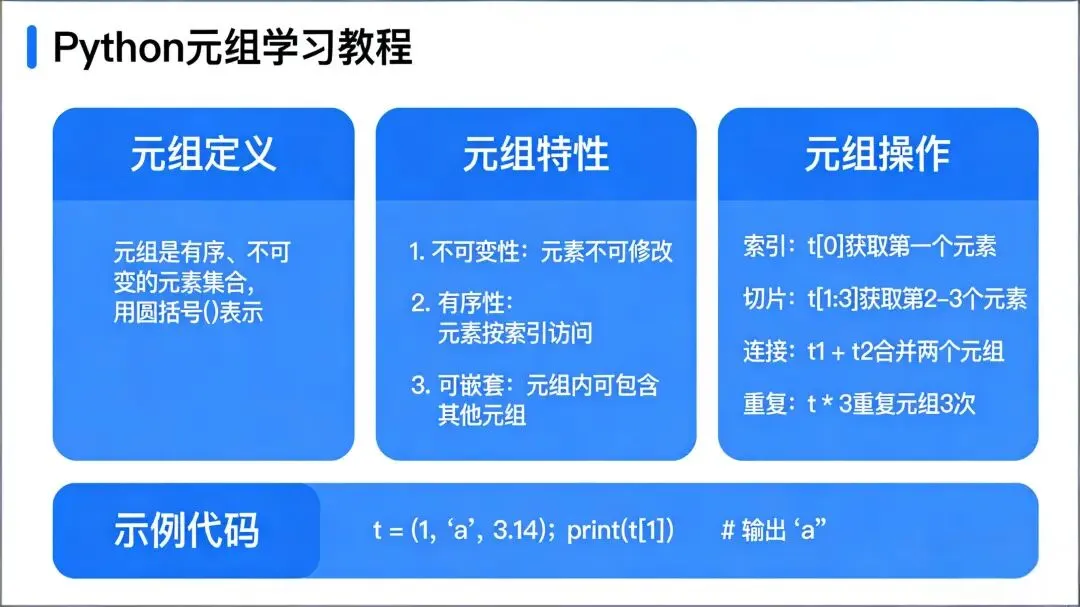
元组(Tuple)是 Python 中一种不可变(immutable)的有序序列,用于存储一组有序的元素。元组与列表类似,但最大的区别是元组一旦创建就不能修改。
1.2 元组的特点
不可变性:元组创建后不能修改、添加或删除元素
有序性:元素按插入顺序排列
异构性:可以存储不同类型的元素
可嵌套:元组中可以包含其他元组或列表
固定大小:创建后大小固定,不能动态调整
可哈希:可以作为字典的键或集合的元素
1.3 元组的定义
# 空元组
empty_tuple= ()
empty_tuple2=tuple()

# 单元素元组(注意必须有逗号)
single_element= (1,)  # 正确,有逗号
single_element2=1,   # 正确,省略括号但保留逗号
wrong_tuple= (1)      # 错误,这是一个整数,不是元组

# 多元素元组
numbers= (1, 2, 3, 4, 5)
fruits= ("apple", "banana", "cherry")
mixed= (1, "apple", 3.14, True, (1, 2, 3))  # 异构元组
二、元组的访问和索引
2.1 索引访问
元组中的每个元素都有一个索引,从 0 开始:
fruits= ("apple", "banana", "cherry")
print(fruits[0])    # 输出: apple
print(fruits[1])    # 输出: banana
print(fruits[2])    # 输出: cherry

# 负索引(从末尾开始)
print(fruits[-1])   # 输出: cherry
print(fruits[-2])   # 输出: banana
print(fruits[-3])   # 输出: apple
2.2 切片操作
切片语法:tuple[start:end:step]
start:起始索引(包含)
end:结束索引(不包含)
step:步长(默认为 1)
numbers= (0, 1, 2, 3, 4, 5, 6, 7, 8, 9)
print(numbers[0:5])      # 输出: (0, 1, 2, 3, 4)
print(numbers[5:])       # 输出: (5, 6, 7, 8, 9)
print(numbers[:5])       # 输出: (0, 1, 2, 3, 4)
print(numbers[::2])      # 输出: (0, 2, 4, 6, 8) (步长为 2)
print(numbers[::-1])     # 输出: (9, 8, 7, 6, 5, 4, 3, 2, 1, 0) (反转元组)
print(numbers[1:8:2])    # 输出: (1, 3, 5, 7) (从索引1到8,步长为2)
2.3 嵌套元组访问
nested= ((1, 2, 3), (4, 5, 6), (7, 8, 9))
print(nested[0])       # 输出: (1, 2, 3)
print(nested[1][1])    # 输出: 5
print(nested[2][0])    # 输出: 7
三、元组的基本操作
3.1 元组长度
fruits= ("apple", "banana", "cherry")
length=len(fruits)  # 输出: 3
3.2 元组拼接
tuple1= (1, 2, 3)
tuple2= (4, 5, 6)
combined=tuple1+tuple2# 输出: (1, 2, 3, 4, 5, 6)
3.3 元组重复
tuple1= (1, 2, 3)
repeated=tuple1*3# 输出: (1, 2, 3, 1, 2, 3, 1, 2, 3)
3.4 成员检查
fruits= ("apple", "banana", "cherry")
print("apple"infruits)     # 输出: True
print("orange"infruits)    # 输出: False
print("banana"notinfruits) # 输出: False
3.5 元组比较
tuple1 = (1, 2, 3)
tuple2 = (1, 2, 3)
tuple3 = (1, 2, 4)

print(tuple1 == tuple2)  # 输出: True
print(tuple1 == tuple3)  # 输出: False
print(tuple1 < tuple3)   # 输出: True (按元素逐个比较)
3.6 元组的不可变性
元组是不可变的,不能修改、添加或删除元素:
fruits = ("apple", "banana", "cherry")
# 以下操作会抛出 TypeError:
# fruits[1] = "orange"  # 修改元素
# fruits.append("orange")  # 添加元素
# del fruits[0]  # 删除元素
四、元组的方法
4.1 index() 方法
返回指定值第一次出现的索引:
numbers = (1, 2, 3, 2, 1, 2, 3)
print(numbers.index(2))    # 输出: 1 (第一次出现的位置)
print(numbers.index(2, 2)) # 输出: 3 (从索引2开始查找)
4.2 count() 方法
返回指定值出现的次数:
numbers = (1, 2, 3, 2, 1, 2, 3)
print(numbers.count(2))    # 输出: 3 (出现的次数)
print(numbers.count(4))    # 输出: 0 (不存在)
4.3 其他内置函数
numbers = (3, 1, 4, 1, 5, 9, 2, 6)
print(min(numbers))    # 输出: 1
print(max(numbers))    # 输出: 9
print(sum(numbers))    # 输出: 31
print(sorted(numbers)) # 输出: [1, 1, 2, 3, 4, 5, 6, 9] (返回列表)
五、元组的高级特性
5.1 元组解包
元组解包是将元组中的元素赋值给多个变量:
# 基本解包
fruits = ("apple", "banana", "cherry")
a, b, c = fruits
print(a)  # 输出: apple
print(b)  # 输出: banana
print(c)  # 输出: cherry

# 扩展解包(Python 3+)
numbers = (1, 2, 3, 4, 5)
first, *middle, last = numbers
print(first)   # 输出: 1
print(middle)  # 输出: [2, 3, 4]
print(last)    # 输出: 5

# 嵌套元组解包
nested = (1, (2, 3), 4)
a, (b, c), d = nested
print(a)  # 输出: 1
print(b)  # 输出: 2
print(c)  # 输出: 3
print(d)  # 输出: 4
5.2 元组与其他数据类型的转换
列表转元组:使用 tuple() 函数
元组转列表:使用 list() 函数
字符串转元组:使用 tuple() 函数
范围转元组:使用 tuple() 函数
# 列表转元组
lst = [1, 2, 3, 4, 5]
tpl = tuple(lst)
print(tpl)  # 输出: (1, 2, 3, 4, 5)

# 元组转列表
tpl = (1, 2, 3, 4, 5)
lst = list(tpl)
print(lst)  # 输出: [1, 2, 3, 4, 5]

# 字符串转元组
s = "hello"
tpl = tuple(s)
print(tpl)  # 输出: ('h', 'e', 'l', 'l', 'o')

# 范围转元组
rng = range(5)
tpl = tuple(rng)
print(tpl)  # 输出: (0, 1, 2, 3, 4)
5.3 元组的不可变性深入理解
# 元组中的可变元素
tpl = (1, 2, [3, 4])
tpl[2][0] = 99  # 可以修改元组中的列表元素
print(tpl)  # 输出: (1, 2, [99, 4])

# 元组作为字典键
person = {
    ("Alice", 25): "Engineer",
    ("Bob", 30): "Designer"
}
print(person[("Alice", 25)])  # 输出: Engineer

# 元组作为集合元素
s = {("a", "b"), ("c", "d")}
print(s)  # 输出: {('a', 'b'), ('c', 'd')}
5.4 元组的迭代
for 循环:遍历元组元素
enumerate():同时获取索引和值
zip():同时遍历多个元组
# for 循环
fruits = ("apple", "banana", "cherry")
for fruit in fruits:
    print(fruit)

# enumerate()
for index, fruit in enumerate(fruits):
    print(f"Index {index}: {fruit}")

# zip()
names = ("Alice", "Bob", "Charlie")
ages = (25, 30, 35)
for name, age in zip(names, ages):
    print(f"{name} is {age} years old")
六、元组的性能对比
6.1 元组 vs 列表
| 特性 | 元组 (Tuple) | 列表 (List) |
|---|
| 可变性 | 不可变 | 可变 |
| 内存使用 | 更节省 | 更消耗 |
| 访问速度 | 更快 | 稍慢 |
| 哈希性 | 可哈希(可作为字典键) | 不可哈希 |
| 方法数量 | 较少(index, count) | 较多 |
| 创建语法 | 使用圆括号 () | 使用方括号 [] |
6.2 性能测试
import time

# 测试访问速度
lst = [1, 2, 3, 4, 5]
tpl = (1, 2, 3, 4, 5)

# 列表访问
start = time.time()
for i in range(1000000):
    _ = lst[0]
print(f"List access time: {time.time() - start:.6f} seconds")

# 元组访问
start = time.time()
for i in range(1000000):
    _ = tpl[0]
print(f"Tuple access time: {time.time() - start:.6f} seconds")

# 测试内存使用
import sys
print(f"List memory: {sys.getsizeof(lst)} bytes")
print(f"Tuple memory: {sys.getsizeof(tpl)} bytes")
七、元组的实际应用
7.1 函数返回多个值
元组常用于函数返回多个值:
def get_user_info():
    name = "Alice"
    age = 25
    job = "Engineer"
    return name, age, job  # 自动打包为元组

# 解包接收
user_name, user_age, user_job = get_user_info()
print(f"Name: {user_name}, Age: {user_age}, Job: {user_job}")
7.2 多变量赋值
使用元组进行多变量同时赋值:
# 交换变量值
a, b = 10, 20
print(f"Before: a={a}, b={b}")
a, b = b, a  # 元组解包实现交换
print(f"After: a={a}, b={b}")

# 多变量初始化
x, y, z = 1, 2, 3
print(x, y, z)  # 输出: 1 2 3
7.3 作为字典键
元组可作为字典的键,用于存储复合键值对:
# 存储坐标对应的数值
coordinates = {
    (0, 0): 1,
    (0, 1): 2,
    (1, 0): 3,
    (1, 1): 4
}
print(coordinates[(0, 1)])  # 输出: 2

# 存储用户信息
users = {
    ("Alice", "Smith"): {"age": 25, "email": "alice@example.com"},
    ("Bob", "Johnson"): {"age": 30, "email": "bob@example.com"}
}
print(users[("Alice", "Smith")]["email"])  # 输出: alice@example.com
7.4 数据保护
当需要确保数据不被修改时,使用元组:
# 配置常量
CONFIG = (
    ("DEBUG", False),
    ("PORT", 8080),
    ("HOST", "localhost")
)

# 尝试修改会失败
# CONFIG[0] = ("DEBUG", True)  # 会抛出 TypeError
7.5 元组与列表的选择
使用元组的场景:
存储不可变数据
作为字典键或集合元素
函数返回多个值
多变量赋值
性能敏感的场景
使用列表的场景:
八、总结
Python 元组是一种不可变的有序序列,具有以下核心特性:
不可变性:创建后不能修改,保证数据的安全性
有序性:元素按插入顺序排列,支持索引和切片
异构性:可以存储不同类型的元素
可嵌套:元组中可以包含其他元组或可变对象
可哈希:可以作为字典的键或集合的元素
高效性:比列表更节省内存,访问速度更快
元组的主要方法有 index() 和 count(),虽然方法数量少于列表,但在特定场景下具有不可替代的优势。元组的解包功能使得多变量赋值和函数返回多个值变得简洁高效。
在实际编程中,应根据数据的特性和使用场景选择合适的数据结构:需要修改的数据使用列表,需要保证不可变性的数据使用元组。
 10个月宝宝每天需要喝多少奶粉?