还记得那个让我们废寝忘食的经典游戏吗?今天,让我们用Python + PyQt6,亲手打造一个属于自己的俄罗斯方块!
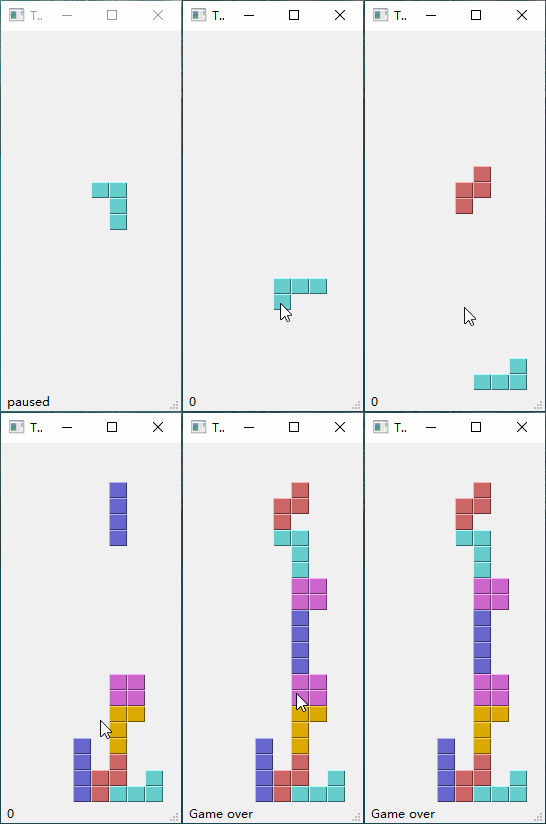
首先演示一下整体运行效果
项目亮点
这个项目不仅是一个游戏,更是学习GUI编程的绝佳案例:核心架构解析
四大核心类,各司其职
1. Tetris类 - 游戏总指挥,负责窗口管理、状态栏显示
class Tetris(QMainWindow): """主窗口类 - 创建游戏的主界面窗口""" def __init__(self): super().__init__() self.initUI() def initUI(self): """初始化应用程序界面""" self.tboard = Board(self) # 创建游戏板 self.setCentralWidget(self.tboard) # 将游戏板设置为中心组件 self.statusbar = self.statusBar() # 创建状态栏 # 连接信号:当游戏板发送消息时,在状态栏显示 self.tboard.msg2Statusbar[str].connect(self.statusbar.showMessage) self.tboard.start() # 开始游戏 self.resize(180, 380) # 设置窗口大小 self.center() # 窗口居中显示 self.setWindowTitle('Tetris') self.show() def center(self): """将窗口居中显示在屏幕上""" qr = self.frameGeometry() # 获取窗口的几何信息 cp = self.screen().availableGeometry().center() # 获取屏幕中心点 qr.moveCenter(cp) # 将窗口中心移动到屏幕中心 self.move(qr.topLeft()) # 移动窗口到计算的位置
2. Board类 - 游戏逻辑核心
class Board(QFrame): """游戏板类 - 包含游戏的核心逻辑""" msg2Statusbar = pyqtSignal(str) # 信号:用于向状态栏发送消息 BoardWidth = 10 # 游戏板宽度(列数) BoardHeight = 22 # 游戏板高度(行数) Speed = 300 # 游戏速度(毫秒) def __init__(self, parent): super().__init__(parent) self.initBoard() def initBoard(self): """初始化游戏板""" self.timer = QBasicTimer() # 游戏定时器 self.isWaitingAfterLine = False # 是否在消除行后等待 self.curX = 0 # 当前方块X坐标 self.curY = 0 # 当前方块Y坐标 self.numLinesRemoved = 0 # 已消除的行数 self.board = [] # 游戏板数据(存储已固定的方块) self.setFocusPolicy(Qt.FocusPolicy.StrongFocus) # 设置焦点策略,以便接收键盘事件 self.isStarted = False # 游戏是否已开始 self.isPaused = False # 游戏是否暂停 self.clearBoard() # 清空游戏板 def shapeAt(self, x, y): """获取游戏板上指定位置的方块类型""" return self.board[(y * Board.BoardWidth) + x] def setShapeAt(self, x, y, shape): """在游戏板上设置指定位置的方块类型""" self.board[(y * Board.BoardWidth) + x] = shape def squareWidth(self): """返回单个方块单元的宽度(像素)""" return self.contentsRect().width() // Board.BoardWidth def squareHeight(self): """返回单个方块单元的高度(像素)""" return self.contentsRect().height() // Board.BoardHeight def start(self): """开始游戏""" if self.isPaused: return self.isStarted = True self.isWaitingAfterLine = False self.numLinesRemoved = 0 # 重置消除行数 self.clearBoard() # 清空游戏板 self.msg2Statusbar.emit(str(self.numLinesRemoved)) # 更新状态栏 self.newPiece() # 生成新方块 self.timer.start(Board.Speed, self) # 启动定时器 def pause(self): """暂停/继续游戏""" if not self.isStarted: return self.isPaused = not self.isPaused if self.isPaused: self.timer.stop() # 暂停时停止定时器 self.msg2Statusbar.emit("paused") else: self.timer.start(Board.Speed, self) # 继续时重启定时器 self.msg2Statusbar.emit(str(self.numLinesRemoved)) self.update() def paintEvent(self, event): """绘制游戏中的所有方块""" painter = QPainter(self) rect = self.contentsRect() # 计算游戏板顶部位置 boardTop = rect.bottom() - Board.BoardHeight * self.squareHeight() # 绘制已固定在游戏板上的方块 for i in range(Board.BoardHeight): for j in range(Board.BoardWidth): shape = self.shapeAt(j, Board.BoardHeight - i - 1) if shape != Tetrominoe.NoShape: self.drawSquare(painter, rect.left() + j * self.squareWidth(), boardTop + i * self.squareHeight(), shape) # 绘制当前正在下落的方块 if self.curPiece.shape() != Tetrominoe.NoShape: for i in range(4): # 每个方块由4个小块组成 x = self.curX + self.curPiece.x(i) y = self.curY - self.curPiece.y(i) self.drawSquare(painter, rect.left() + x * self.squareWidth(), boardTop + (Board.BoardHeight - y - 1) * self.squareHeight(), self.curPiece.shape()) def keyPressEvent(self, event): """处理键盘按键事件""" if not self.isStarted or self.curPiece.shape() == Tetrominoe.NoShape: super(Board, self).keyPressEvent(event) return key = event.key() if key == Qt.Key.Key_P: # P键:暂停/继续 self.pause() return if self.isPaused: return elif key == Qt.Key.Key_Left.value: # 左箭头:向左移动 self.tryMove(self.curPiece, self.curX - 1, self.curY) elif key == Qt.Key.Key_Right.value: # 右箭头:向右移动 self.tryMove(self.curPiece, self.curX + 1, self.curY) elif key == Qt.Key.Key_Down.value: # 下箭头:向右旋转 self.tryMove(self.curPiece.rotateRight(), self.curX, self.curY) elif key == Qt.Key.Key_Up.value: # 上箭头:向左旋转 self.tryMove(self.curPiece.rotateLeft(), self.curX, self.curY) elif key == Qt.Key.Key_Space.value: # 空格键:快速下落到底部 self.dropDown() elif key == Qt.Key.Key_D.value: # D键:向下移动一行 self.oneLineDown() else: super(Board, self).keyPressEvent(event) def timerEvent(self, event): """处理定时器事件 - 自动让方块下落""" if event.timerId() == self.timer.timerId(): if self.isWaitingAfterLine: # 如果刚消除了行,生成新方块 self.isWaitingAfterLine = False self.newPiece() else: # 否则让方块下落一行 self.oneLineDown() else: super(Board, self).timerEvent(event) def clearBoard(self): """清空游戏板 - 将所有位置设置为空""" for i in range(Board.BoardHeight * Board.BoardWidth): self.board.append(Tetrominoe.NoShape) def dropDown(self): """快速下落方块到底部""" newY = self.curY while newY > 0: # 尝试向下移动,直到无法移动为止 if not self.tryMove(self.curPiece, self.curX, newY - 1): break newY -= 1 self.pieceDropped() # 固定方块并处理消除行 def oneLineDown(self): """让方块向下移动一行""" if not self.tryMove(self.curPiece, self.curX, self.curY - 1): self.pieceDropped() # 如果无法下移,固定方块 def pieceDropped(self): """方块固定后,移除满行并生成新方块""" # 将当前方块的4个小块固定到游戏板上 for i in range(4): x = self.curX + self.curPiece.x(i) y = self.curY - self.curPiece.y(i) self.setShapeAt(x, y, self.curPiece.shape()) self.removeFullLines() # 移除满行 if not self.isWaitingAfterLine: self.newPiece() # 生成新方块 def removeFullLines(self): """移除游戏板上的所有满行""" numFullLines = 0 rowsToRemove = [] # 需要移除的行索引列表 # 检查每一行是否已满 for i in range(Board.BoardHeight): n = 0 # 该行中非空格子的数量 for j in range(Board.BoardWidth): if not self.shapeAt(j, i) == Tetrominoe.NoShape: n = n + 1 if n == 10: # 如果一行全满(10列) rowsToRemove.append(i) rowsToRemove.reverse() # 从下往上移除,避免索引问题 # 移除满行:将上方的行向下移动 for m in rowsToRemove: for k in range(m, Board.BoardHeight): for l in range(Board.BoardWidth): self.setShapeAt(l, k, self.shapeAt(l, k + 1)) numFullLines = numFullLines + len(rowsToRemove) if numFullLines > 0: self.numLinesRemoved = self.numLinesRemoved + numFullLines # 更新消除行数 self.msg2Statusbar.emit(str(self.numLinesRemoved)) # 更新状态栏显示 self.isWaitingAfterLine = True # 标记等待状态 self.curPiece.setShape(Tetrominoe.NoShape) # 清除当前方块 self.update() # 刷新显示 def newPiece(self): """创建新的方块""" self.curPiece = Shape() # 创建新方块对象 self.curPiece.setRandomShape() # 随机设置方块形状 # 设置初始位置:水平居中,顶部对齐 self.curX = Board.BoardWidth // 2 + 1 self.curY = Board.BoardHeight - 1 + self.curPiece.minY() # 尝试放置新方块,如果无法放置则游戏结束 if not self.tryMove(self.curPiece, self.curX, self.curY): self.curPiece.setShape(Tetrominoe.NoShape) self.timer.stop() # 停止定时器 self.isStarted = False self.msg2Statusbar.emit("Game over") # 显示游戏结束 def tryMove(self, newPiece, newX, newY): """尝试移动方块到新位置 - 返回True表示可以移动,False表示不能移动""" # 检查方块的4个小块是否都在有效范围内 for i in range(4): x = newX + newPiece.x(i) y = newY - newPiece.y(i) # 检查是否超出边界 if x < 0 or x >= Board.BoardWidth or y < 0 or y >= Board.BoardHeight: return False # 检查该位置是否已被占用 if self.shapeAt(x, y) != Tetrominoe.NoShape: return False # 如果所有检查都通过,更新方块位置 self.curPiece = newPiece self.curX = newX self.curY = newY self.update() # 刷新显示 return True def drawSquare(self, painter, x, y, shape): """绘制一个方块单元 - 使用3D效果(高光+阴影)""" # 颜色表:每种方块类型对应一种颜色 colorTable = [0x000000, 0xCC6666, 0x66CC66, 0x6666CC, 0xCCCC66, 0xCC66CC, 0x66CCCC, 0xDAAA00] color = QColor(colorTable[shape]) # 绘制方块的主体部分 painter.fillRect(x + 1, y + 1, self.squareWidth() - 2, self.squareHeight() - 2, color) # 绘制高光效果(左上边缘) painter.setPen(color.lighter()) painter.drawLine(x, y + self.squareHeight() - 1, x, y) painter.drawLine(x, y, x + self.squareWidth() - 1, y) # 绘制阴影效果(右下边缘) painter.setPen(color.darker()) painter.drawLine(x + 1, y + self.squareHeight() - 1, x + self.squareWidth() - 1, y + self.squareHeight() - 1) painter.drawLine(x + self.squareWidth() - 1, y + self.squareHeight() - 1, x + self.squareWidth() - 1, y + 1)
class Tetrominoe: """俄罗斯方块类型枚举类 - 定义7种标准方块形状""" NoShape = 0 # 空形状 ZShape = 1 # Z形方块 SShape = 2 # S形方块 LineShape = 3 # 直线形方块 TShape = 4 # T形方块 SquareShape = 5 # 方形方块 LShape = 6 # L形方块 MirroredLShape = 7 # 镜像L形方块
class Shape: """方块形状类 - 定义方块的坐标和旋转方法""" # 坐标表:每种方块类型的4个小块相对于中心点的坐标 (x, y) coordsTable = ( ((0, 0), (0, 0), (0, 0), (0, 0)), # 空形状 ((0, -1), (0, 0), (-1, 0), (-1, 1)), # Z形 ((0, -1), (0, 0), (1, 0), (1, 1)), # S形 ((0, -1), (0, 0), (0, 1), (0, 2)), # 直线形 ((-1, 0), (0, 0), (1, 0), (0, 1)), # T形 ((0, 0), (1, 0), (0, 1), (1, 1)), # 方形 ((-1, -1), (0, -1), (0, 0), (0, 1)), # L形 ((1, -1), (0, -1), (0, 0), (0, 1)) # 镜像L形 ) def __init__(self): """初始化方块 - 每个方块由4个小块组成""" self.coords = [[0, 0] for i in range(4)] # 4个小块的坐标 self.pieceShape = Tetrominoe.NoShape # 方块类型 self.setShape(Tetrominoe.NoShape) def shape(self): """返回方块类型""" return self.pieceShape def setShape(self, shape): """设置方块形状 - 从坐标表中加载对应形状的坐标""" table = Shape.coordsTable[shape] for i in range(4): for j in range(2): self.coords[i][j] = table[i][j] # 复制坐标数据 self.pieceShape = shape def setRandomShape(self): """随机选择一个方块形状(1-7)""" self.setShape(random.randint(1, 7)) def x(self, index): """返回指定小块的X坐标""" return self.coords[index][0] def y(self, index): """返回指定小块的Y坐标""" return self.coords[index][1] def setX(self, index, x): """设置指定小块的X坐标""" self.coords[index][0] = x def setY(self, index, y): """设置指定小块的Y坐标""" self.coords[index][1] = y def minX(self): """返回所有小块中的最小X值""" m = self.coords[0][0] for i in range(4): m = min(m, self.coords[i][0]) return m def maxX(self): """返回所有小块中的最大X值""" m = self.coords[0][0] for i in range(4): m = max(m, self.coords[i][0]) return m def minY(self): """返回所有小块中的最小Y值""" m = self.coords[0][1] for i in range(4): m = min(m, self.coords[i][1]) return m def maxY(self): """返回所有小块中的最大Y值""" m = self.coords[0][1] for i in range(4): m = max(m, self.coords[i][1]) return m def rotateLeft(self): """向左旋转方块(逆时针90度)""" if self.pieceShape == Tetrominoe.SquareShape: # 方形不需要旋转 return self result = Shape() result.pieceShape = self.pieceShape # 旋转矩阵:逆时针90度 (x, y) -> (y, -x) for i in range(4): result.setX(i, self.y(i)) result.setY(i, -self.x(i)) return result def rotateRight(self): """向右旋转方块(顺时针90度)""" if self.pieceShape == Tetrominoe.SquareShape: # 方形不需要旋转 return self result = Shape() result.pieceShape = self.pieceShape # 旋转矩阵:顺时针90度 (x, y) -> (-y, x) for i in range(4): result.setX(i, -self.y(i)) result.setY(i, self.x(i)) return result
关键技术解析
1️⃣ 游戏循环机制,使用QBasicTime
# 使用QBasicTimer创建稳定游戏循环self.timer = QBasicTimer()self.timer.start(Board.Speed, self)
2️⃣ 数学建模思想
# 用一维数组表示二维游戏板# 巧妙的索引计算:y * BoardWidth + xdef shapeAt(self, x, y): return self.board[(y * Board.BoardWidth) + x]
3️⃣ 方块旋转算法
def rotateLeft(self): # 90度逆时针旋转的数学实现 # (x, y) -> (y, -x) result.setX(i, self.y(i)) result.setY(i, -self.x(i))
4️⃣ 碰撞检测逻辑
def tryMove(self, newPiece, newX, newY): # 边界检测 + 冲突检测 # 确保方块不会重叠或越界
按键操作说明
← →左右移动
↑逆时针旋转
↓顺时针旋转
空格瞬间掉落
D键加速下降
P键暂停/继续
需要源码的小伙伴可以直接在公众号回复【俄罗斯方块】获取源码下载链接