要用Python实现一个具备核心功能的本地文件管理器,能够实现文件/文件夹的浏览、创建、删除、重命名等基础操作。下面我将提供两种实现方案:命令行版(基础易用,无需额外依赖) 和 图形界面版(直观友好,基于tkinter),满足不同使用场景需求。
一、命令行版文件管理器(核心功能实现)
该版本无需安装第三方库,直接依赖Python内置标准库 os(文件系统操作)和 shutil(高级文件操作,如文件夹删除、复制),实现核心文件管理功能。
完整代码
import osimport shutildefprint_current_dir_info(current_path):"""打印当前目录下的文件和文件夹信息""" print(f"\n========== 当前目录:{current_path} ==========")# 区分文件夹和文件 dirs = [] files = []try:for item in os.listdir(current_path): item_path = os.path.join(current_path, item)if os.path.isdir(item_path): dirs.append(f"[文件夹] {item}")else:# 获取文件大小(字节) file_size = os.path.getsize(item_path) files.append(f"[文件] {item} (大小:{file_size} 字节)")except PermissionError: print("⚠️ 没有权限访问该目录下的内容")return [], []# 打印结果for d in dirs: print(d)for f in files: print(f)return dirs, filesdefchange_directory(current_path, target_dir):"""切换目录""" target_path = os.path.join(current_path, target_dir)# 处理绝对路径输入if os.path.isabs(target_dir): target_path = target_dir# 验证目录是否存在且可访问if os.path.isdir(target_path):return os.path.abspath(target_path)else: print("❌ 目标目录不存在或无法访问")return current_pathdefcreate_new_item(current_path, item_name, is_dir=False):"""创建新文件或文件夹""" item_path = os.path.join(current_path, item_name)try:if is_dir:# 创建文件夹(exist_ok=True 避免已存在时报错) os.makedirs(item_path, exist_ok=True) print(f"✅ 文件夹创建成功:{item_path}")else:# 创建文件(使用w模式,若已存在则清空内容)with open(item_path, 'w', encoding='utf-8') as f:pass print(f"✅ 文件创建成功:{item_path}")except Exception as e: print(f"❌ 创建失败:{str(e)}")defdelete_item(current_path, item_name):"""删除文件或文件夹(谨慎使用,删除后难以恢复)""" item_path = os.path.join(current_path, item_name)ifnot os.path.exists(item_path): print("❌ 目标文件/文件夹不存在")returntry:if os.path.isfile(item_path):# 删除文件 os.remove(item_path) print(f"✅ 文件已删除:{item_path}")else:# 删除文件夹(包括其中所有内容) shutil.rmtree(item_path) print(f"✅ 文件夹及其内容已删除:{item_path}")except Exception as e: print(f"❌ 删除失败:{str(e)}")defrename_item(current_path, old_name, new_name):"""重命名文件或文件夹""" old_path = os.path.join(current_path, old_name) new_path = os.path.join(current_path, new_name)ifnot os.path.exists(old_path): print("❌ 原文件/文件夹不存在")returntry: os.rename(old_path, new_path) print(f"✅ 重命名成功:{old_name} -> {new_name}")except Exception as e: print(f"❌ 重命名失败:{str(e)}")defmain():# 初始目录为当前工作目录 current_path = os.getcwd()whileTrue: print_current_dir_info(current_path) print("\n========== 操作菜单 ==========") print("1. 进入子目录(输入文件夹名称)") print("2. 返回上一级目录") print("3. 创建新文件") print("4. 创建新文件夹") print("5. 删除文件/文件夹") print("6. 重命名文件/文件夹") print("7. 退出程序") choice = input("\n请输入操作编号(1-7):").strip()if choice == '1': dir_name = input("请输入要进入的文件夹名称:").strip() current_path = change_directory(current_path, dir_name)elif choice == '2':# 返回上一级目录(os.path.dirname获取父目录) parent_path = os.path.dirname(current_path)if parent_path != current_path: # 避免已经是根目录 current_path = parent_pathelse: print("⚠️ 已经处于根目录,无法继续返回")elif choice == '3': file_name = input("请输入要创建的文件名称(含后缀,如test.txt):").strip() create_new_item(current_path, file_name, is_dir=False)elif choice == '4': dir_name = input("请输入要创建的文件夹名称:").strip() create_new_item(current_path, dir_name, is_dir=True)elif choice == '5': item_name = input("请输入要删除的文件/文件夹名称:").strip() confirm = input(f"⚠️ 确认要删除 {item_name} 吗?(输入y确认,其他取消):").strip().lower()if confirm == 'y': delete_item(current_path, item_name)elif choice == '6': old_name = input("请输入原文件/文件夹名称:").strip() new_name = input("请输入新文件/文件夹名称:").strip() rename_item(current_path, old_name, new_name)elif choice == '7': print("👋 程序退出,感谢使用!")breakelse: print("❌ 输入无效,请输入1-7之间的编号")# 暂停一下,方便查看结果 input("\n按回车键继续...") os.system('cls'if os.name == 'nt'else'clear') # 清屏(Windows用cls,Linux/Mac用clear)if __name__ == "__main__": main()
核心功能说明
- 依赖库:仅使用Python内置的
os 和 shutil,无需额外安装第三方包,跨平台兼容(Windows/Linux/Mac)。 - 使用方法:直接运行脚本,按照命令行菜单提示输入操作编号即可。
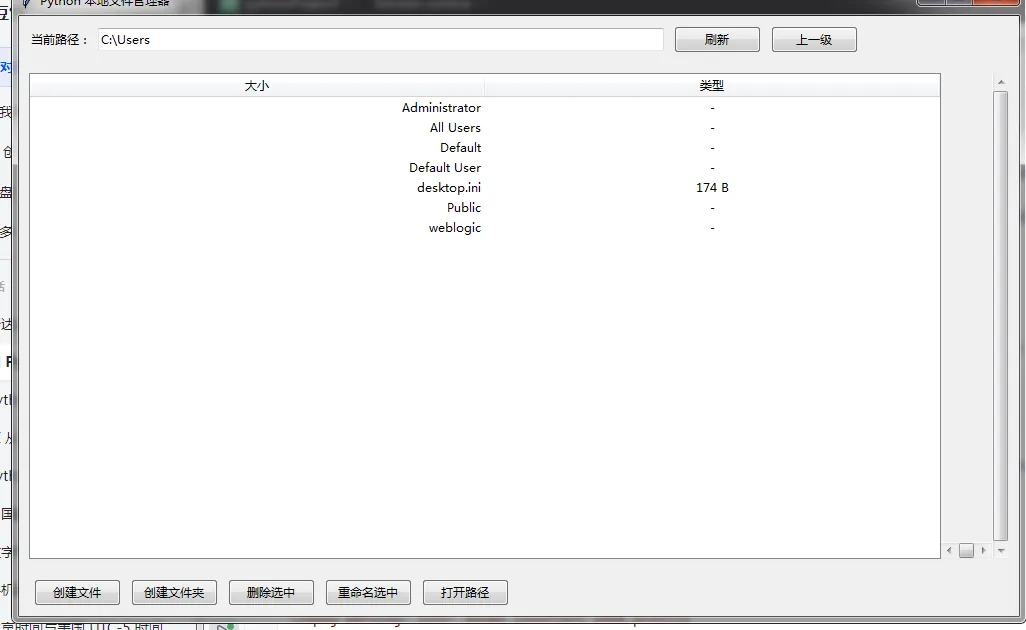
二、图形界面版文件管理器(基于tkinter)
该版本使用Python内置的 tkinter 库(无需额外安装)构建图形界面,操作更直观,适合不熟悉命令行的用户。
完整代码
import osimport shutilimport tkinter as tkfrom tkinter import ttk, messagebox, filedialogclassFileManagerGUI:def__init__(self, root): self.root = root self.root.title("Python 本地文件管理器") self.root.geometry("1000x600")# 初始目录为当前工作目录 self.current_path = os.getcwd()# 构建界面 self.create_widgets()# 刷新目录列表 self.refresh_file_list()defcreate_widgets(self):"""创建界面组件"""# 1. 路径显示与操作栏 path_frame = ttk.Frame(self.root, padding=10) path_frame.pack(fill=tk.X, side=tk.TOP)# 路径标签 ttk.Label(path_frame, text="当前路径:").pack(side=tk.LEFT)# 路径显示框 self.path_var = tk.StringVar(value=self.current_path) self.path_entry = ttk.Entry(path_frame, textvariable=self.path_var, width=80) self.path_entry.pack(side=tk.LEFT, padx=5)# 刷新按钮 ttk.Button(path_frame, text="刷新", command=self.refresh_file_list).pack(side=tk.LEFT, padx=5)# 回到上一级按钮 ttk.Button(path_frame, text="上一级", command=self.goto_parent_dir).pack(side=tk.LEFT, padx=5)# 2. 文件列表显示区域 list_frame = ttk.Frame(self.root, padding=10) list_frame.pack(fill=tk.BOTH, expand=True, side=tk.TOP)# 列表视图(显示文件/文件夹) self.file_tree = ttk.Treeview(list_frame, columns=("size", "type"), show="headings") self.file_tree.heading("size", text="大小") self.file_tree.heading("type", text="类型") self.file_tree.column("size", width=100, anchor=tk.E) self.file_tree.column("type", width=100, anchor=tk.CENTER)# 滚动条 v_scroll = ttk.Scrollbar(list_frame, orient=tk.VERTICAL, command=self.file_tree.yview) h_scroll = ttk.Scrollbar(list_frame, orient=tk.HORIZONTAL, command=self.file_tree.xview) self.file_tree.configure(yscrollcommand=v_scroll.set, xscrollcommand=h_scroll.set)# 布局列表和滚动条 self.file_tree.pack(side=tk.LEFT, fill=tk.BOTH, expand=True) v_scroll.pack(side=tk.RIGHT, fill=tk.Y) h_scroll.pack(side=tk.BOTTOM, fill=tk.X)# 绑定双击事件(进入文件夹/打开文件) self.file_tree.bind("<Double-1>", self.on_double_click)# 3. 功能按钮栏 btn_frame = ttk.Frame(self.root, padding=10) btn_frame.pack(fill=tk.X, side=tk.BOTTOM) ttk.Button(btn_frame, text="创建文件", command=self.create_file).pack(side=tk.LEFT, padx=5) ttk.Button(btn_frame, text="创建文件夹", command=self.create_dir).pack(side=tk.LEFT, padx=5) ttk.Button(btn_frame, text="删除选中", command=self.delete_selected).pack(side=tk.LEFT, padx=5) ttk.Button(btn_frame, text="重命名选中", command=self.rename_selected).pack(side=tk.LEFT, padx=5) ttk.Button(btn_frame, text="打开路径", command=self.open_explorer).pack(side=tk.LEFT, padx=5)defrefresh_file_list(self):"""刷新当前目录下的文件列表"""# 清空现有列表for item in self.file_tree.get_children(): self.file_tree.delete(item)# 更新路径显示 self.path_var.set(self.current_path)# 遍历当前目录,添加到列表try:for item in os.listdir(self.current_path): item_path = os.path.join(self.current_path, item)if os.path.isdir(item_path):# 文件夹 self.file_tree.insert("", tk.END, values=(item, "-", "文件夹"), tags=("dir",))else:# 文件try: file_size = os.path.getsize(item_path)# 简化大小显示(字节->KB/MB)if file_size >= 1024 * 1024: file_size_str = f"{file_size / (1024 * 1024):.2f} MB"elif file_size >= 1024: file_size_str = f"{file_size / 1024:.2f} KB"else: file_size_str = f"{file_size} B"except: file_size_str = "未知"# 获取文件后缀 file_type = os.path.splitext(item)[1] or"无后缀" self.file_tree.insert("", tk.END, values=(item, file_size_str, file_type), tags=("file",))except PermissionError: messagebox.showerror("错误", "没有权限访问该目录")except Exception as e: messagebox.showerror("错误", f"刷新失败:{str(e)}")defgoto_parent_dir(self):"""返回上一级目录""" parent_path = os.path.dirname(self.current_path)if parent_path != self.current_path: self.current_path = parent_path self.refresh_file_list()else: messagebox.showinfo("提示", "已经处于根目录,无法继续返回")defon_double_click(self, event):"""双击事件:进入文件夹/打开文件""" selected_item = self.file_tree.selection()ifnot selected_item:return# 获取选中的文件名 item_values = self.file_tree.item(selected_item[0], "values") item_name = item_values[0] item_path = os.path.join(self.current_path, item_name)if os.path.isdir(item_path):# 进入文件夹 self.current_path = item_path self.refresh_file_list()else:# 打开文件(调用系统默认程序)try:if os.name == 'nt': # Windows os.startfile(item_path)else: # Linux/Macimport subprocess subprocess.run(["open"if os.name == 'posix'else"xdg-open", item_path])except Exception as e: messagebox.showerror("错误", f"无法打开文件:{str(e)}")defcreate_file(self):"""创建新文件""" file_name = tk.simpledialog.askstring("创建文件", "请输入文件名称(含后缀,如test.txt):")ifnot file_name:return file_path = os.path.join(self.current_path, file_name)try:with open(file_path, 'w', encoding='utf-8') as f:pass messagebox.showinfo("成功", f"文件创建成功:{file_path}") self.refresh_file_list()except Exception as e: messagebox.showerror("错误", f"创建失败:{str(e)}")defcreate_dir(self):"""创建新文件夹""" dir_name = tk.simpledialog.askstring("创建文件夹", "请输入文件夹名称:")ifnot dir_name:return dir_path = os.path.join(self.current_path, dir_name)try: os.makedirs(dir_path, exist_ok=True) messagebox.showinfo("成功", f"文件夹创建成功:{dir_path}") self.refresh_file_list()except Exception as e: messagebox.showerror("错误", f"创建失败:{str(e)}")defdelete_selected(self):"""删除选中的文件/文件夹""" selected_item = self.file_tree.selection()ifnot selected_item: messagebox.showwarning("提示", "请先选中要删除的文件/文件夹")return item_values = self.file_tree.item(selected_item[0], "values") item_name = item_values[0] item_path = os.path.join(self.current_path, item_name)ifnot messagebox.askyesno("确认删除", f"是否确认删除 {item_name}?\n删除后无法恢复!"):returntry:if os.path.isfile(item_path): os.remove(item_path)else: shutil.rmtree(item_path) messagebox.showinfo("成功", f"已成功删除 {item_name}") self.refresh_file_list()except Exception as e: messagebox.showerror("错误", f"删除失败:{str(e)}")defrename_selected(self):"""重命名选中的文件/文件夹""" selected_item = self.file_tree.selection()ifnot selected_item: messagebox.showwarning("提示", "请先选中要重命名的文件/文件夹")return item_values = self.file_tree.item(selected_item[0], "values") old_name = item_values[0] new_name = tk.simpledialog.askstring("重命名", f"请输入 {old_name} 的新名称:", initialvalue=old_name)ifnot new_name or new_name == old_name:return old_path = os.path.join(self.current_path, old_name) new_path = os.path.join(self.current_path, new_name)try: os.rename(old_path, new_path) messagebox.showinfo("成功", f"重命名成功:{old_name} -> {new_name}") self.refresh_file_list()except Exception as e: messagebox.showerror("错误", f"重命名失败:{str(e)}")defopen_explorer(self):"""用系统默认文件管理器打开当前路径"""try:if os.name == 'nt': # Windows os.startfile(self.current_path)else: # Linux/Macimport subprocess subprocess.run(["open"if os.uname().sysname == 'Darwin'else"xdg-open", self.current_path])except Exception as e: messagebox.showerror("错误", f"无法打开路径:{str(e)}")if __name__ == "__main__":# 补充tkinter的simpledialog(避免导入缺失)try:from tkinter import simpledialogexcept ImportError:import tkinter.simpledialog as simpledialog root = tk.Tk() app = FileManagerGUI(root) root.mainloop()
核心功能说明
- 依赖库:仅使用Python内置的
tkinter、os、shutil,无需额外安装第三方包,跨平台兼容。 - 使用方法:直接运行脚本,弹出图形界面后,通过按钮和列表操作即可,操作逻辑与系统自带文件管理器一致。
三、关键知识点总结
os:提供基础的文件系统操作(目录遍历、路径拼接、文件创建/删除/重命名等),是文件管理的核心。shutil:提供高级文件操作(文件夹递归删除、文件复制/移动等),补充os在文件夹操作上的不足。tkinter:提供图形界面构建能力,将命令行功能可视化,提升用户体验。
- 路径分隔符:使用
os.path.join() 拼接路径,避免直接使用 \(Windows)或 /(Linux/Mac)。 - 清屏/打开文件:通过
os.name 判断系统类型,执行对应命令。
四、扩展建议
- 增加文件复制/移动功能(基于
shutil.copy()和shutil.move())。
以上两个版本均实现了本地文件管理器的核心功能,命令行版适合快速使用和服务器环境,图形界面版适合桌面端日常操作,可根据你的需求选择使用。
 10个月宝宝每天需要喝多少奶粉?