当前位置:首页>python>20种最实用的Python图表,做数据可视化不用再抓狂了

20种最实用的Python图表,做数据可视化不用再抓狂了

  • 2026-03-10 09:30:15
20种最实用的Python图表,做数据可视化不用再抓狂了

今天咱不聊鸡汤、不讲情怀,直接开整!带你沉浸式体验 Python 可视化神器——Matplotlib的20种最常见图表玩法。

不管你是数据分析,机器学习,还是做周报、写PPT,只要掌握了这些图形,绝对是质的飞跃!

接下来,准备好你的 IDE,我们一个个上手敲起来!


注:要想Matplotlib支持中文!代码跑之前记得加上 这一行解决中文乱码问题:
pipinstallmatplotlib

如何你还没有安装matplotlib请打开你的终端(Terminal)或者命令行(cmd),直接敲:

pipinstallmatplotlib

回车,喝口水,等一会儿,它自己就装好了。


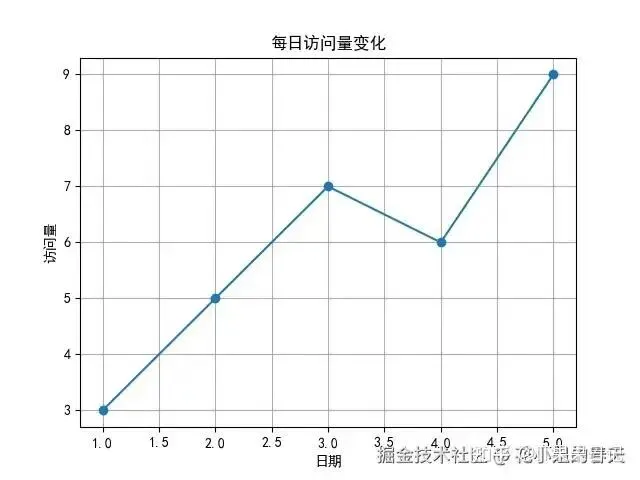
1. 折线图(Line Chart)

常用于趋势变化,比如气温、股价、KPI变化啥的。

importmatplotlib.pyplotaspltplt.rcParams['font.family']='SimHei'# 黑体支持中文x=[1,2,3,4,5]y=[3,5,7,6,9]plt.plot(x,y,marker='o')plt.title('每日访问量变化')plt.xlabel('日期')plt.ylabel('访问量')plt.grid(True)plt.show()
image.png

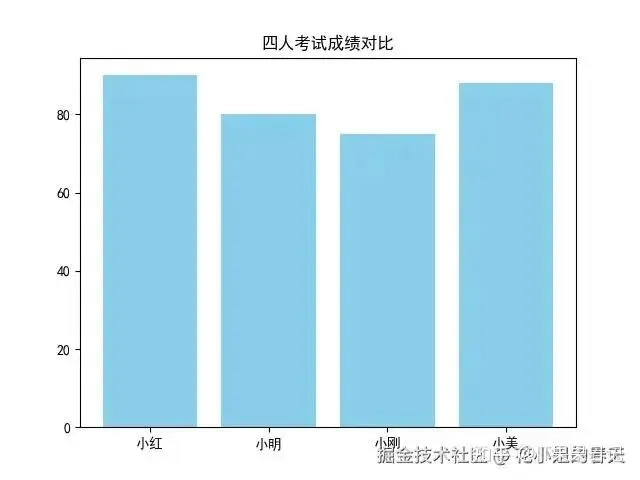
2. 条形图(Bar Chart)

横着比数据,适合分类比较。

importmatplotlib.pyplotaspltplt.rcParams['font.family']='SimHei'# 黑体支持中文categories=['小红','小明','小刚','小美']scores=[90,80,75,88]plt.bar(categories,scores,color='skyblue')plt.title('四人考试成绩对比')plt.show()
image.png

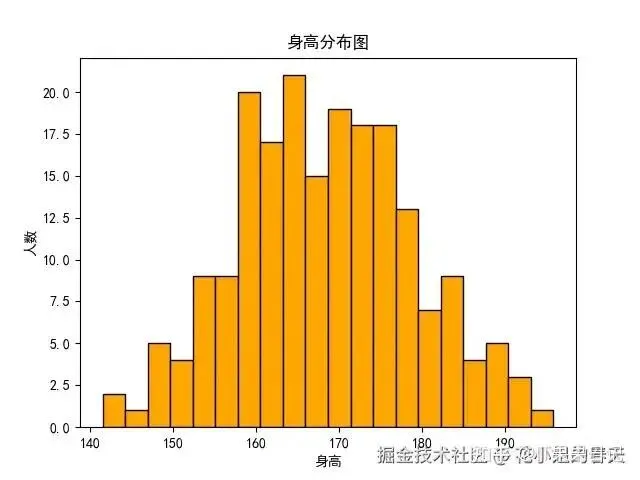
3. 直方图(Histogram)

适合看数据分布,比如工资分布、身高、体重这些。

importmatplotlib.pyplotaspltimportnumpyasnpplt.rcParams['font.family']='SimHei'# 黑体支持中文data=np.random.normal(170,10,200)plt.hist(data,bins=20,color='orange',edgecolor='black')plt.title('身高分布图')plt.xlabel('身高')plt.ylabel('人数')plt.show()
image.png

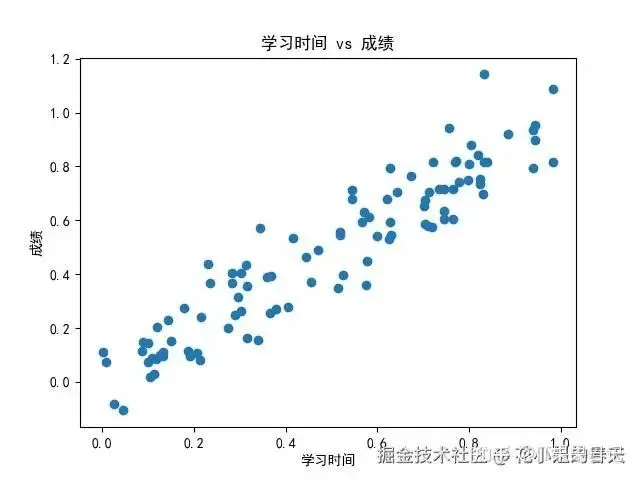
4. 散点图(Scatter Plot)

两个变量之间的关系,看是否相关。

importmatplotlib.pyplotaspltimportnumpyasnpplt.rcParams['font.family']='SimHei'# 黑体支持中文x=np.random.rand(100)y=x+np.random.normal(0,0.1,100)plt.scatter(x,y)plt.title('学习时间 vs 成绩')plt.xlabel('学习时间')plt.ylabel('成绩')plt.show()
image.png

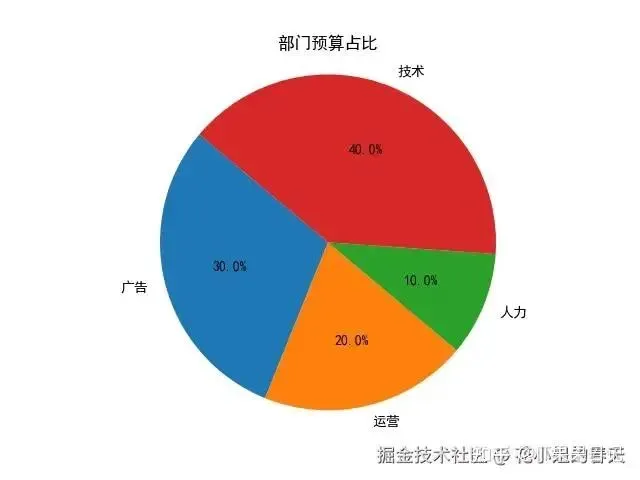
5. 饼图(Pie Chart)

占比图!让老板看谁吃的预算多

importmatplotlib.pyplotaspltplt.rcParams['font.family']='SimHei'# 黑体支持中文labels=['广告','运营','人力','技术']sizes=[30,20,10,40]plt.pie(sizes,labels=labels,autopct='%1.1f%%',startangle=140)plt.title('部门预算占比')plt.axis('equal')plt.show()
image.png

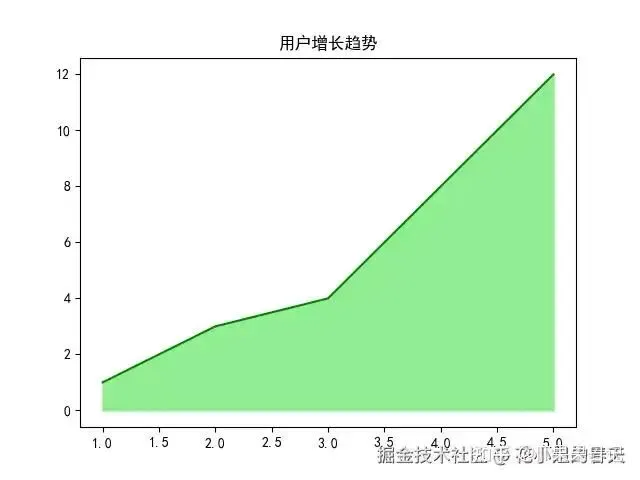
6. 面积图(Area Chart)

比折线图多了一点“填充感”,也更直观。

importmatplotlib.pyplotaspltplt.rcParams['font.family']='SimHei'# 黑体支持中文x=range(1,6)y=[1,3,4,8,12]plt.fill_between(x,y,color="lightgreen")plt.plot(x,y,color="green")plt.title('用户增长趋势')plt.show()
image.png

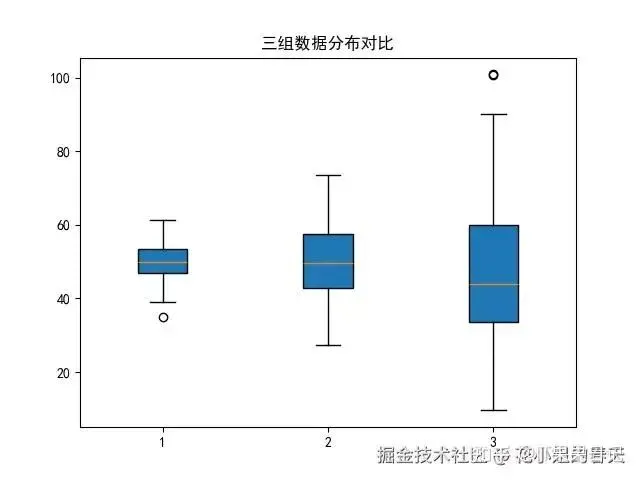
7. 箱线图(Box Plot)

统计分析必备,帮你看离群值、上下四分位这些。

importmatplotlib.pyplotaspltimportnumpyasnpplt.rcParams['font.family']='SimHei'# 黑体支持中文data=[np.random.normal(50,std,100)forstdin(5,10,20)]plt.boxplot(data,patch_artist=True)plt.title('三组数据分布对比')plt.show()
image.png

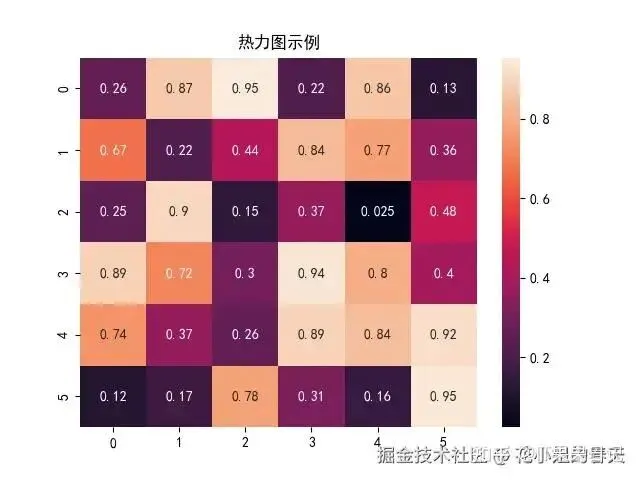
8. 热力图(Heatmap)

用颜色来表现数值大小,强烈推荐结合seaborn

importmatplotlib.pyplotaspltimportnumpyasnpimportseabornassnsplt.rcParams['font.family']='SimHei'# 黑体支持中文data=np.random.rand(6,6)sns.heatmap(data,annot=True)plt.title('热力图示例')plt.show()
image.png

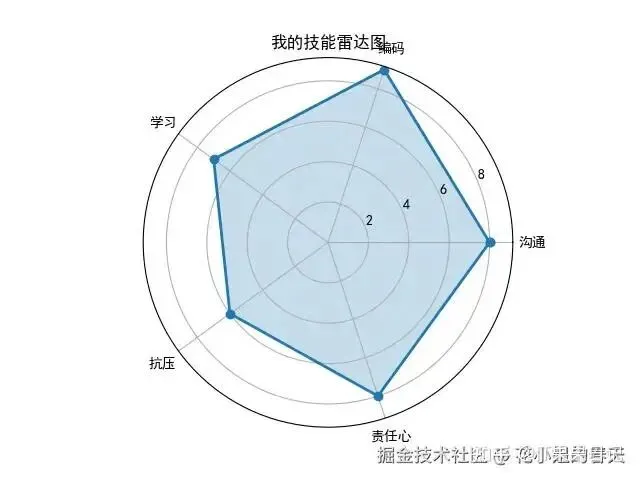
9. 雷达图(Radar Chart)

多维指标一图展示,简历必备,别说我没告诉你

importmatplotlib.pyplotaspltimportnumpyasnpplt.rcParams['font.family']='SimHei'# 黑体支持中文labels=['沟通','编码','学习','抗压','责任心']stats=[8,9,7,6,8]angles=np.linspace(0,2*np.pi,len(labels),endpoint=False).tolist()stats+=stats[:1]angles+=angles[:1]fig,ax=plt.subplots(subplot_kw={'polar':True})ax.plot(angles,stats,'o-',linewidth=2)ax.fill(angles,stats,alpha=0.25)ax.set_thetagrids(np.degrees(angles[:-1]),labels)plt.title('我的技能雷达图')plt.show()
image.png

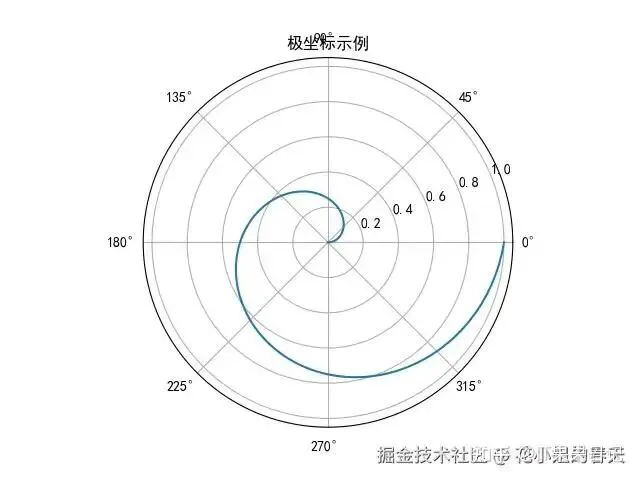
10. 极坐标图(Polar Chart)

散点+极坐标,视觉冲击感超强。

importmatplotlib.pyplotaspltimportnumpyasnpplt.rcParams['font.family']='SimHei'# 黑体支持中文r=np.linspace(0,1,100)theta=2*np.pi*rplt.polar(theta,r)plt.title('极坐标示例')plt.show()
image.png

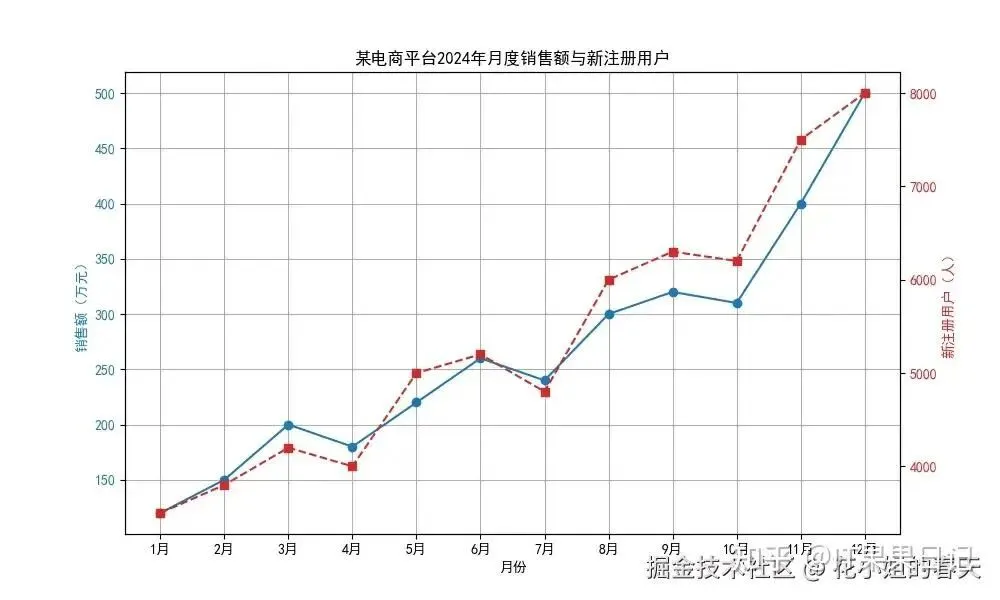
11. 双轴图(Dual Axis)

两个Y轴,两个变量共用一个X轴,超实用。

importmatplotlib.pyplotaspltplt.rcParams['font.family']='SimHei'# 黑体支持中文# 数据months=['1月','2月','3月','4月','5月','6月','7月','8月','9月','10月','11月','12月']sales=[120,150,200,180,220,260,240,300,320,310,400,500]new_users=[3500,3800,4200,4000,5000,5200,4800,6000,6300,6200,7500,8000]fig,ax1=plt.subplots(figsize=(10,6))# 左轴:销售额color='tab:blue'ax1.set_xlabel('月份')ax1.set_ylabel('销售额(万元)',color=color)ax1.plot(months,sales,color=color,marker='o',label='销售额')ax1.tick_params(axis='y',labelcolor=color)# 右轴:新注册用户ax2=ax1.twinx()color='tab:red'ax2.set_ylabel('新注册用户(人)',color=color)ax2.plot(months,new_users,color=color,marker='s',linestyle='--',label='新注册用户')ax2.tick_params(axis='y',labelcolor=color)plt.title('某电商平台2024年月度销售额与新注册用户')ax1.grid(True)plt.show()
image.png

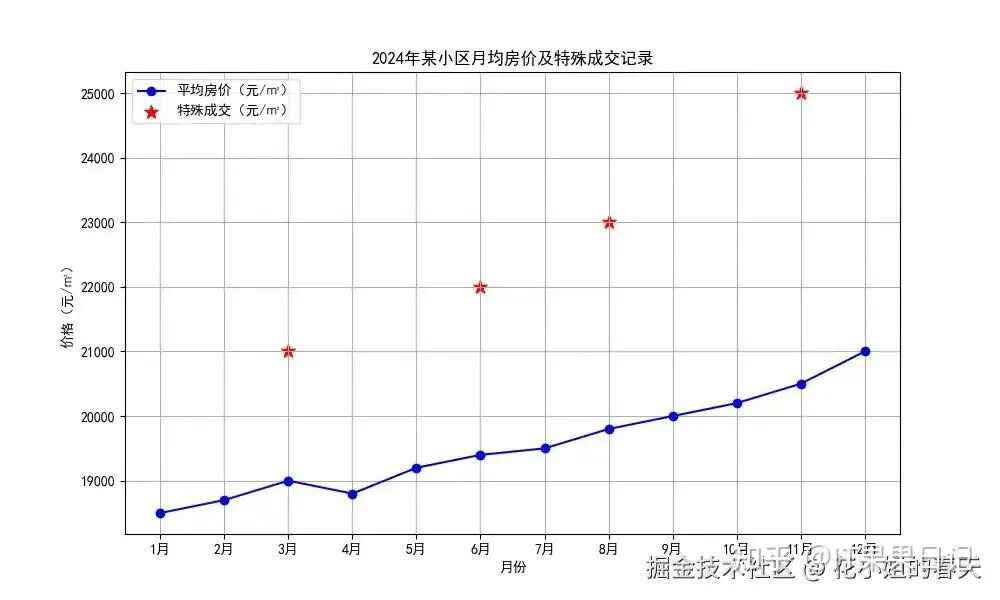
12. 折线图+散点图混搭(Line + Scatter)

增强折线图表达力的小技巧!

importmatplotlib.pyplotaspltplt.rcParams['font.family']='SimHei'# 黑体支持中文# 折线数据months=['1月','2月','3月','4月','5月','6月','7月','8月','9月','10月','11月','12月']avg_price=[18500,18700,19000,18800,19200,19400,19500,19800,20000,20200,20500,21000]# 散点数据special_months=['3月','6月','8月','11月']special_price=[21000,22000,23000,25000]fig,ax=plt.subplots(figsize=(10,6))# 画折线图ax.plot(months,avg_price,color='blue',marker='o',label='平均房价(元/㎡)')# 画散点图ax.scatter(special_months,special_price,color='red',s=100,marker='*',label='特殊成交(元/㎡)')plt.title('2024年某小区月均房价及特殊成交记录')plt.xlabel('月份')plt.ylabel('价格(元/㎡)')plt.legend()plt.grid(True)plt.show()
image.png

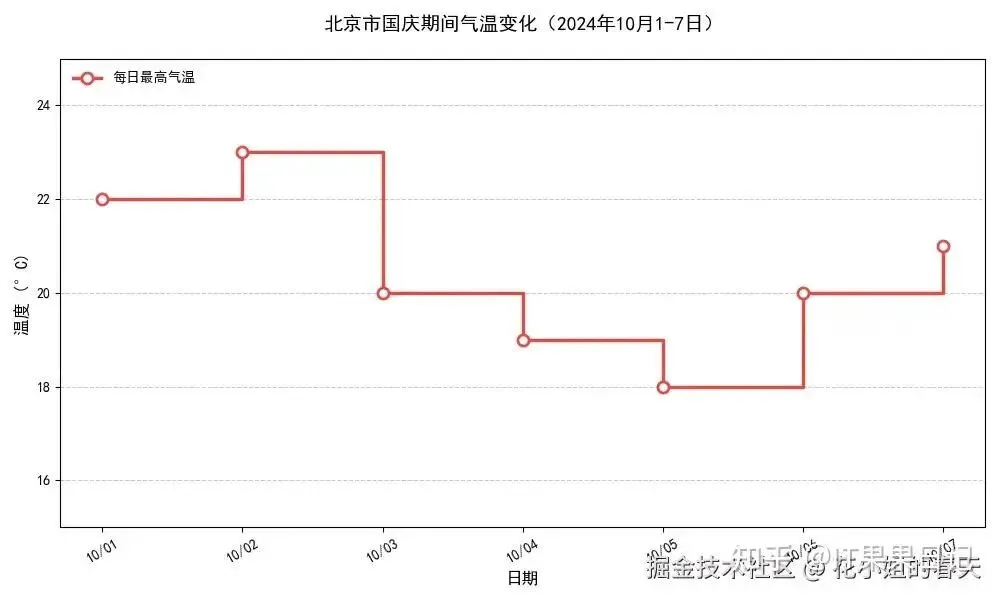
13. 阶梯图(Step Plot)

适合描述“突变”的情况,比如电费、分段计价那种。

importmatplotlib.pyplotaspltfromdatetimeimportdatetimeimportmatplotlib.datesasmdatesplt.rcParams['font.family']='SimHei'# 黑体支持中文# 数据dates=['2023-10-01','2023-10-02','2023-10-03','2023-10-04','2023-10-05','2023-10-06','2023-10-07']temperatures=[22,23,20,19,18,20,21]# 转换日期格式dates=[datetime.strptime(d,'%Y-%m-%d')fordindates]# 创建图表plt.figure(figsize=(10,6))# 绘制阶梯图(post样式的阶梯变化)plt.step(dates,temperatures,where='post',# 阶梯在数据点后变化color='#E64A45',# 中国红配色linewidth=2.5,marker='o',# 添加数据点标记markersize=8,markerfacecolor='white',markeredgewidth=2,label='每日最高气温')# 添加标题和标签plt.title('北京市国庆期间气温变化(2024年10月1-7日)',fontsize=14,pad=20)plt.xlabel('日期',fontsize=12)plt.ylabel('温度 (°C)',fontsize=12)# 配置坐标轴plt.gca().xaxis.set_major_formatter(mdates.DateFormatter('%m/%d'))plt.gca().xaxis.set_major_locator(mdates.DayLocator())plt.xticks(rotation=30)plt.ylim(15,25)# 添加辅助元素plt.grid(axis='y',linestyle='--',alpha=0.7)plt.tight_layout()plt.legend(loc='upper left',frameon=False)plt.show()
image.png

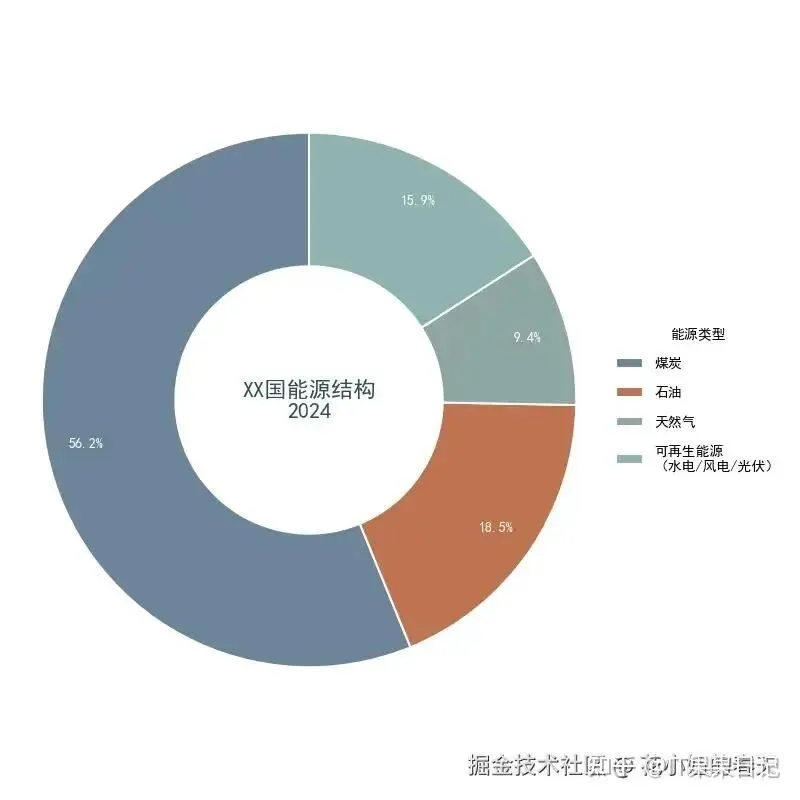
14. 饼图 + 中心洞(环形图)

视觉更舒服,直接用wedgeprops搞定。

importmatplotlib.pyplotaspltplt.rcParams['font.family']='SimHei'# 黑体支持中文# 数据categories=['煤炭','石油','天然气','可再生能源\n(水电/风电/光伏)']percentages=[56.2,18.5,9.4,15.9]colors=['#6D8698',# 灰蓝(煤炭)'#BE7352',# 棕褐(石油)'#8FA6A2',# 青灰(天然气)'#8FB3B0'# 浅绿(可再生能源)]# 创建带中心洞的环形图fig,ax=plt.subplots(figsize=(8,8))wedges,texts,autotexts=ax.pie(percentages,wedgeprops={'width':0.5,# 环宽=半径的50%'edgecolor':'white',# 白色分割线'linewidth':1.5# 分割线粗细},colors=colors,startangle=90,# 起始角度(12点方向)autopct='%1.1f%%',# 百分比格式pctdistance=0.85# 百分比标签位置(0.85倍半径))# 设置百分比标签样式forautotextinautotexts:autotext.set_color('white')autotext.set_fontsize(10)autotext.set_weight('bold')# 添加中心标题ax.text(0,0,'XX国能源结构\n2024',ha='center',va='center',fontsize=16,fontweight='bold',color='#2F4F4F')# 添加图例(带透明度效果)legend=ax.legend(wedges,categories,title="能源类型",loc="center left",bbox_to_anchor=(1,0,0.5,1),frameon=False,labelspacing=1.2)legend.get_title().set_fontweight('bold')# 设置长宽比保证正圆形ax.axis('equal')plt.tight_layout()plt.show()
image.png

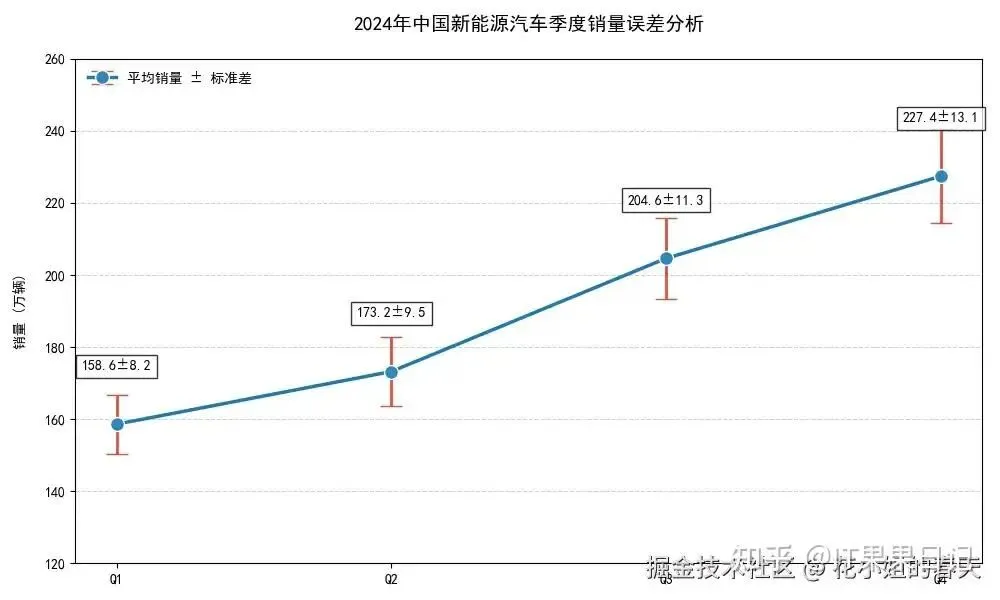
15. 误差线图(Error Bar

实验、分析场景常用。

importmatplotlib.pyplotaspltplt.rcParams['font.family']='SimHei'# 黑体支持中文# 数据 (单位:万辆)quarters=['Q1','Q2','Q3','Q4']avg_sales=[158.6,173.2,204.6,227.4]# 季度平均销量std_dev=[8.2,9.5,11.3,13.1]# 各季度销量标准差# 创建带误差线的散点图plt.figure(figsize=(10,6))# 主绘图语句main_line=plt.errorbar(x=quarters,y=avg_sales,yerr=std_dev,# 误差线数据fmt='o-',# 点线组合markersize=10,markerfacecolor='#2E86C1',markeredgecolor='white',elinewidth=2,# 误差线粗细ecolor='#E74C3C',# 误差线颜色capsize=8,# 误差线顶端横杠长度linewidth=2.5,label='平均销量 ± 标准差')# 添加数据标签fori,(v,s)inenumerate(zip(avg_sales,std_dev)):plt.text(i,v+15,f'{v}±{s}',ha='center',fontsize=10,bbox=dict(facecolor='white',alpha=0.8))# 可视化优化plt.title('2024年中国新能源汽车季度销量误差分析',fontsize=14,pad=20)plt.ylabel('销量 (万辆)',labelpad=12)plt.ylim(120,260)plt.grid(axis='y',linestyle='--',alpha=0.6)# 添加图例leg=plt.legend(loc='upper left')leg.get_frame().set_linewidth(0.0)# 移除图例边框plt.tight_layout()plt.show()
image.png

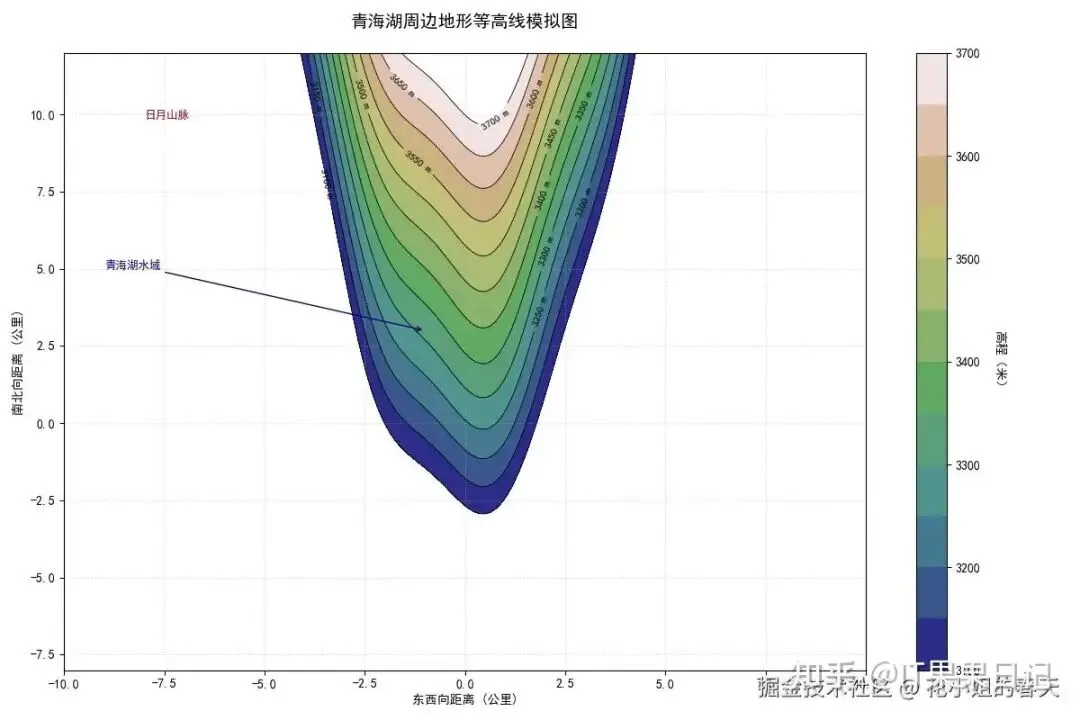
16. 等高线图(Contour Plot

展示函数值随二维变量变化的趋势。

importmatplotlib.pyplotaspltfrommatplotlibimportcmimportnumpyasnpplt.rcParams['font.family']='SimHei'# 黑体支持中文plt.rcParams['axes.unicode_minus']=False# 解决负数乱码问题# 生成地形数据(模拟青海湖周边区域 20x20公里)x=np.linspace(-10,10,200)y=np.linspace(-8,12,200)X,Y=np.meshgrid(x,y)# 高程函数(包含湖盆与山脉特征)Z=3200+50*Y-40*X**2+30*np.sin(2*X)+45*np.exp(-(X**2+Y**2)/25)# 创建画布plt.figure(figsize=(12,8))# 绘制填充等高线cs=plt.contourf(X,Y,Z,levels=np.linspace(3100,3700,13),cmap=cm.gist_earth,alpha=0.85)# 绘制等高线c_lines=plt.contour(X,Y,Z,levels=np.linspace(3100,3700,13),colors='black',linewidths=0.6)# 添加标签plt.clabel(c_lines,inline=True,fontsize=8,fmt='%d m')# 添加高程标注# 添加色标cbar=plt.colorbar(cs)cbar.set_label('高程(米)',rotation=270,labelpad=20)# 设置地形图元素plt.title('青海湖周边地形等高线模拟图',pad=20,fontsize=14)plt.xlabel('东西向距离 (公里)')plt.ylabel('南北向距离 (公里)')plt.grid(linestyle=':',alpha=0.5)# 标注特征区域plt.text(-8,10,'日月山脉',ha='left',va='center',fontsize=9,color='#8B0000')plt.annotate('青海湖水域',xy=(-1,3),xytext=(-9,5),arrowprops=dict(arrowstyle="->",color='navy'),fontsize=9,color='#00008B')plt.tight_layout()plt.show()
image.png

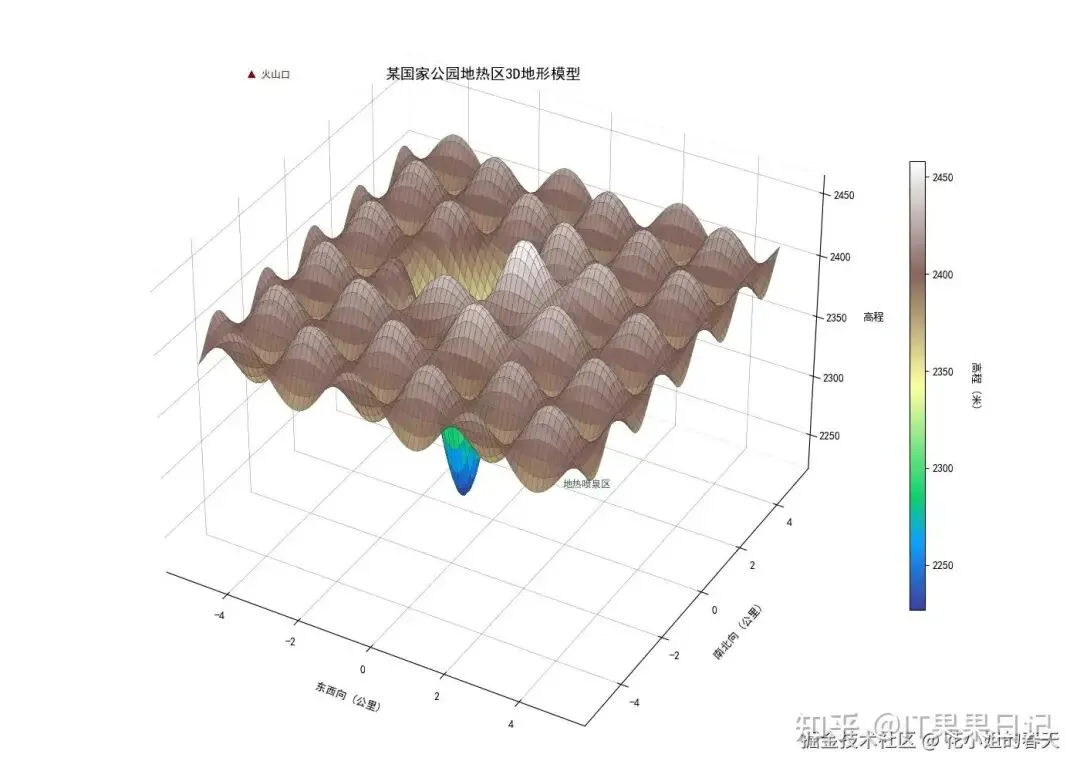
17. 3D 曲面图(3D Surface

你没看错,Matplotlib也能画3D!

importmatplotlib.pyplotaspltfrommatplotlibimportcmimportnumpyasnpplt.rcParams['font.family']='SimHei'# 黑体支持中文 plt.rcParams['axes.unicode_minus'] = False # 解决负数乱码问题 # 生成真实地形数据(模拟黄石公园44.5°N, 110.5°W区域) x = np.linspace(-5, 5, 150) y = np.linspace(-5, 5, 150) X, Y = np.meshgrid(x, y) # 高程函数(包含火山口与地热区特征) Z = 2400 + 50*np.exp(-0.3*(X**2 + Y**2)) - 200*np.exp(-0.8*((X+1)**2 + (Y-0.5)**2))  Z += 30*np.sin(2*X) * np.cos(3*Y) # 创建3D画布 fig = plt.figure(figsize=(14, 10)) ax = fig.add_subplot(111, projection='3d') # 绘制曲面 surf = ax.plot_surface(X, Y, Z,                        cmap=cm.terrain,    # 地形专用色标                       rstride=2,         # 行采样步长                       cstride=2,         # 列采样步长                       alpha=0.95,                       antialiased=True,                       linewidth=0.2,                       edgecolor='#333333') # 添加色标 cbar = fig.colorbar(surf, shrink=0.6, aspect=30) cbar.set_label('高程 (米)', rotation=270, labelpad=25) # 设置观测角度 ax.view_init(elev=35, azim=300)  # 35度俯角,300度方位角 # 添加标注 ax.set_xlabel('东西向 (公里)', labelpad=12) ax.set_ylabel('南北向 (公里)', labelpad=12) ax.set_zlabel('高程', labelpad=12) ax.set_title('某国家公园地热区3D地形模型', y=0.98, fontsize=14) # 添加地形特征标注 ax.text(-4, -4, 2600, '▲ 火山口', color='#8B0000', fontsize=9) ax.text(1.5, 0.8, 2250, '地热喷泉区', color='#2F4F4F', fontsize=9) # 优化显示效果 ax.xaxis.pane.fill = False ax.yaxis.pane.fill = False ax.zaxis.pane.fill = False ax.xaxis._axinfo["grid"].update({"linewidth":0.3, "color" : "#666666"}) ax.yaxis._axinfo["grid"].update({"linewidth":0.3, "color" : "#666666"}) ax.zaxis._axinfo["grid"].update({"linewidth":0.3, "color" : "#666666"}) plt.tight_layout() pltimport matplotlib.pyplot as pltfrommatplotlibimportcmimportnumpyasnpplt.rcParams['font.family']='SimHei'# 黑体支持中文plt.rcParams['axes.unicode_minus']=False# 解决负数乱码问题# 生成真实地形数据(模拟黄石公园44.5°N, 110.5°W区域)x=np.linspace(-5,5,150)y=np.linspace(-5,5,150)X,Y=np.meshgrid(x,y)# 高程函数(包含火山口与地热区特征)Z=2400+50*np.exp(-0.3*(X**2+Y**2))-200*np.exp(-0.8*((X+1)**2+(Y-0.5)**2))Z+=30*np.sin(2*X)*np.cos(3*Y)# 创建3D画布fig=plt.figure(figsize=(14,10))ax=fig.add_subplot(111,projection='3d')# 绘制曲面surf=ax.plot_surface(X,Y,Z,cmap=cm.terrain,# 地形专用色标rstride=2,# 行采样步长cstride=2,# 列采样步长alpha=0.95,antialiased=True,linewidth=0.2,edgecolor='#333333')# 添加色标cbar=fig.colorbar(surf,shrink=0.6,aspect=30)cbar.set_label('高程 (米)',rotation=270,labelpad=25)# 设置观测角度ax.view_init(elev=35,azim=300)# 35度俯角,300度方位角# 添加标注ax.set_xlabel('东西向 (公里)',labelpad=12)ax.set_ylabel('南北向 (公里)',labelpad=12)ax.set_zlabel('高程',labelpad=12)ax.set_title('某国家公园地热区3D地形模型',y=0.98,fontsize=14)# 添加地形特征标注ax.text(-4,-4,2600,'▲ 火山口',color='#8B0000',fontsize=9)ax.text(1.5,0.8,2250,'地热喷泉区',color='#2F4F4F',fontsize=9)# 优化显示效果ax.xaxis.pane.fill=Falseax.yaxis.pane.fill=Falseax.zaxis.pane.fill=Falseax.xaxis._axinfo["grid"].update({"linewidth":0.3,"color":"#666666"})ax.yaxis._axinfo["grid"].update({"linewidth":0.3,"color":"#666666"})ax.zaxis._axinfo["grid"].update({"linewidth":0.3,"color":"#666666"})plt.tight_layout()plt.show()
image.png

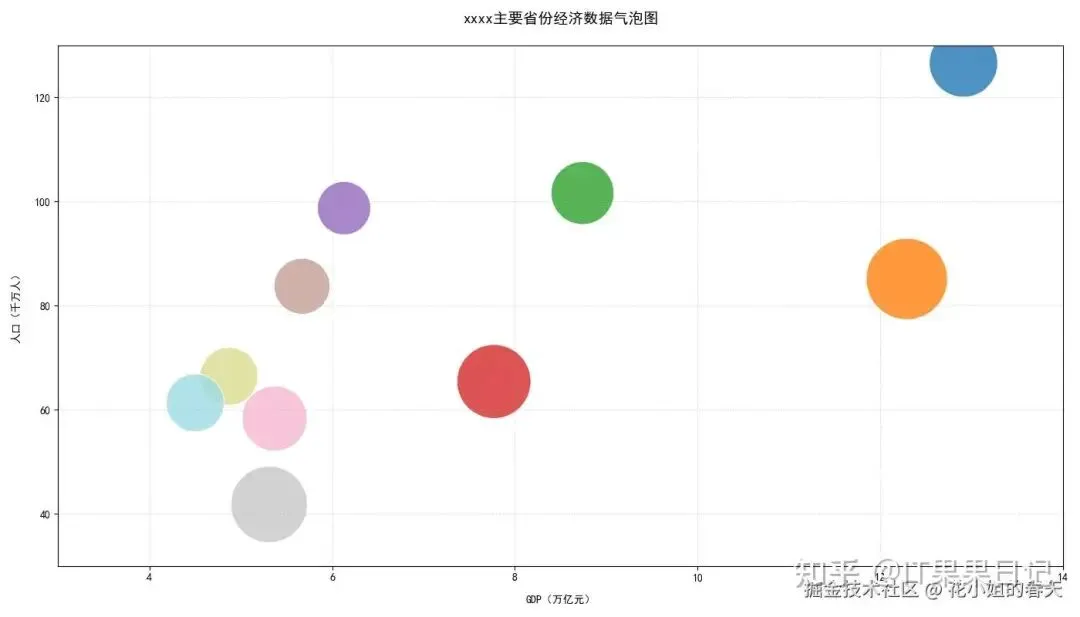
18. 气泡图(Bubble Plot)

其实是散点图加强版,用大小表示变量大小。

importmatplotlib.pyplotaspltimportnumpyasnpplt.rcParams['font.family']='SimHei'# 黑体支持中文plt.rcParams['axes.unicode_minus']=False# 解决负数乱码问题# 各省份数据(GDP单位:万亿元,人口单位:千万人)provinces=['广东','江苏','山东','浙江','河南','四川','湖北','福建','湖南','安徽']gdp=[12.91,12.29,8.74,7.77,6.13,5.67,5.37,5.31,4.87,4.50]population=[126.6,85.1,101.6,65.4,98.7,83.7,58.3,41.8,66.4,61.3]per_capita_gdp=[10.2,14.4,8.6,11.9,6.2,6.8,9.2,12.7,7.3,7.3]# 单位:万元/人# 创建画布plt.figure(figsize=(14,8))# 绘制气泡图scatter=plt.scatter(x=gdp,y=population,s=np.array(per_capita_gdp)*400,# 气泡大小缩放c=np.arange(len(provinces)),# 颜色映射cmap='tab20',alpha=0.8,edgecolors='white',linewidths=0.8)# 设置坐标轴plt.title('xxxx主要省份经济数据气泡图',fontsize=14,pad=20)plt.xlabel('GDP(万亿元)',labelpad=12)plt.ylabel('人口(千万人)',labelpad=12)plt.grid(linestyle=':',alpha=0.6)# 设置坐标范围plt.xlim(3,14)plt.ylim(30,130)plt.tight_layout()plt.show()
image.png

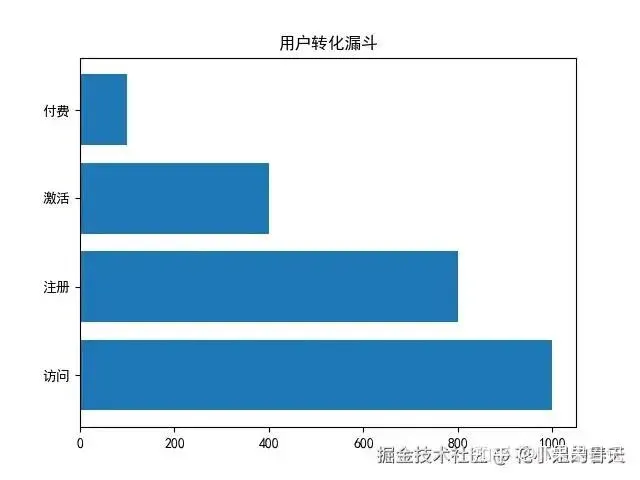
19. 漏斗图(Funnel Chart)

展示“转化率”的神器。

importmatplotlib.pyplotaspltplt.rcParams['font.family']='SimHei'# 黑体支持中文plt.rcParams['axes.unicode_minus']=False# 解决负数乱码问题labels=['访问','注册','激活','付费']values=[1000,800,400,100]plt.barh(labels,values)plt.title('用户转化漏斗')plt.show()
image.png

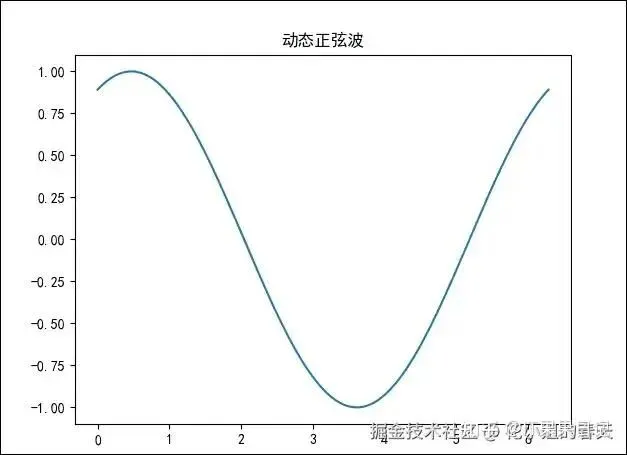
20. 动态图(Animation)

别说静态图无聊,Matplotlib也能动起来!

importmatplotlib.pyplotaspltimportnumpyasnpfrommatplotlibimportanimationplt.rcParams['font.family']='SimHei'# 黑体支持中文plt.rcParams['axes.unicode_minus']=False# 解决负数乱码问题fig,ax=plt.subplots()x=np.linspace(0,2*np.pi,128)line,=ax.plot(x,np.sin(x))defupdate(i):line.set_ydata(np.sin(x+i/10.0))returnline,ani=animation.FuncAnimation(fig,update,frames=100,interval=50)plt.title('动态正弦波')plt.show()
正弦.gif

原文链接:https://zhuanlan.zhihu.com/p/1906641913332895760

版权声明

来源:【IT果果日记】知乎文章内容仅做学术分享之用,不代表本号观点,版权归原作者所有,若涉及侵权等行为,请联系我们删除,万分感谢!

最新文章

随机文章

基本 文件 流程 错误 SQL 调试
  1. 请求信息 : 2026-03-27 15:04:38 HTTP/2.0 GET : https://f.mffb.com.cn/a/478490.html
  2. 运行时间 : 0.101400s [ 吞吐率:9.86req/s ] 内存消耗:4,897.63kb 文件加载:140
  3. 缓存信息 : 0 reads,0 writes
  4. 会话信息 : SESSION_ID=5c2910f429cd5f8f8cafc6de8c1b47ad
  1. /yingpanguazai/ssd/ssd1/www/f.mffb.com.cn/public/index.php ( 0.79 KB )
  2. /yingpanguazai/ssd/ssd1/www/f.mffb.com.cn/vendor/autoload.php ( 0.17 KB )
  3. /yingpanguazai/ssd/ssd1/www/f.mffb.com.cn/vendor/composer/autoload_real.php ( 2.49 KB )
  4. /yingpanguazai/ssd/ssd1/www/f.mffb.com.cn/vendor/composer/platform_check.php ( 0.90 KB )
  5. /yingpanguazai/ssd/ssd1/www/f.mffb.com.cn/vendor/composer/ClassLoader.php ( 14.03 KB )
  6. /yingpanguazai/ssd/ssd1/www/f.mffb.com.cn/vendor/composer/autoload_static.php ( 4.90 KB )
  7. /yingpanguazai/ssd/ssd1/www/f.mffb.com.cn/vendor/topthink/think-helper/src/helper.php ( 8.34 KB )
  8. /yingpanguazai/ssd/ssd1/www/f.mffb.com.cn/vendor/topthink/think-validate/src/helper.php ( 2.19 KB )
  9. /yingpanguazai/ssd/ssd1/www/f.mffb.com.cn/vendor/topthink/think-orm/src/helper.php ( 1.47 KB )
  10. /yingpanguazai/ssd/ssd1/www/f.mffb.com.cn/vendor/topthink/think-orm/stubs/load_stubs.php ( 0.16 KB )
  11. /yingpanguazai/ssd/ssd1/www/f.mffb.com.cn/vendor/topthink/framework/src/think/Exception.php ( 1.69 KB )
  12. /yingpanguazai/ssd/ssd1/www/f.mffb.com.cn/vendor/topthink/think-container/src/Facade.php ( 2.71 KB )
  13. /yingpanguazai/ssd/ssd1/www/f.mffb.com.cn/vendor/symfony/deprecation-contracts/function.php ( 0.99 KB )
  14. /yingpanguazai/ssd/ssd1/www/f.mffb.com.cn/vendor/symfony/polyfill-mbstring/bootstrap.php ( 8.26 KB )
  15. /yingpanguazai/ssd/ssd1/www/f.mffb.com.cn/vendor/symfony/polyfill-mbstring/bootstrap80.php ( 9.78 KB )
  16. /yingpanguazai/ssd/ssd1/www/f.mffb.com.cn/vendor/symfony/var-dumper/Resources/functions/dump.php ( 1.49 KB )
  17. /yingpanguazai/ssd/ssd1/www/f.mffb.com.cn/vendor/topthink/think-dumper/src/helper.php ( 0.18 KB )
  18. /yingpanguazai/ssd/ssd1/www/f.mffb.com.cn/vendor/symfony/var-dumper/VarDumper.php ( 4.30 KB )
  19. /yingpanguazai/ssd/ssd1/www/f.mffb.com.cn/vendor/topthink/framework/src/think/App.php ( 15.30 KB )
  20. /yingpanguazai/ssd/ssd1/www/f.mffb.com.cn/vendor/topthink/think-container/src/Container.php ( 15.76 KB )
  21. /yingpanguazai/ssd/ssd1/www/f.mffb.com.cn/vendor/psr/container/src/ContainerInterface.php ( 1.02 KB )
  22. /yingpanguazai/ssd/ssd1/www/f.mffb.com.cn/app/provider.php ( 0.19 KB )
  23. /yingpanguazai/ssd/ssd1/www/f.mffb.com.cn/vendor/topthink/framework/src/think/Http.php ( 6.04 KB )
  24. /yingpanguazai/ssd/ssd1/www/f.mffb.com.cn/vendor/topthink/think-helper/src/helper/Str.php ( 7.29 KB )
  25. /yingpanguazai/ssd/ssd1/www/f.mffb.com.cn/vendor/topthink/framework/src/think/Env.php ( 4.68 KB )
  26. /yingpanguazai/ssd/ssd1/www/f.mffb.com.cn/app/common.php ( 0.03 KB )
  27. /yingpanguazai/ssd/ssd1/www/f.mffb.com.cn/vendor/topthink/framework/src/helper.php ( 18.78 KB )
  28. /yingpanguazai/ssd/ssd1/www/f.mffb.com.cn/vendor/topthink/framework/src/think/Config.php ( 5.54 KB )
  29. /yingpanguazai/ssd/ssd1/www/f.mffb.com.cn/config/app.php ( 0.95 KB )
  30. /yingpanguazai/ssd/ssd1/www/f.mffb.com.cn/config/cache.php ( 0.78 KB )
  31. /yingpanguazai/ssd/ssd1/www/f.mffb.com.cn/config/console.php ( 0.23 KB )
  32. /yingpanguazai/ssd/ssd1/www/f.mffb.com.cn/config/cookie.php ( 0.56 KB )
  33. /yingpanguazai/ssd/ssd1/www/f.mffb.com.cn/config/database.php ( 2.48 KB )
  34. /yingpanguazai/ssd/ssd1/www/f.mffb.com.cn/vendor/topthink/framework/src/think/facade/Env.php ( 1.67 KB )
  35. /yingpanguazai/ssd/ssd1/www/f.mffb.com.cn/config/filesystem.php ( 0.61 KB )
  36. /yingpanguazai/ssd/ssd1/www/f.mffb.com.cn/config/lang.php ( 0.91 KB )
  37. /yingpanguazai/ssd/ssd1/www/f.mffb.com.cn/config/log.php ( 1.35 KB )
  38. /yingpanguazai/ssd/ssd1/www/f.mffb.com.cn/config/middleware.php ( 0.19 KB )
  39. /yingpanguazai/ssd/ssd1/www/f.mffb.com.cn/config/route.php ( 1.89 KB )
  40. /yingpanguazai/ssd/ssd1/www/f.mffb.com.cn/config/session.php ( 0.57 KB )
  41. /yingpanguazai/ssd/ssd1/www/f.mffb.com.cn/config/trace.php ( 0.34 KB )
  42. /yingpanguazai/ssd/ssd1/www/f.mffb.com.cn/config/view.php ( 0.82 KB )
  43. /yingpanguazai/ssd/ssd1/www/f.mffb.com.cn/app/event.php ( 0.25 KB )
  44. /yingpanguazai/ssd/ssd1/www/f.mffb.com.cn/vendor/topthink/framework/src/think/Event.php ( 7.67 KB )
  45. /yingpanguazai/ssd/ssd1/www/f.mffb.com.cn/app/service.php ( 0.13 KB )
  46. /yingpanguazai/ssd/ssd1/www/f.mffb.com.cn/app/AppService.php ( 0.26 KB )
  47. /yingpanguazai/ssd/ssd1/www/f.mffb.com.cn/vendor/topthink/framework/src/think/Service.php ( 1.64 KB )
  48. /yingpanguazai/ssd/ssd1/www/f.mffb.com.cn/vendor/topthink/framework/src/think/Lang.php ( 7.35 KB )
  49. /yingpanguazai/ssd/ssd1/www/f.mffb.com.cn/vendor/topthink/framework/src/lang/zh-cn.php ( 13.70 KB )
  50. /yingpanguazai/ssd/ssd1/www/f.mffb.com.cn/vendor/topthink/framework/src/think/initializer/Error.php ( 3.31 KB )
  51. /yingpanguazai/ssd/ssd1/www/f.mffb.com.cn/vendor/topthink/framework/src/think/initializer/RegisterService.php ( 1.33 KB )
  52. /yingpanguazai/ssd/ssd1/www/f.mffb.com.cn/vendor/services.php ( 0.14 KB )
  53. /yingpanguazai/ssd/ssd1/www/f.mffb.com.cn/vendor/topthink/framework/src/think/service/PaginatorService.php ( 1.52 KB )
  54. /yingpanguazai/ssd/ssd1/www/f.mffb.com.cn/vendor/topthink/framework/src/think/service/ValidateService.php ( 0.99 KB )
  55. /yingpanguazai/ssd/ssd1/www/f.mffb.com.cn/vendor/topthink/framework/src/think/service/ModelService.php ( 2.04 KB )
  56. /yingpanguazai/ssd/ssd1/www/f.mffb.com.cn/vendor/topthink/think-trace/src/Service.php ( 0.77 KB )
  57. /yingpanguazai/ssd/ssd1/www/f.mffb.com.cn/vendor/topthink/framework/src/think/Middleware.php ( 6.72 KB )
  58. /yingpanguazai/ssd/ssd1/www/f.mffb.com.cn/vendor/topthink/framework/src/think/initializer/BootService.php ( 0.77 KB )
  59. /yingpanguazai/ssd/ssd1/www/f.mffb.com.cn/vendor/topthink/think-orm/src/Paginator.php ( 11.86 KB )
  60. /yingpanguazai/ssd/ssd1/www/f.mffb.com.cn/vendor/topthink/think-validate/src/Validate.php ( 63.20 KB )
  61. /yingpanguazai/ssd/ssd1/www/f.mffb.com.cn/vendor/topthink/think-orm/src/Model.php ( 23.55 KB )
  62. /yingpanguazai/ssd/ssd1/www/f.mffb.com.cn/vendor/topthink/think-orm/src/model/concern/Attribute.php ( 21.05 KB )
  63. /yingpanguazai/ssd/ssd1/www/f.mffb.com.cn/vendor/topthink/think-orm/src/model/concern/AutoWriteData.php ( 4.21 KB )
  64. /yingpanguazai/ssd/ssd1/www/f.mffb.com.cn/vendor/topthink/think-orm/src/model/concern/Conversion.php ( 6.44 KB )
  65. /yingpanguazai/ssd/ssd1/www/f.mffb.com.cn/vendor/topthink/think-orm/src/model/concern/DbConnect.php ( 5.16 KB )
  66. /yingpanguazai/ssd/ssd1/www/f.mffb.com.cn/vendor/topthink/think-orm/src/model/concern/ModelEvent.php ( 2.33 KB )
  67. /yingpanguazai/ssd/ssd1/www/f.mffb.com.cn/vendor/topthink/think-orm/src/model/concern/RelationShip.php ( 28.29 KB )
  68. /yingpanguazai/ssd/ssd1/www/f.mffb.com.cn/vendor/topthink/think-helper/src/contract/Arrayable.php ( 0.09 KB )
  69. /yingpanguazai/ssd/ssd1/www/f.mffb.com.cn/vendor/topthink/think-helper/src/contract/Jsonable.php ( 0.13 KB )
  70. /yingpanguazai/ssd/ssd1/www/f.mffb.com.cn/vendor/topthink/think-orm/src/model/contract/Modelable.php ( 0.09 KB )
  71. /yingpanguazai/ssd/ssd1/www/f.mffb.com.cn/vendor/topthink/framework/src/think/Db.php ( 2.88 KB )
  72. /yingpanguazai/ssd/ssd1/www/f.mffb.com.cn/vendor/topthink/think-orm/src/DbManager.php ( 8.52 KB )
  73. /yingpanguazai/ssd/ssd1/www/f.mffb.com.cn/vendor/topthink/framework/src/think/Log.php ( 6.28 KB )
  74. /yingpanguazai/ssd/ssd1/www/f.mffb.com.cn/vendor/topthink/framework/src/think/Manager.php ( 3.92 KB )
  75. /yingpanguazai/ssd/ssd1/www/f.mffb.com.cn/vendor/psr/log/src/LoggerTrait.php ( 2.69 KB )
  76. /yingpanguazai/ssd/ssd1/www/f.mffb.com.cn/vendor/psr/log/src/LoggerInterface.php ( 2.71 KB )
  77. /yingpanguazai/ssd/ssd1/www/f.mffb.com.cn/vendor/topthink/framework/src/think/Cache.php ( 4.92 KB )
  78. /yingpanguazai/ssd/ssd1/www/f.mffb.com.cn/vendor/psr/simple-cache/src/CacheInterface.php ( 4.71 KB )
  79. /yingpanguazai/ssd/ssd1/www/f.mffb.com.cn/vendor/topthink/think-helper/src/helper/Arr.php ( 16.63 KB )
  80. /yingpanguazai/ssd/ssd1/www/f.mffb.com.cn/vendor/topthink/framework/src/think/cache/driver/File.php ( 7.84 KB )
  81. /yingpanguazai/ssd/ssd1/www/f.mffb.com.cn/vendor/topthink/framework/src/think/cache/Driver.php ( 9.03 KB )
  82. /yingpanguazai/ssd/ssd1/www/f.mffb.com.cn/vendor/topthink/framework/src/think/contract/CacheHandlerInterface.php ( 1.99 KB )
  83. /yingpanguazai/ssd/ssd1/www/f.mffb.com.cn/app/Request.php ( 0.09 KB )
  84. /yingpanguazai/ssd/ssd1/www/f.mffb.com.cn/vendor/topthink/framework/src/think/Request.php ( 55.78 KB )
  85. /yingpanguazai/ssd/ssd1/www/f.mffb.com.cn/app/middleware.php ( 0.25 KB )
  86. /yingpanguazai/ssd/ssd1/www/f.mffb.com.cn/vendor/topthink/framework/src/think/Pipeline.php ( 2.61 KB )
  87. /yingpanguazai/ssd/ssd1/www/f.mffb.com.cn/vendor/topthink/think-trace/src/TraceDebug.php ( 3.40 KB )
  88. /yingpanguazai/ssd/ssd1/www/f.mffb.com.cn/vendor/topthink/framework/src/think/middleware/SessionInit.php ( 1.94 KB )
  89. /yingpanguazai/ssd/ssd1/www/f.mffb.com.cn/vendor/topthink/framework/src/think/Session.php ( 1.80 KB )
  90. /yingpanguazai/ssd/ssd1/www/f.mffb.com.cn/vendor/topthink/framework/src/think/session/driver/File.php ( 6.27 KB )
  91. /yingpanguazai/ssd/ssd1/www/f.mffb.com.cn/vendor/topthink/framework/src/think/contract/SessionHandlerInterface.php ( 0.87 KB )
  92. /yingpanguazai/ssd/ssd1/www/f.mffb.com.cn/vendor/topthink/framework/src/think/session/Store.php ( 7.12 KB )
  93. /yingpanguazai/ssd/ssd1/www/f.mffb.com.cn/vendor/topthink/framework/src/think/Route.php ( 23.73 KB )
  94. /yingpanguazai/ssd/ssd1/www/f.mffb.com.cn/vendor/topthink/framework/src/think/route/RuleName.php ( 5.75 KB )
  95. /yingpanguazai/ssd/ssd1/www/f.mffb.com.cn/vendor/topthink/framework/src/think/route/Domain.php ( 2.53 KB )
  96. /yingpanguazai/ssd/ssd1/www/f.mffb.com.cn/vendor/topthink/framework/src/think/route/RuleGroup.php ( 22.43 KB )
  97. /yingpanguazai/ssd/ssd1/www/f.mffb.com.cn/vendor/topthink/framework/src/think/route/Rule.php ( 26.95 KB )
  98. /yingpanguazai/ssd/ssd1/www/f.mffb.com.cn/vendor/topthink/framework/src/think/route/RuleItem.php ( 9.78 KB )
  99. /yingpanguazai/ssd/ssd1/www/f.mffb.com.cn/route/app.php ( 1.72 KB )
  100. /yingpanguazai/ssd/ssd1/www/f.mffb.com.cn/vendor/topthink/framework/src/think/facade/Route.php ( 4.70 KB )
  101. /yingpanguazai/ssd/ssd1/www/f.mffb.com.cn/vendor/topthink/framework/src/think/route/dispatch/Controller.php ( 4.74 KB )
  102. /yingpanguazai/ssd/ssd1/www/f.mffb.com.cn/vendor/topthink/framework/src/think/route/Dispatch.php ( 10.44 KB )
  103. /yingpanguazai/ssd/ssd1/www/f.mffb.com.cn/app/controller/Index.php ( 4.81 KB )
  104. /yingpanguazai/ssd/ssd1/www/f.mffb.com.cn/app/BaseController.php ( 2.05 KB )
  105. /yingpanguazai/ssd/ssd1/www/f.mffb.com.cn/vendor/topthink/think-orm/src/facade/Db.php ( 0.93 KB )
  106. /yingpanguazai/ssd/ssd1/www/f.mffb.com.cn/vendor/topthink/think-orm/src/db/connector/Mysql.php ( 5.44 KB )
  107. /yingpanguazai/ssd/ssd1/www/f.mffb.com.cn/vendor/topthink/think-orm/src/db/PDOConnection.php ( 52.47 KB )
  108. /yingpanguazai/ssd/ssd1/www/f.mffb.com.cn/vendor/topthink/think-orm/src/db/Connection.php ( 8.39 KB )
  109. /yingpanguazai/ssd/ssd1/www/f.mffb.com.cn/vendor/topthink/think-orm/src/db/ConnectionInterface.php ( 4.57 KB )
  110. /yingpanguazai/ssd/ssd1/www/f.mffb.com.cn/vendor/topthink/think-orm/src/db/builder/Mysql.php ( 16.58 KB )
  111. /yingpanguazai/ssd/ssd1/www/f.mffb.com.cn/vendor/topthink/think-orm/src/db/Builder.php ( 24.06 KB )
  112. /yingpanguazai/ssd/ssd1/www/f.mffb.com.cn/vendor/topthink/think-orm/src/db/BaseBuilder.php ( 27.50 KB )
  113. /yingpanguazai/ssd/ssd1/www/f.mffb.com.cn/vendor/topthink/think-orm/src/db/Query.php ( 15.71 KB )
  114. /yingpanguazai/ssd/ssd1/www/f.mffb.com.cn/vendor/topthink/think-orm/src/db/BaseQuery.php ( 45.13 KB )
  115. /yingpanguazai/ssd/ssd1/www/f.mffb.com.cn/vendor/topthink/think-orm/src/db/concern/TimeFieldQuery.php ( 7.43 KB )
  116. /yingpanguazai/ssd/ssd1/www/f.mffb.com.cn/vendor/topthink/think-orm/src/db/concern/AggregateQuery.php ( 3.26 KB )
  117. /yingpanguazai/ssd/ssd1/www/f.mffb.com.cn/vendor/topthink/think-orm/src/db/concern/ModelRelationQuery.php ( 20.07 KB )
  118. /yingpanguazai/ssd/ssd1/www/f.mffb.com.cn/vendor/topthink/think-orm/src/db/concern/ParamsBind.php ( 3.66 KB )
  119. /yingpanguazai/ssd/ssd1/www/f.mffb.com.cn/vendor/topthink/think-orm/src/db/concern/ResultOperation.php ( 7.01 KB )
  120. /yingpanguazai/ssd/ssd1/www/f.mffb.com.cn/vendor/topthink/think-orm/src/db/concern/WhereQuery.php ( 19.37 KB )
  121. /yingpanguazai/ssd/ssd1/www/f.mffb.com.cn/vendor/topthink/think-orm/src/db/concern/JoinAndViewQuery.php ( 7.11 KB )
  122. /yingpanguazai/ssd/ssd1/www/f.mffb.com.cn/vendor/topthink/think-orm/src/db/concern/TableFieldInfo.php ( 2.63 KB )
  123. /yingpanguazai/ssd/ssd1/www/f.mffb.com.cn/vendor/topthink/think-orm/src/db/concern/Transaction.php ( 2.77 KB )
  124. /yingpanguazai/ssd/ssd1/www/f.mffb.com.cn/vendor/topthink/framework/src/think/log/driver/File.php ( 5.96 KB )
  125. /yingpanguazai/ssd/ssd1/www/f.mffb.com.cn/vendor/topthink/framework/src/think/contract/LogHandlerInterface.php ( 0.86 KB )
  126. /yingpanguazai/ssd/ssd1/www/f.mffb.com.cn/vendor/topthink/framework/src/think/log/Channel.php ( 3.89 KB )
  127. /yingpanguazai/ssd/ssd1/www/f.mffb.com.cn/vendor/topthink/framework/src/think/event/LogRecord.php ( 1.02 KB )
  128. /yingpanguazai/ssd/ssd1/www/f.mffb.com.cn/vendor/topthink/think-helper/src/Collection.php ( 16.47 KB )
  129. /yingpanguazai/ssd/ssd1/www/f.mffb.com.cn/vendor/topthink/framework/src/think/facade/View.php ( 1.70 KB )
  130. /yingpanguazai/ssd/ssd1/www/f.mffb.com.cn/vendor/topthink/framework/src/think/View.php ( 4.39 KB )
  131. /yingpanguazai/ssd/ssd1/www/f.mffb.com.cn/vendor/topthink/framework/src/think/Response.php ( 8.81 KB )
  132. /yingpanguazai/ssd/ssd1/www/f.mffb.com.cn/vendor/topthink/framework/src/think/response/View.php ( 3.29 KB )
  133. /yingpanguazai/ssd/ssd1/www/f.mffb.com.cn/vendor/topthink/framework/src/think/Cookie.php ( 6.06 KB )
  134. /yingpanguazai/ssd/ssd1/www/f.mffb.com.cn/vendor/topthink/think-view/src/Think.php ( 8.38 KB )
  135. /yingpanguazai/ssd/ssd1/www/f.mffb.com.cn/vendor/topthink/framework/src/think/contract/TemplateHandlerInterface.php ( 1.60 KB )
  136. /yingpanguazai/ssd/ssd1/www/f.mffb.com.cn/vendor/topthink/think-template/src/Template.php ( 46.61 KB )
  137. /yingpanguazai/ssd/ssd1/www/f.mffb.com.cn/vendor/topthink/think-template/src/template/driver/File.php ( 2.41 KB )
  138. /yingpanguazai/ssd/ssd1/www/f.mffb.com.cn/vendor/topthink/think-template/src/template/contract/DriverInterface.php ( 0.86 KB )
  139. /yingpanguazai/ssd/ssd1/www/f.mffb.com.cn/runtime/temp/067d451b9a0c665040f3f1bdd3293d68.php ( 11.98 KB )
  140. /yingpanguazai/ssd/ssd1/www/f.mffb.com.cn/vendor/topthink/think-trace/src/Html.php ( 4.42 KB )
  1. CONNECT:[ UseTime:0.000782s ] mysql:host=127.0.0.1;port=3306;dbname=f_mffb;charset=utf8mb4
  2. SHOW FULL COLUMNS FROM `fenlei` [ RunTime:0.001008s ]
  3. SELECT * FROM `fenlei` WHERE `fid` = 0 [ RunTime:0.000337s ]
  4. SELECT * FROM `fenlei` WHERE `fid` = 63 [ RunTime:0.000310s ]
  5. SHOW FULL COLUMNS FROM `set` [ RunTime:0.000711s ]
  6. SELECT * FROM `set` [ RunTime:0.000241s ]
  7. SHOW FULL COLUMNS FROM `article` [ RunTime:0.000749s ]
  8. SELECT * FROM `article` WHERE `id` = 478490 LIMIT 1 [ RunTime:0.001018s ]
  9. UPDATE `article` SET `lasttime` = 1774595078 WHERE `id` = 478490 [ RunTime:0.015105s ]
  10. SELECT * FROM `fenlei` WHERE `id` = 66 LIMIT 1 [ RunTime:0.000281s ]
  11. SELECT * FROM `article` WHERE `id` < 478490 ORDER BY `id` DESC LIMIT 1 [ RunTime:0.000649s ]
  12. SELECT * FROM `article` WHERE `id` > 478490 ORDER BY `id` ASC LIMIT 1 [ RunTime:0.001175s ]
  13. SELECT * FROM `article` WHERE `id` < 478490 ORDER BY `id` DESC LIMIT 10 [ RunTime:0.000961s ]
  14. SELECT * FROM `article` WHERE `id` < 478490 ORDER BY `id` DESC LIMIT 10,10 [ RunTime:0.004307s ]
  15. SELECT * FROM `article` WHERE `id` < 478490 ORDER BY `id` DESC LIMIT 20,10 [ RunTime:0.003062s ]
0.103235s