Python中的字符串格式化基础和Prompt拼接
- 2026-09-10 12:22:27
变量注入 模板复用 格式约束 多轮上下文拼接 调试可视化 安全转义 动态生成结构化文本
而这些问题,本质上都和字符串格式化能力直接相关。
场景 1:动态构建 Prompt
下面是最基础的 Prompt 模板化:
role = "资深 Python 教练"audience = "有 1 年经验的开发者"topic = "f-string 与 format mini-language"prompt = f"""你现在扮演一名{role}。你的目标读者是:{audience}请系统讲解:{topic}要求:1. 有示例2. 有原理3. 有易错点"""print(prompt)
你现在扮演一名资深 Python 教练。
你的目标读者是:有 1 年经验的开发者
请系统讲解:f-string 与 format mini-language
要求:
1. 有示例
2. 有原理
3. 有易错点
场景 2:结构化输出要求
from datetime import datetimetitle = "Python 字符串格式化"word_limit = 2000today = datetime.now()prompt = f"""请写一篇公众号文章。标题:{title}日期:{today:%Y-%m-%d}字数要求:约 {word_limit:,} 字输出结构:1. 背景2. 历史演进3. 核心语法4. 实战案例5. 常见错误6. 总结"""print(prompt)
请写一篇公众号文章。
标题:Python 字符串格式化
日期:2026-06-20
字数要求:约 2,000 字
输出结构:
1. 背景
2. 历史演进
3. 核心语法
4. 实战案例
5. 常见错误
6. 总结
场景 3:调试 Prompt 内容
user_input = "请输出 JSON\n不要解释"print(f"{user_input=}")print(f"{user_input!r}")
user_input='请输出 JSON\n不要解释'
'请输出 JSON\n不要解释'
场景 4:结果报告生成
accuracy = 0.94321recall = 0.91234samples = 125000report = f"""模型评估结果:- Accuracy: {accuracy:.2%}- Recall: {recall:.2%}- Samples: {samples:,}"""print(report)
模型评估结果:
- Accuracy: 94.32%
- Recall: 91.23%
- Samples: 125,000
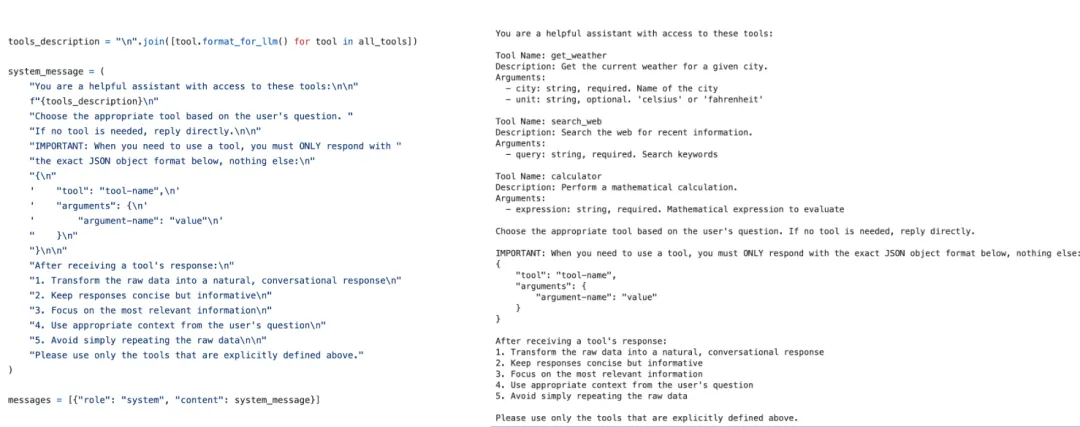
tools_description = "\n".join([tool.format_for_llm() for tool in all_tools])system_message = ("You are a helpful assistant with access to these tools:\n\n"f"{tools_description}\n""Choose the appropriate tool based on the user's question. ""If no tool is needed, reply directly.\n\n""IMPORTANT: When you need to use a tool, you must ONLY respond with ""the exact JSON object format below, nothing else:\n""{\n"' "tool": "tool-name",\n'' "arguments": {\n'' "argument-name": "value"\n'" }\n""}\n\n""After receiving a tool's response:\n""1. Transform the raw data into a natural, conversational response\n""2. Keep responses concise but informative\n""3. Focus on the most relevant information\n""4. Use appropriate context from the user's question\n""5. Avoid simply repeating the raw data\n\n""Please use only the tools that are explicitly defined above.")
# 输出结果预期You are a helpful assistant with access to these tools:Tool Name: get_weatherDescription: Get the current weather for a given city.Arguments:- city: string, required. Name of the city- unit: string, optional. 'celsius' or 'fahrenheit'Tool Name: search_webDescription: Search the web for recent information.Arguments:- query: string, required. Search keywordsTool Name: calculatorDescription: Perform a mathematical calculation.Arguments:- expression: string, required. Mathematical expression to evaluateChoose the appropriate tool based on the user's question. If no tool is needed, reply directly.IMPORTANT: When you need to use a tool, you must ONLY respond with the exact JSON object format below, nothing else:{"tool": "tool-name","arguments": {"argument-name": "value"}}After receiving a tool's response:1. Transform the raw data into a natural, conversational response2. Keep responses concise but informative3. Focus on the most relevant information4. Use appropriate context from the user's question5. Avoid simply repeating the raw dataPlease use only the tools that are explicitly defined above.
一、基于%的格式化
% 格式化是 Python 最早的字符串格式化方式,风格类似 C 语言里的 printf。
# 基本写法name = "Tom"age = 18print("name=%s age=%d" % (name, age))# 输出 name=Tom age=18
这里:
%s 表示字符串
%d 表示整数
后面的 (name, age) 按顺序填充进去
n = 255print("%d" % n) #255print("%x" % n) #ffprint("%o" % n) #377
# 右对齐print("%10s" % "Tom")# Tom# 左对齐print("%-10s" % "Tom")#Tom# 补零print("%05d" % 12)#00012# 浮点数精度pi = 3.1415926print("%.4f" % pi)#3.1416# 字典格式化data = {"language": "Python","number": 2}print("%(language)s has %(number)d quote types." % data)#Python has 2 quote types.
role = "资深 Python 教练"topic = "字符串格式化"prompt = "你是一名%s,请系统讲解%s。" % (role, topic)prompt# 你是一名资深 Python 教练,请系统讲解字符串格式化。
二、基于format()的格式化
str.format() 在 Python 2.6 引入。它比 % 格式化更强,也更统一。很多人把它当作过渡方案,但实际上,它非常重要,因为它直接指向了 Python 的 format 体系。
1. 基础写法
name = "Tom"age = 18print("name={} age={}".format(name, age))#name=Tom age=18
2. 指定位置参数
print("{1} {0}".format("A", "B"))# B A
这里 {1} 表示第二个参数,{0} 表示第一个参数。
3. 关键字参数
print("{name} {age}".format(name="Tom", age=18))# Tom 18
这比 % 更直观,尤其适合变量多的时候。
4. 属性访问
class User:def __init__(self):self.name = "Tom"u = User()print("{u.name}".format(u=u))# Tom
5. 字典访问
data = {"name": "Tom"}print("{data[name]}".format(data=data))#Tom
6. 复用参数
print("{0} loves {0}".format("Python"))#Python loves Python
这一点在 Prompt 模板里特别好用。
7. str.format() 在 Prompt 场景中的价值
template = """你是一名{role}。请围绕以下主题生成内容:主题:{topic}风格:{style}字数:{length}"""prompt = template.format(role="资深技术作者",topic="Python 字符串格式化",style="系统、清晰、深入",length="2000字")print(prompt)
你是一名资深技术作者。
请围绕以下主题生成内容:
主题:Python 字符串格式化
风格:系统、清晰、深入
字数:2000字
这种写法比%格式化清晰得多,因为变量名直接出现在模板里。
8. str.format() 的核心意义
很多人觉得 str.format() 被 f-string 取代了,但它并没有过时。它最大的价值在于:
1)模板和数据可以分离
template="你好,{name}。今天是 {date}。"result=template.format(name="张三", date="2026-06-20")result# 你好,张三。今天是 2026-06-20。
这在“模板字符串事先定义好,再晚一点填充数据”的场景里很有用。而 f-string 必须在定义字符串时直接嵌入表达式,不能先保存一个字符串模板,后续再填值。
2)它帮助你理解 Python 格式协议:很多 f-string 的格式说明,本质和 str.format() 是一套规则。比如:
"{:.2f}".format(3.14159)f"{3.14159:.2f}"
背后逻辑是统一的。
三、f-string格式化
f-string 是 Python 3.6 引入的格式化字符串字面量(Formatted String Literals)。这是现代 Python 中最推荐、最常用、最自然的字符串格式化方式。
1. 基础写法
name = "Tom"print(f"Hello {name}")# Hello Tom
2. 为什么 f-string 如此受欢迎?
1)可读性强
变量直接写在字符串内部,非常自然:
f"用户名:{name},年龄:{age}"# 用户名:Tom,年龄:18
2)支持表达式
a=10b=20print(f"{a + b}")# 30
3)支持函数调用、方法调用
def add(a, b):return a+bprint(f"{add(1,2)}")# 3name="tom"print(f"{name.upper()}")# TOM
4)调试神器:f"{var=}"(Python 3.8+)
x = 10print(f"{x=}")# x=10name = "Tom"age = 18print(f"{name=}, {age=}")# name='Tom', age=18role = "数据分析师"task = "总结销售趋势"print(f"{role=}, {task=}")#role='数据分析师', task='总结销售趋势'
3、转换符:!s、!r、!a
在格式化时,Python 允许你显式指定如何把对象转成字符串。
1)!s:调用 str()
text = "你好"print(f"{text!s}")# 你好
2. !r:调用 repr()
print(f"{text!r}")#'你好's = "hello\nworld"print(f"{s!s}")#hello#worldprint(f"{s!r}")# 'hello\nworld'
3. !a:调用 ascii()
text = "你好"print(f"{text!a}")# '\u4f60\u597d'
当你调试 Prompt 里的换行、制表符、空格时,!r 非常有用:
!r 非常有用:prompt = "第一行\n第二行\n"print(f"{prompt!r}")# '第一行\n第二行\n'
\n 是否真的存在,而不是被“显示效果”骗了。其实这些都是比较基础的知识,复习下做起来更轻松。from datetime import datetimetoday = datetime.now()prompt = f"""今天是 {today:%Y-%m-%d}。请基于今天的日期,生成一份工作日报模板。"""print(prompt)
今天是 2026-06-20。
请基于今天的日期,生成一份工作日报模板。
import pandas as pddata = [{"sample_id": "s1","text": "加我VX领取福利,稳定兼职日结","ocr_text": "加微信领取福利 日结","image_path": "images/s1.png","tags": "引流,兼职刷单","scene": "私信","risk_type": "黑产引流"},{"sample_id": "s2","text": "低价充值,官方渠道,秒到账","ocr_text": "低价充值 秒到账","image_path": "images/s2.png","tags": "低价引流,诈骗","scene": "评论","risk_type": "黑产营销"},]df = pd.DataFrame(data)df

for _, row in df.iterrows():Prompt =f"""# 样本ID: {row['sample_id']}- 文本:{row['text']}- OCR文本: {row['ocr_text']}- 标签: {row['tags']}- 场景:{row['scene']}- 风险类型: {row['risk_type']}"""print(Prompt)
# 样本ID: s1
- 文本:加我VX领取福利,稳定兼职日结
- OCR文本: 加微信领取福利 日结
- 标签: 引流,兼职刷单
- 场景:私信
- 风险类型: 黑产引流
# 样本ID: s2
- 文本:低价充值,官方渠道,秒到账
- OCR文本: 低价充值 秒到账
- 标签: 低价引流,诈骗
- 场景:评论
- 风险类型: 黑产营销


随机文章
-
 10个月宝宝每天需要喝多少奶粉?
- 从零写一个 AI Agent:用 Python 搞懂智能体原理
- [学习报告]-Python 260621
- Linux内核虚拟文件系统:sysfs / procfs / debugfs
- Linux cgroup v2开发者参考
- 《操作系统教程(Linux版)》第五章|存储管理干货笔记 + 面试高频题 (本书的重点)
- 彻底碾压 WinPE!国产 Linux PE2.0 重磅更新,运维圈公认天花板
- 双系统修改Linux grub菜单的启动时间和顺序以及Windows和时间不一致问题
- 真正重要的是 Linux 系统思维:四条底层逻辑比命令更重要(下)
- Linux 设备模型:设计与实现
- 紧急预警!Windows和Linux系统核心安全机制即将到期,你的电脑正面临“底层入侵”风险!