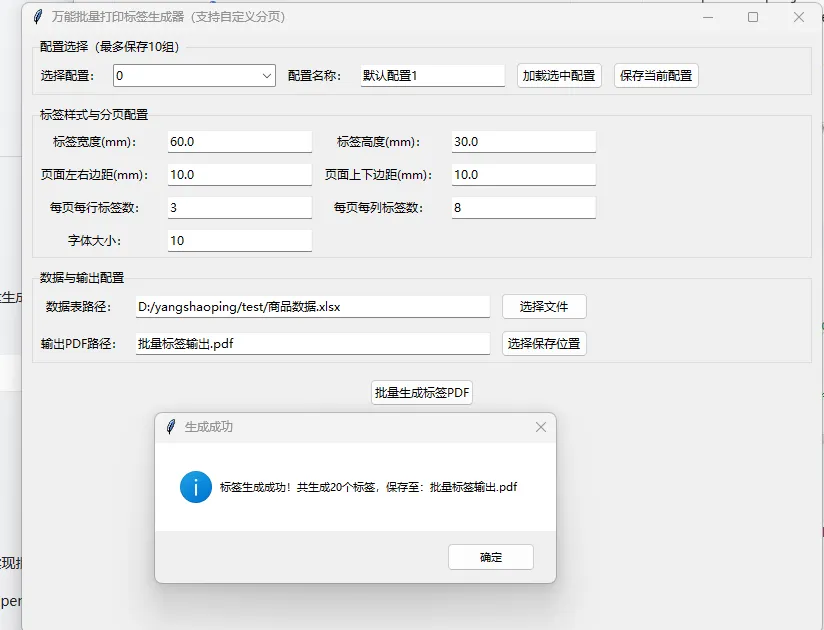
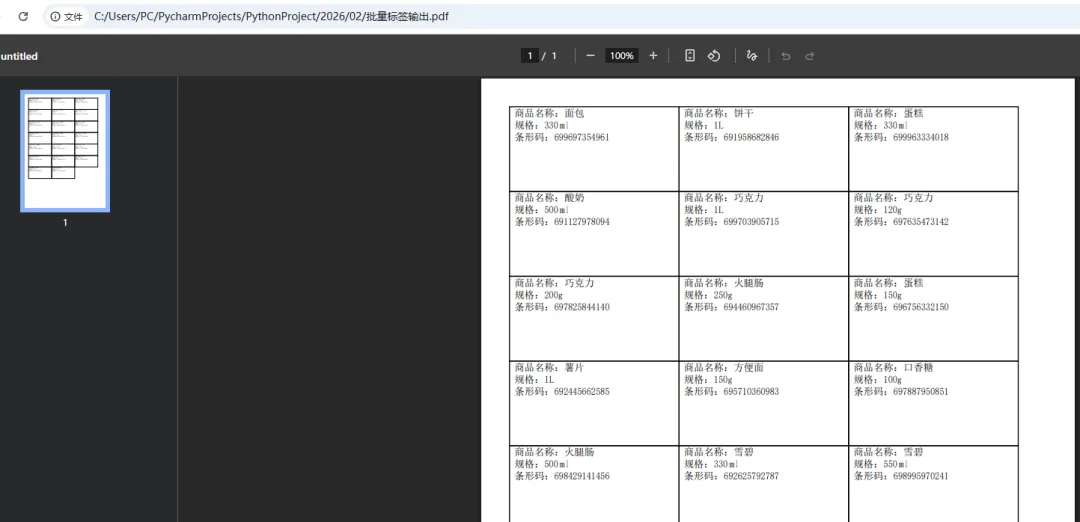
要实现一个Python可视化工具,支持自定义分页标签数量、保存10组配置、基于模板和数据表批量生成打印标签,用tkinter做可视化界面,reportlab生成PDF标签(方便打印),json保存配置参数,来满足你的全部需求。
核心功能实现思路
- 数据存储:用JSON保存10组配置,支持自定义配置名称。
- 可视化界面:提供配置编辑、分页数量设置、模板选择、数据导入、配置保存/加载功能。
- 标签生成:基于
reportlab批量生成PDF格式标签(可直接打印),支持自定义每页标签数量。 - 模板兼容:支持自定义标签尺寸、边距、字体等样式参数。
前置依赖安装
首先安装所需第三方库,打开终端执行:
pip install reportlab pandas tkintertable # tkinter一般Python自带,pandas用于处理数据表
完整实现代码
import tkinter as tkfrom tkinter import ttk, filedialog, messageboximport jsonimport osfrom reportlab.pdfgen import canvasfrom reportlab.lib.pagesizes import A4, mmfrom reportlab.pdfbase import pdfmetricsfrom reportlab.pdfbase.cidfonts import UnicodeCIDFontimport pandas as pd# 全局配置常量CONFIG_FILE = "label_configs.json"# 配置文件保存路径MAX_CONFIG_COUNT = 10# 最多保存10组配置DEFAULT_CONFIG = {"config_name": "默认配置1","label_width": 60, # 标签宽度(mm)"label_height": 30, # 标签高度(mm)"page_margin_x": 10, # 页面左右边距(mm)"page_margin_y": 10, # 页面上下边距(mm)"labels_per_row": 3, # 每页每行标签数量"labels_per_col": 8, # 每页每列标签数量(分页核心参数)"font_size": 10, # 标签字体大小"data_path": "", # 数据表路径(xlsx/csv)"output_pdf": "批量标签输出.pdf"# 输出PDF路径}# 初始化配置文件definit_config_file():ifnot os.path.exists(CONFIG_FILE): default_configs = [DEFAULT_CONFIG.copy() for _ in range(MAX_CONFIG_COUNT)]for i, cfg in enumerate(default_configs): cfg["config_name"] = f"默认配置{i+1}"with open(CONFIG_FILE, "w", encoding="utf-8") as f: json.dump(default_configs, f, ensure_ascii=False, indent=4)# 加载所有配置defload_all_configs():ifnot os.path.exists(CONFIG_FILE): init_config_file()with open(CONFIG_FILE, "r", encoding="utf-8") as f:return json.load(f)# 保存单组配置defsave_single_config(config_index, new_config): configs = load_all_configs()if0 <= config_index < MAX_CONFIG_COUNT: configs[config_index] = new_configwith open(CONFIG_FILE, "w", encoding="utf-8") as f: json.dump(configs, f, ensure_ascii=False, indent=4)returnTruereturnFalse# 生成标签PDF核心函数defgenerate_label_pdf(config):try:# 1. 验证配置参数 required_keys = ["label_width", "label_height", "page_margin_x", "page_margin_y","labels_per_row", "labels_per_col", "font_size", "data_path", "output_pdf"]for key in required_keys:if key notin config:raise Exception(f"配置缺失关键参数:{key}")# 2. 加载数据表 data_path = config["data_path"]ifnot os.path.exists(data_path):raise Exception("数据表文件不存在,请检查路径")if data_path.endswith(".xlsx"): df = pd.read_excel(data_path)elif data_path.endswith(".csv"): df = pd.read_csv(data_path, encoding="utf-8-sig")else:raise Exception("仅支持xlsx/csv格式数据表")if df.empty:raise Exception("数据表中无有效数据")# 3. 转换单位(mm -> point,reportlab默认单位) label_width = config["label_width"] * mm label_height = config["label_height"] * mm page_margin_x = config["page_margin_x"] * mm page_margin_y = config["page_margin_y"] * mm labels_per_row = int(config["labels_per_row"]) labels_per_col = int(config["labels_per_col"]) font_size = int(config["font_size"])# 4. 初始化PDF画布 c = canvas.Canvas(config["output_pdf"], pagesize=A4) pdfmetrics.registerFont(UnicodeCIDFont('STSong-Light')) # 注册中文字体 chinese_font = "STSong-Light"# 5. 计算每页标签总数和标签位置偏移 labels_per_page = labels_per_row * labels_per_col x_step = label_width # 横向标签间距(与标签宽度一致,无额外间距) y_step = label_height # 纵向标签间距(与标签高度一致,无额外间距) start_x = page_margin_x# 从页面下方开始绘制(reportlab坐标原点在左下角) start_y = A4[1] - page_margin_y - label_height# 6. 批量绘制标签 data_list = df.to_dict("records") # 转换数据为字典列表for idx, record in enumerate(data_list):# 计算当前标签在页面内的位置 page_idx = idx // labels_per_page label_in_page_idx = idx % labels_per_page row_idx = label_in_page_idx // labels_per_row col_idx = label_in_page_idx % labels_per_row# 新建页面(非第一页且为新页面第一个标签时)if label_in_page_idx == 0and idx > 0: c.showPage()# 计算当前标签的坐标 current_x = start_x + col_idx * x_step current_y = start_y - row_idx * y_step# 绘制标签边框(方便对齐打印) c.rect(current_x, current_y, label_width, label_height, stroke=1, fill=0)# 绘制标签内容(拼接所有列数据,换行显示) text = c.beginText(current_x + 5, current_y + label_height - 10) # 内边距5pt text.setFont(chinese_font, font_size)for key, value in record.items(): text.textLine(f"{key}:{str(value)}") c.drawText(text)# 7. 保存PDF c.save()returnTrue, f"标签生成成功!共生成{len(data_list)}个标签,保存至:{config['output_pdf']}"except Exception as e:returnFalse, f"标签生成失败:{str(e)}"# 可视化界面类classLabelGeneratorApp:def__init__(self, root): self.root = root self.root.title("万能批量打印标签生成器(支持自定义分页)") self.root.geometry("800x600")# 加载配置 self.configs = load_all_configs() self.current_config_idx = tk.IntVar(value=0)# 创建界面组件 self.create_widgets()defcreate_widgets(self):# 1. 配置选择区域 frame_config_select = ttk.LabelFrame(self.root, text="配置选择(最多保存10组)") frame_config_select.pack(fill="x", padx=10, pady=5) ttk.Label(frame_config_select, text="选择配置:").grid(row=0, column=0, padx=5, pady=5) self.config_combobox = ttk.Combobox(frame_config_select, textvariable=self.current_config_idx, values=list(range(MAX_CONFIG_COUNT)), state="readonly") self.config_combobox.grid(row=0, column=1, padx=5, pady=5) self.config_combobox.bind("<<ComboboxSelected>>", self.load_current_config) ttk.Label(frame_config_select, text="配置名称:").grid(row=0, column=2, padx=5, pady=5) self.config_name_entry = ttk.Entry(frame_config_select) self.config_name_entry.grid(row=0, column=3, padx=5, pady=5) ttk.Button(frame_config_select, text="加载选中配置", command=self.load_current_config).grid(row=0, column=4, padx=5, pady=5) ttk.Button(frame_config_select, text="保存当前配置", command=self.save_current_config).grid(row=0, column=5, padx=5, pady=5)# 2. 标签样式配置区域 frame_label_style = ttk.LabelFrame(self.root, text="标签样式与分页配置") frame_label_style.pack(fill="x", padx=10, pady=5)# 2.1 标签尺寸 ttk.Label(frame_label_style, text="标签宽度(mm):").grid(row=0, column=0, padx=5, pady=5) self.label_width_entry = ttk.Entry(frame_label_style) self.label_width_entry.grid(row=0, column=1, padx=5, pady=5) ttk.Label(frame_label_style, text="标签高度(mm):").grid(row=0, column=2, padx=5, pady=5) self.label_height_entry = ttk.Entry(frame_label_style) self.label_height_entry.grid(row=0, column=3, padx=5, pady=5)# 2.2 页面边距 ttk.Label(frame_label_style, text="页面左右边距(mm):").grid(row=1, column=0, padx=5, pady=5) self.page_margin_x_entry = ttk.Entry(frame_label_style) self.page_margin_x_entry.grid(row=1, column=1, padx=5, pady=5) ttk.Label(frame_label_style, text="页面上下边距(mm):").grid(row=1, column=2, padx=5, pady=5) self.page_margin_y_entry = ttk.Entry(frame_label_style) self.page_margin_y_entry.grid(row=1, column=3, padx=5, pady=5)# 2.3 分页标签数量(核心改进) ttk.Label(frame_label_style, text="每页每行标签数:").grid(row=2, column=0, padx=5, pady=5) self.labels_per_row_entry = ttk.Entry(frame_label_style) self.labels_per_row_entry.grid(row=2, column=1, padx=5, pady=5) ttk.Label(frame_label_style, text="每页每列标签数:").grid(row=2, column=2, padx=5, pady=5) self.labels_per_col_entry = ttk.Entry(frame_label_style) self.labels_per_col_entry.grid(row=2, column=3, padx=5, pady=5)# 2.4 字体大小 ttk.Label(frame_label_style, text="字体大小:").grid(row=3, column=0, padx=5, pady=5) self.font_size_entry = ttk.Entry(frame_label_style) self.font_size_entry.grid(row=3, column=1, padx=5, pady=5)# 3. 数据与输出配置区域 frame_data_output = ttk.LabelFrame(self.root, text="数据与输出配置") frame_data_output.pack(fill="x", padx=10, pady=5) ttk.Label(frame_data_output, text="数据表路径:").grid(row=0, column=0, padx=5, pady=5) self.data_path_entry = ttk.Entry(frame_data_output, width=50) self.data_path_entry.grid(row=0, column=1, padx=5, pady=5) ttk.Button(frame_data_output, text="选择文件", command=self.select_data_file).grid(row=0, column=2, padx=5, pady=5) ttk.Label(frame_data_output, text="输出PDF路径:").grid(row=1, column=0, padx=5, pady=5) self.output_pdf_entry = ttk.Entry(frame_data_output, width=50) self.output_pdf_entry.grid(row=1, column=1, padx=5, pady=5) ttk.Button(frame_data_output, text="选择保存位置", command=self.select_output_pdf).grid(row=1, column=2, padx=5, pady=5)# 4. 生成按钮区域 frame_generate = ttk.Frame(self.root) frame_generate.pack(fill="x", padx=10, pady=10) ttk.Button(frame_generate, text="批量生成标签PDF", command=self.generate_labels, style="Accent.TButton").pack(side="center")# 5. 初始化加载默认配置 self.load_current_config()defselect_data_file(self): file_path = filedialog.askopenfilename(title="选择数据表", filetypes=[("Excel/CSV文件", "*.xlsx *.csv"), ("所有文件", "*.*")])if file_path: self.data_path_entry.delete(0, tk.END) self.data_path_entry.insert(0, file_path)defselect_output_pdf(self): file_path = filedialog.asksaveasfilename(title="保存PDF标签", defaultextension=".pdf", filetypes=[("PDF文件", "*.pdf"), ("所有文件", "*.*")])if file_path: self.output_pdf_entry.delete(0, tk.END) self.output_pdf_entry.insert(0, file_path)defload_current_config(self, event=None): config_idx = self.current_config_idx.get() config = self.configs[config_idx]# 填充界面输入框 self.config_name_entry.delete(0, tk.END) self.config_name_entry.insert(0, config.get("config_name", "")) self.label_width_entry.delete(0, tk.END) self.label_width_entry.insert(0, config.get("label_width", 60)) self.label_height_entry.delete(0, tk.END) self.label_height_entry.insert(0, config.get("label_height", 30)) self.page_margin_x_entry.delete(0, tk.END) self.page_margin_x_entry.insert(0, config.get("page_margin_x", 10)) self.page_margin_y_entry.delete(0, tk.END) self.page_margin_y_entry.insert(0, config.get("page_margin_y", 10)) self.labels_per_row_entry.delete(0, tk.END) self.labels_per_row_entry.insert(0, config.get("labels_per_row", 3)) self.labels_per_col_entry.delete(0, tk.END) self.labels_per_col_entry.insert(0, config.get("labels_per_col", 8)) self.font_size_entry.delete(0, tk.END) self.font_size_entry.insert(0, config.get("font_size", 10)) self.data_path_entry.delete(0, tk.END) self.data_path_entry.insert(0, config.get("data_path", "")) self.output_pdf_entry.delete(0, tk.END) self.output_pdf_entry.insert(0, config.get("output_pdf", "批量标签输出.pdf"))defsave_current_config(self):try:# 收集界面输入数据 new_config = {"config_name": self.config_name_entry.get().strip(),"label_width": float(self.label_width_entry.get().strip()),"label_height": float(self.label_height_entry.get().strip()),"page_margin_x": float(self.page_margin_x_entry.get().strip()),"page_margin_y": float(self.page_margin_y_entry.get().strip()),"labels_per_row": int(self.labels_per_row_entry.get().strip()),"labels_per_col": int(self.labels_per_col_entry.get().strip()),"font_size": int(self.font_size_entry.get().strip()),"data_path": self.data_path_entry.get().strip(),"output_pdf": self.output_pdf_entry.get().strip() }# 验证配置名称ifnot new_config["config_name"]: messagebox.showerror("错误", "配置名称不能为空")return# 验证数值合法性if new_config["label_width"] <= 0or new_config["label_height"] <= 0: messagebox.showerror("错误", "标签尺寸必须大于0")returnif new_config["labels_per_row"] <= 0or new_config["labels_per_col"] <= 0: messagebox.showerror("错误", "每页标签数量必须大于0")return# 保存配置 config_idx = self.current_config_idx.get()if save_single_config(config_idx, new_config): self.configs = load_all_configs() # 刷新本地配置 messagebox.showinfo("成功", "配置保存成功!")else: messagebox.showerror("错误", "配置保存失败,索引超出范围")except ValueError: messagebox.showerror("错误", "请输入合法的数值类型")except Exception as e: messagebox.showerror("错误", f"保存失败:{str(e)}")defgenerate_labels(self):try:# 先保存当前配置(避免用户未保存直接生成) self.save_current_config()# 获取当前配置 config_idx = self.current_config_idx.get() config = self.configs[config_idx]# 生成标签PDF success, msg = generate_label_pdf(config)if success: messagebox.showinfo("生成成功", msg)else: messagebox.showerror("生成失败", msg)except Exception as e: messagebox.showerror("错误", f"生成过程异常:{str(e)}")# 程序入口if __name__ == "__main__": root = tk.Tk() app = LabelGeneratorApp(root) root.mainloop()
功能使用说明
- 初始化运行:直接运行代码,会自动生成
label_configs.json配置文件(保存10组默认配置),并弹出可视化界面。 - 选择左侧配置索引(0-9,对应10组配置),可自定义配置名称。
- 填写标签尺寸、页面边距、每页每行/每列标签数量(核心分页参数,比如填写"每行4、每列10",则每页生成40个标签)。
- 选择数据表(xlsx/csv格式,表头会作为标签内容的字段名)。
- 配置保存:点击"保存当前配置",可将当前填写的参数存入对应索引的配置组,下次可直接加载使用。
- 生成标签:点击"批量生成标签PDF",会自动生成PDF格式标签(包含边框方便打印对齐),可直接用打印机打印。
- Excel/csv文件,第一行为表头(如"商品名称"、"规格"、"条形码"),后续行为具体数据。
- 示例csv内容:
商品名称,规格,条形码矿泉水,550ml,6901234567890方便面,140g,6909876543210
核心功能亮点
- 自定义分页:通过"每页每行/每列标签数量"精准控制单页标签总数,适配不同规格打印纸。
- 10组配置保存:配置持久化到JSON文件,无需重复填写参数,支持自定义配置名称方便区分。
- 自定义样式:支持标签尺寸、边距、字体大小的自由调整,适配不同场景的标签模板。
- 可视化操作:无需编写代码,通过图形界面即可完成所有操作,对非技术人员友好。
总结
- 该工具通过
tkinter实现可视化界面,reportlab生成可打印的PDF标签,json持久化保存10组配置。 - 核心分页功能由"每页每行/每列标签数量"控制,可灵活调整单页标签总数,满足不同打印需求。
- 支持xlsx/csv数据表导入,中文显示正常,配置操作简单,生成的PDF可直接打印使用。
扩展建议
- 可增加标签内容自定义排版(比如指定显示某些字段、调整字段位置)。
你现在的报错核心是 pandas 读取 .xlsx 文件缺少 openpyxl 依赖,而且我们可以在代码中做两层优化:一是明确指定 openpyxl 作为 Excel 读取引擎,二是增加依赖缺失的友好提示,同时确保安装后能正常运行。
修复方案(修改两处核心代码)
1. 修复 pd.read_excel() 调用(指定引擎,避免歧义)
在读取 .xlsx 文件时,明确指定 engine="openpyxl",这是 pandas 新版本读取 Excel 的强制要求(旧版本默认引擎已废弃)。
2. 增加 openpyxl 导入检测(友好提示依赖缺失)
在代码开头增加导入检测,避免用户看到晦涩的报错信息。
完整修复后代码(直接替换即可运行)
import tkinter as tk
from tkinter import ttk, filedialog, messagebox
import json
import os
from reportlab.pdfgen import canvas
from reportlab.lib.pagesizes import A4, mm
from reportlab.pdfbase import pdfmetrics
from reportlab.pdfbase.cidfonts import UnicodeCIDFont
import pandas as pd

# 新增:检测 openpyxl 依赖是否安装
try:
import openpyxl
except ImportError:
    openpyxl_available = False
else:
    openpyxl_available = True

# 全局配置常量
CONFIG_FILE = "label_configs.json"# 配置文件保存路径
MAX_CONFIG_COUNT = 10# 最多保存10组配置
DEFAULT_CONFIG = {
"config_name": "默认配置1",
"label_width": 60,  # 标签宽度(mm)
"label_height": 30,  # 标签高度(mm)
"page_margin_x": 10,  # 页面左右边距(mm)
"page_margin_y": 10,  # 页面上下边距(mm)
"labels_per_row": 3,  # 每页每行标签数量
"labels_per_col": 8,  # 每页每列标签数量(分页核心参数)
"font_size": 10,  # 标签字体大小
"data_path": "",  # 数据表路径(xlsx/csv)
"output_pdf": "批量标签输出.pdf"# 输出PDF路径
}


# 初始化配置文件
definit_config_file():
ifnot os.path.exists(CONFIG_FILE):
        default_configs = [DEFAULT_CONFIG.copy() for _ in range(MAX_CONFIG_COUNT)]
for i, cfg in enumerate(default_configs):
            cfg["config_name"] = f"默认配置{i + 1}"
with open(CONFIG_FILE, "w", encoding="utf-8") as f:
            json.dump(default_configs, f, ensure_ascii=False, indent=4)


# 加载所有配置
defload_all_configs():
ifnot os.path.exists(CONFIG_FILE):
        init_config_file()
with open(CONFIG_FILE, "r", encoding="utf-8") as f:
return json.load(f)


# 保存单组配置
defsave_single_config(config_index, new_config):
    configs = load_all_configs()
if0 <= config_index < MAX_CONFIG_COUNT:
        configs[config_index] = new_config
with open(CONFIG_FILE, "w", encoding="utf-8") as f:
            json.dump(configs, f, ensure_ascii=False, indent=4)
returnTrue
returnFalse


# 生成标签PDF核心函数
defgenerate_label_pdf(config):
try:
# 1. 验证配置参数
        required_keys = ["label_width", "label_height", "page_margin_x", "page_margin_y",
"labels_per_row", "labels_per_col", "font_size", "data_path", "output_pdf"]
for key in required_keys:
if key notin config:
raise Exception(f"配置缺失关键参数:{key}")

# 2. 加载数据表
        data_path = config["data_path"]
ifnot os.path.exists(data_path):
raise Exception("数据表文件不存在,请检查路径")

if data_path.endswith(".xlsx"):
# 修复点1:检测 openpyxl 是否可用,且明确指定 engine="openpyxl"
ifnot openpyxl_available:
raise Exception("缺少读取Excel文件的依赖库!请在终端执行:pip install openpyxl")
            df = pd.read_excel(data_path, engine="openpyxl")  # 明确指定引擎,解决报错核心
elif data_path.endswith(".csv"):
            df = pd.read_csv(data_path, encoding="utf-8-sig")
else:
raise Exception("仅支持xlsx/csv格式数据表")

if df.empty:
raise Exception("数据表中无有效数据")

# 3. 转换单位(mm -> point,reportlab默认单位)
        label_width = config["label_width"] * mm
        label_height = config["label_height"] * mm
        page_margin_x = config["page_margin_x"] * mm
        page_margin_y = config["page_margin_y"] * mm
        labels_per_row = int(config["labels_per_row"])
        labels_per_col = int(config["labels_per_col"])
        font_size = int(config["font_size"])

# 4. 初始化PDF画布
        c = canvas.Canvas(config["output_pdf"], pagesize=A4)
        pdfmetrics.registerFont(UnicodeCIDFont('STSong-Light'))  # 注册中文字体
        chinese_font = "STSong-Light"

# 5. 计算每页标签总数和标签位置偏移
        labels_per_page = labels_per_row * labels_per_col
        x_step = label_width  # 横向标签间距(与标签宽度一致,无额外间距)
        y_step = label_height  # 纵向标签间距(与标签高度一致,无额外间距)
        start_x = page_margin_x
# 从页面下方开始绘制(reportlab坐标原点在左下角)
        start_y = A4[1] - page_margin_y - label_height

# 6. 批量绘制标签
        data_list = df.to_dict("records")  # 转换数据为字典列表
for idx, record in enumerate(data_list):
# 计算当前标签在页面内的位置
            page_idx = idx // labels_per_page
            label_in_page_idx = idx % labels_per_page
            row_idx = label_in_page_idx // labels_per_row
            col_idx = label_in_page_idx % labels_per_row

# 新建页面(非第一页且为新页面第一个标签时)
if label_in_page_idx == 0and idx > 0:
                c.showPage()

# 计算当前标签的坐标
            current_x = start_x + col_idx * x_step
            current_y = start_y - row_idx * y_step

# 绘制标签边框(方便对齐打印)
            c.rect(current_x, current_y, label_width, label_height, stroke=1, fill=0)

# 绘制标签内容(拼接所有列数据,换行显示)
            text = c.beginText(current_x + 5, current_y + label_height - 10)  # 内边距5pt
            text.setFont(chinese_font, font_size)
for key, value in record.items():
                text.textLine(f"{key}:{str(value)}")
            c.drawText(text)

# 7. 保存PDF
        c.save()
returnTrue, f"标签生成成功!共生成{len(data_list)}个标签,保存至:{config['output_pdf']}"
except Exception as e:
returnFalse, f"标签生成失败:{str(e)}"


# 可视化界面类
classLabelGeneratorApp:
def__init__(self, root):
        self.root = root
        self.root.title("万能批量打印标签生成器(支持自定义分页)")
        self.root.geometry("800x600")

# 加载配置
        self.configs = load_all_configs()
        self.current_config_idx = tk.IntVar(value=0)

# 创建界面组件
        self.create_widgets()

defcreate_widgets(self):
# 1. 配置选择区域
        frame_config_select = ttk.LabelFrame(self.root, text="配置选择(最多保存10组)")
        frame_config_select.pack(fill="x", padx=10, pady=5)

        ttk.Label(frame_config_select, text="选择配置:").grid(row=0, column=0, padx=5, pady=5)
        self.config_combobox = ttk.Combobox(frame_config_select, textvariable=self.current_config_idx,
                                            values=list(range(MAX_CONFIG_COUNT)), state="readonly")
        self.config_combobox.grid(row=0, column=1, padx=5, pady=5)
        self.config_combobox.bind("<<ComboboxSelected>>", self.load_current_config)

        ttk.Label(frame_config_select, text="配置名称:").grid(row=0, column=2, padx=5, pady=5)
        self.config_name_entry = ttk.Entry(frame_config_select)
        self.config_name_entry.grid(row=0, column=3, padx=5, pady=5)

        ttk.Button(frame_config_select, text="加载选中配置", command=self.load_current_config).grid(row=0, column=4,
                                                                                                    padx=5, pady=5)
        ttk.Button(frame_config_select, text="保存当前配置", command=self.save_current_config).grid(row=0, column=5,
                                                                                                    padx=5, pady=5)

# 2. 标签样式配置区域
        frame_label_style = ttk.LabelFrame(self.root, text="标签样式与分页配置")
        frame_label_style.pack(fill="x", padx=10, pady=5)

# 2.1 标签尺寸
        ttk.Label(frame_label_style, text="标签宽度(mm):").grid(row=0, column=0, padx=5, pady=5)
        self.label_width_entry = ttk.Entry(frame_label_style)
        self.label_width_entry.grid(row=0, column=1, padx=5, pady=5)

        ttk.Label(frame_label_style, text="标签高度(mm):").grid(row=0, column=2, padx=5, pady=5)
        self.label_height_entry = ttk.Entry(frame_label_style)
        self.label_height_entry.grid(row=0, column=3, padx=5, pady=5)

# 2.2 页面边距
        ttk.Label(frame_label_style, text="页面左右边距(mm):").grid(row=1, column=0, padx=5, pady=5)
        self.page_margin_x_entry = ttk.Entry(frame_label_style)
        self.page_margin_x_entry.grid(row=1, column=1, padx=5, pady=5)

        ttk.Label(frame_label_style, text="页面上下边距(mm):").grid(row=1, column=2, padx=5, pady=5)
        self.page_margin_y_entry = ttk.Entry(frame_label_style)
        self.page_margin_y_entry.grid(row=1, column=3, padx=5, pady=5)

# 2.3 分页标签数量(核心改进)
        ttk.Label(frame_label_style, text="每页每行标签数:").grid(row=2, column=0, padx=5, pady=5)
        self.labels_per_row_entry = ttk.Entry(frame_label_style)
        self.labels_per_row_entry.grid(row=2, column=1, padx=5, pady=5)

        ttk.Label(frame_label_style, text="每页每列标签数:").grid(row=2, column=2, padx=5, pady=5)
        self.labels_per_col_entry = ttk.Entry(frame_label_style)
        self.labels_per_col_entry.grid(row=2, column=3, padx=5, pady=5)

# 2.4 字体大小
        ttk.Label(frame_label_style, text="字体大小:").grid(row=3, column=0, padx=5, pady=5)
        self.font_size_entry = ttk.Entry(frame_label_style)
        self.font_size_entry.grid(row=3, column=1, padx=5, pady=5)

# 3. 数据与输出配置区域
        frame_data_output = ttk.LabelFrame(self.root, text="数据与输出配置")
        frame_data_output.pack(fill="x", padx=10, pady=5)

        ttk.Label(frame_data_output, text="数据表路径:").grid(row=0, column=0, padx=5, pady=5)
        self.data_path_entry = ttk.Entry(frame_data_output, width=50)
        self.data_path_entry.grid(row=0, column=1, padx=5, pady=5)
        ttk.Button(frame_data_output, text="选择文件", command=self.select_data_file).grid(row=0, column=2, padx=5,
                                                                                           pady=5)

        ttk.Label(frame_data_output, text="输出PDF路径:").grid(row=1, column=0, padx=5, pady=5)
        self.output_pdf_entry = ttk.Entry(frame_data_output, width=50)
        self.output_pdf_entry.grid(row=1, column=1, padx=5, pady=5)
        ttk.Button(frame_data_output, text="选择保存位置", command=self.select_output_pdf).grid(row=1, column=2, padx=5,
                                                                                                pady=5)

# 4. 生成按钮区域
        frame_generate = ttk.Frame(self.root)
        frame_generate.pack(fill="x", padx=10, pady=10)
        ttk.Button(frame_generate, text="批量生成标签PDF", command=self.generate_labels).pack()

# 5. 初始化加载默认配置
        self.load_current_config()

defselect_data_file(self):
        file_path = filedialog.askopenfilename(title="选择数据表",
                                               filetypes=[("Excel/CSV文件", "*.xlsx *.csv"), ("所有文件", "*.*")])
if file_path:
            self.data_path_entry.delete(0, tk.END)
            self.data_path_entry.insert(0, file_path)

defselect_output_pdf(self):
        file_path = filedialog.asksaveasfilename(title="保存PDF标签", defaultextension=".pdf",
                                                 filetypes=[("PDF文件", "*.pdf"), ("所有文件", "*.*")])
if file_path:
            self.output_pdf_entry.delete(0, tk.END)
            self.output_pdf_entry.insert(0, file_path)

defload_current_config(self, event=None):
        config_idx = self.current_config_idx.get()
        config = self.configs[config_idx]

# 填充界面输入框
        self.config_name_entry.delete(0, tk.END)
        self.config_name_entry.insert(0, config.get("config_name", ""))

        self.label_width_entry.delete(0, tk.END)
        self.label_width_entry.insert(0, config.get("label_width", 60))

        self.label_height_entry.delete(0, tk.END)
        self.label_height_entry.insert(0, config.get("label_height", 30))

        self.page_margin_x_entry.delete(0, tk.END)
        self.page_margin_x_entry.insert(0, config.get("page_margin_x", 10))

        self.page_margin_y_entry.delete(0, tk.END)
        self.page_margin_y_entry.insert(0, config.get("page_margin_y", 10))

        self.labels_per_row_entry.delete(0, tk.END)
        self.labels_per_row_entry.insert(0, config.get("labels_per_row", 3))

        self.labels_per_col_entry.delete(0, tk.END)
        self.labels_per_col_entry.insert(0, config.get("labels_per_col", 8))

        self.font_size_entry.delete(0, tk.END)
        self.font_size_entry.insert(0, config.get("font_size", 10))

        self.data_path_entry.delete(0, tk.END)
        self.data_path_entry.insert(0, config.get("data_path", ""))

        self.output_pdf_entry.delete(0, tk.END)
        self.output_pdf_entry.insert(0, config.get("output_pdf", "批量标签输出.pdf"))

defsave_current_config(self):
try:
# 收集界面输入数据
            new_config = {
"config_name": self.config_name_entry.get().strip(),
"label_width": float(self.label_width_entry.get().strip()),
"label_height": float(self.label_height_entry.get().strip()),
"page_margin_x": float(self.page_margin_x_entry.get().strip()),
"page_margin_y": float(self.page_margin_y_entry.get().strip()),
"labels_per_row": int(self.labels_per_row_entry.get().strip()),
"labels_per_col": int(self.labels_per_col_entry.get().strip()),
"font_size": int(self.font_size_entry.get().strip()),
"data_path": self.data_path_entry.get().strip(),
"output_pdf": self.output_pdf_entry.get().strip()
            }

# 验证配置名称
ifnot new_config["config_name"]:
                messagebox.showerror("错误", "配置名称不能为空")
return

# 验证数值合法性
if new_config["label_width"] <= 0or new_config["label_height"] <= 0:
                messagebox.showerror("错误", "标签尺寸必须大于0")
return

if new_config["labels_per_row"] <= 0or new_config["labels_per_col"] <= 0:
                messagebox.showerror("错误", "每页标签数量必须大于0")
return

# 保存配置
            config_idx = self.current_config_idx.get()
if save_single_config(config_idx, new_config):
                self.configs = load_all_configs()  # 刷新本地配置
                messagebox.showinfo("成功", "配置保存成功!")
else:
                messagebox.showerror("错误", "配置保存失败,索引超出范围")
except ValueError:
            messagebox.showerror("错误", "请输入合法的数值类型")
except Exception as e:
            messagebox.showerror("错误", f"保存失败:{str(e)}")

defgenerate_labels(self):
try:
# 先保存当前配置(避免用户未保存直接生成)
            self.save_current_config()

# 获取当前配置
            config_idx = self.current_config_idx.get()
            config = self.configs[config_idx]

# 生成标签PDF
            success, msg = generate_label_pdf(config)
if success:
                messagebox.showinfo("生成成功", msg)
else:
                messagebox.showerror("生成失败", msg)
except Exception as e:
            messagebox.showerror("错误", f"生成过程异常:{str(e)}")


# 程序入口
if __name__ == "__main__":
    root = tk.Tk()
    app = LabelGeneratorApp(root)
    root.mainloop()
后续必做步骤(安装依赖)
打开你的项目虚拟环境终端,执行以下命令安装 openpyxl:
# 激活虚拟环境(如果未激活)
C:\Users\PC\PycharmProjects\PythonProject\.venv\Scripts\activate

# 安装 openpyxl
pip install openpyxl
验证是否修复成功
- 选择一个
.xlsx 或 .csv 数据表,填写配置并生成标签。 - 若能成功生成 PDF 且无报错,说明修复完成;生成的 PDF 可直接打开并打印。
总结
- 核心报错原因是
pandas 读取 .xlsx 缺少 openpyxl 依赖,且未指定读取引擎。 - 代码修复两点:增加
openpyxl 依赖检测、pd.read_excel() 明确指定 engine="openpyxl"。 - 必须通过
pip install openpyxl 安装依赖,才能正常读取 Excel 文件。 - 修复后程序会给出友好的依赖缺失提示,方便后续排查问题。